QHSEtech

    eAuditor Audits & Inspections

    eAuditor is a cloud and mobile platform for inspections, issue capture and corrective actions. Teams turn paper or spreadsheet checklists into templates, run inspections on a phone or tablet including without a connection, attach photos and signatures, assign follow-up actions, schedule recurring work and review reports and dashboards.

    Evidence: Researched profile

    Built from vendor sources checked ; AI-assisted drafting. Documentation review, not a hands-on test. How pages are made

    Who is eAuditor Audits & Inspections for?

    Field teams in manufacturing, construction, retail, facilities, hospitality and healthcare that want digital checklists, mobile inspections and action follow-up, with a free entry tier and per-seat paid plans. The pricing page shows two sets of figures (Premium $12.99 under the Monthly toggle and $9.99 under the Yearly toggle; Lite from $6 and from $5), and the terms and App Store listing word the Free plan and trial differently. Confirm live prices, limits and refund terms in writing; the terms say fees are non-refundable and subscriptions renew automatically. No SOC 2 or ISO 27001 statement was found on the reviewed pages, which does not show that none exists.

    In our editorial judgment, eAuditor may suit teams that want offline mobile inspections, action follow-up and a free entry tier, provided the live prices, trial and refund terms and security documentation are confirmed in writing. It is less suitable if five active templates on the Free plan must cover a whole checklist library, or if the team needs a stated security certification, a named data region or fixed published pricing without further checks.

    Published price: $0 (Free plan); Premium shown as $9.99/seat/month (Yearly toggle) or $12.99/seat/month (Monthly toggle). Free trial documented. Sources checked .

    Product tour

    Vendor visuals—not a QHSEtech hands-on test.

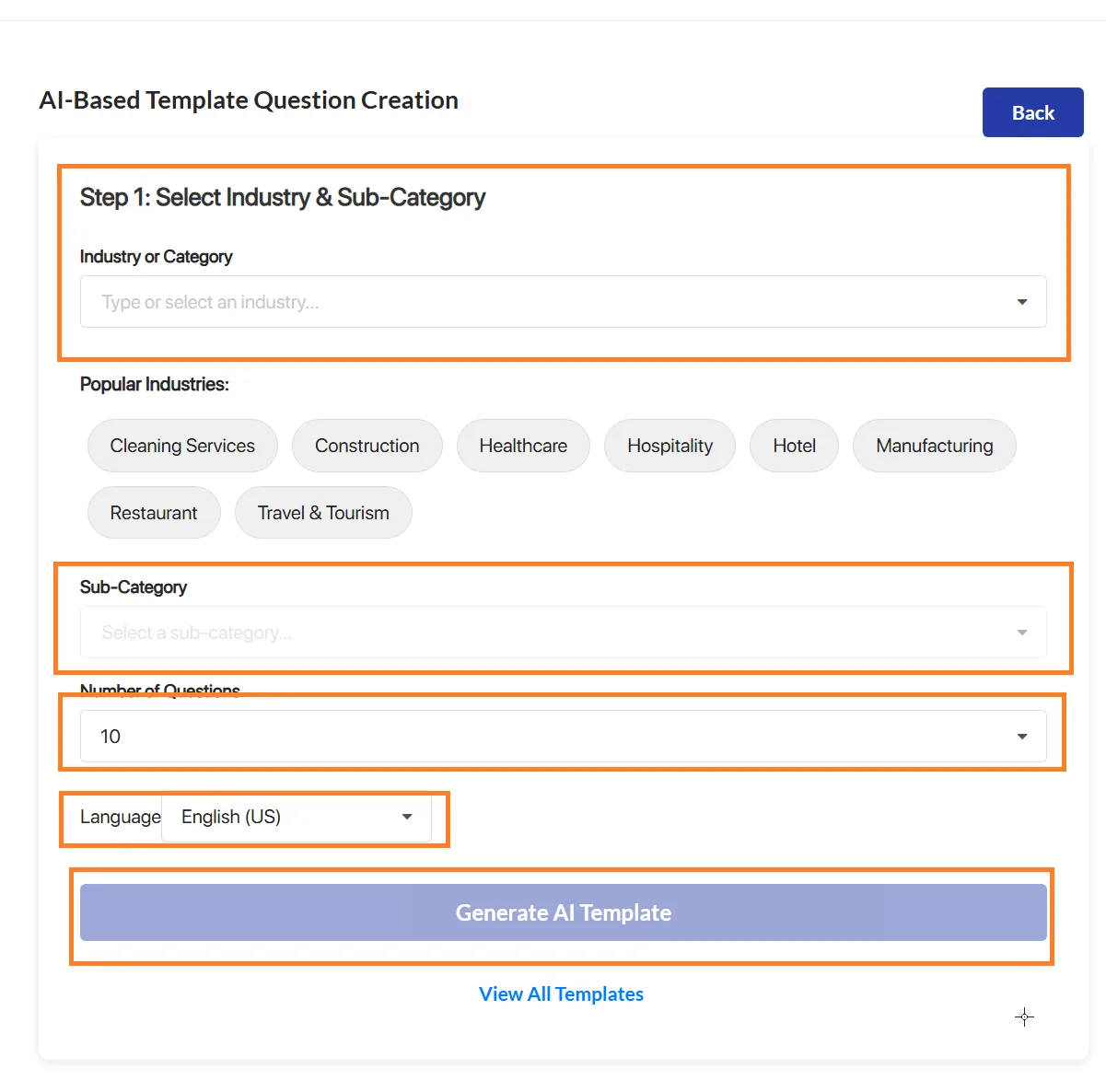
    AI-based template creation form with industry buttons, sub-category, number of questions and language fields and a generate button

    AI template creation form

    Source
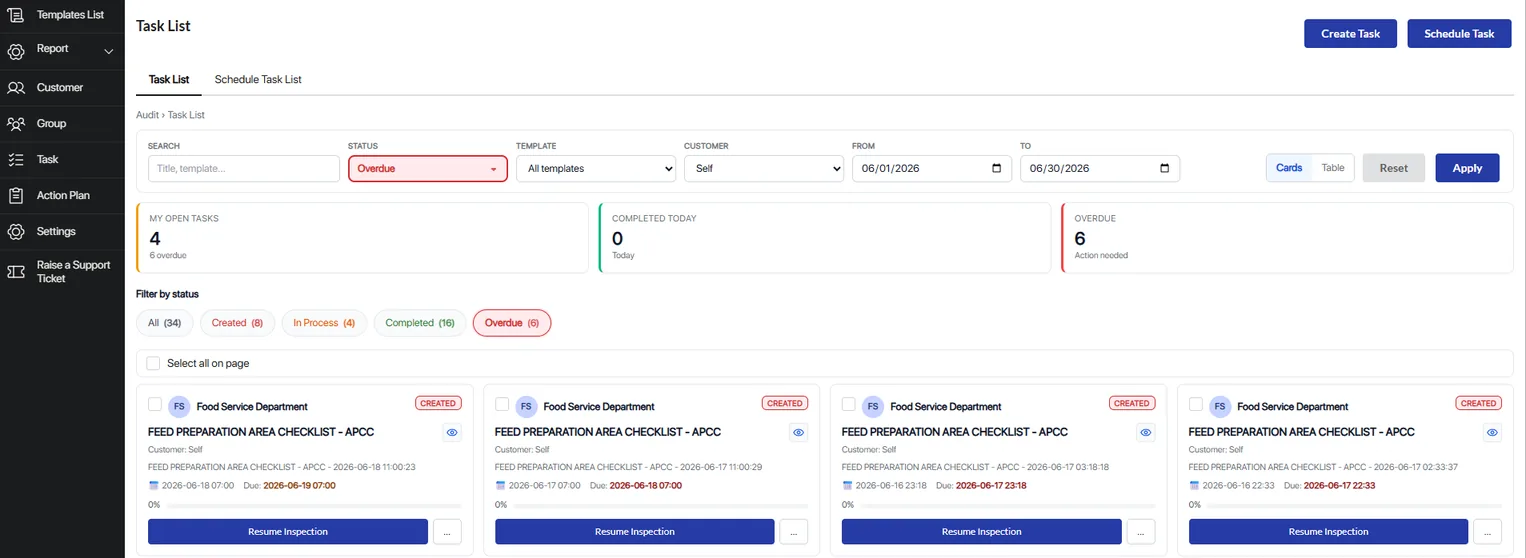
    Web task list with search and status filters, counters for open, completed and overdue tasks and cards for scheduled checklist inspections with due dates

    Task list with status filters and overdue count

    Source

    Capabilities and scope

    The vendor terms (effective 1 January 2026) name Lyons Information Systems, itself a Sequoia Systems, Inc. subsidiary, as operator; the App Store listing shows Sequoia Systems, Inc. as seller. Plans differ by seat type (Full, Lite, Guest) and template limits; seat types apply only on Premium and Enterprise, and the Free plan is separate from the Premium trial. Free plan: up to 10 seats, 5 active templates, unlimited inspections, 3 years of history. Premium adds unlimited seats and templates, advanced analytics and training, permissions, integrations, advanced security and unlimited history. Enterprise is quoted per seat or per site.

    eAuditor Audits & Inspections capabilities, evidence status and source links
    CapabilityEvidenceScope and source
    Digital checklist builderDocumented by vendor

    Drag-and-drop template builder with answer-based show/hide logic; paper or spreadsheet checklists can be converted. The Free plan allows five active templates; Premium lists unlimited.

    Platform overview and checklist builderPricing tiers, seat types and trial
    Offline mobile inspectionsDocumented by vendor

    Inspections can continue without a connection, with progress kept on the device and synced after reconnection. Conflict handling, storage limits and offline photos, signatures and dictation are not described.

    Offline inspection capabilityInspection features: scanning, signatures and offlineApple App Store listing
    Corrective action trackingDocumented by vendor

    Issues found during an inspection can be assigned with deadlines and progress tracking, and closed with photos or notes as proof. A follow-up ticket can be raised from a configured answer; recipients are not fully specified.

    Solutions by industryAutomated follow-up tickets
    Reports and brandingDepends on scope

    Reports are generated after an inspection and can be shared. The plan table shows PDF and web reports on Free and PDF, Word, Excel and web on Premium, with custom branded reports apparently Premium only; the table is hard to read, so confirm.

    Platform overview and checklist builderPricing tiers, seat types and trialInspection features: scanning, signatures and offline
    Analytics dashboardsDocumented by vendor

    Mobile and desktop data feed dashboards on productivity and compliance trends. Free lists analytics, Premium advanced analytics; the home page shows Pareto and Power BI examples.

    Platform overview and checklist builderPricing tiers, seat types and trial
    Single sign-onDepends on scope

    SSO with identity providers such as Azure AD or Okta is described on the integrations page. The pricing page lists advanced security under Premium and names SSO and SCIM in only one toggle state; SCIM is absent from the integrations page.

    Pricing tiers, seat types and trialIntegrations catalog
    Integrations and APIDepends on scope

    Power BI, Tableau, report sync to SharePoint, Google Drive, Dropbox or OneDrive, Outlook and Google Calendar scheduling, Zapier, Power Automate and a REST API are listed. Pricing places integrations under Premium; SAP is named without detail.

    Integrations catalogPricing tiers, seat types and trialPlatform overview and checklist builder
    Seat types and permissionsDocumented by vendor

    Full, Lite and Guest seats differ in inspection limits (12 a year for Lite on annual plans, 3 lifetime for Guest), training and administration, and apply only on Premium and Enterprise. The seat table also lists sensors, lone-worker and document rows without further description.

    Seat type definitions
    Recurring scheduling and overdue trackingDocumented by vendor

    The task dashboard page describes assigning inspections to people, daily to annual recurring schedules, due dates, status and highlighted overdue items. Reminders and a calendar view are not described there.

    Task dashboard and recurring inspections
    Issue and observation reportingDocumented by vendor

    Anyone can log observations, hazards or near misses from the app or a QR code, and the right people are notified; Free lists tasks and issue reporting. Formal incident investigation is not described.

    Platform overview and checklist builderPricing tiers, seat types and trial
    AI checklist generationDocumented by vendor

    A draft checklist can be generated from an industry, question count and language, then edited and published; the plan table has an AI template builder row whose plan placement is unclear. The terms say AI output may need human review.

    AI-generated checklistsPlatform overview and checklist builderPricing tiers, seat types and trialTerms and conditions: operator, hosting and security
    AI report analysisDepends on scope

    An Analyze with AI option turns report responses into weighted scores, bar graphs, suggestions and summaries. The vendor says it is in the web version now and mobile later; plan placement, accuracy and data handling are not described.

    AI report analysis

    More capability notes

    6 additional areas. Status describes reviewed sources, not hands-on performance.

    Also watch for: Pricing page shows two sets of Premium and Lite figures. Free plan capped at 5 active templates and 3 years of history. No security certification stated on the reviewed pages. Integrations and advanced security are listed under Premium. Terms state automatic renewal and non-refundable fees.

    eAuditor Audits & Inspections pricing

    Per-seat subscription with free plan

    Free plan $0 for up to 10 seats with 5 active templates, unlimited inspections, 3 years of history, analytics, training, tasks and issue reporting. Premium shows $12.99 per seat/month under the Monthly toggle and $9.99 under the Yearly (24% discount) toggle, assigned from the page markup because the amounts have no period label; it has a 30-day free trial button, unlimited seats and templates, advanced analytics and training, permissions, integrations and advanced security, and only the Monthly-toggle block names SSO and SCIM. Lite seats are added to a paid plan and show from $6 (Monthly toggle) or from $5 (Yearly toggle) per seat/month, both captioned 'when billed annually', with 12 inspections a year and view-only analytics. A seat table also shows $5 for a limited seat and $12.99 for an unlimited-access seat labelled 'Lite seat'. Enterprise is custom-priced per seat or per site. No currency is named. The terms say subscriptions renew automatically and fees are non-refundable unless the agreement states otherwise.

    Pricing sources checked : Checked against the vendor's published pricing. Which figure belongs to which billing period comes from the page's toggle markup, the currency is not named, and the terms and App Store listing word the Free plan and trial differently.

    Offline mobile capture documented; conflict handling not described

    The vendor blog and inspection page describe completing inspections without a connection, with progress kept on the device and synced after reconnection, and the App Store listing states offline capability. Conflict handling, device storage limits and offline behavior of photos, signatures and dictation are not described.

    What we could not verify

    5 depend on scope

    Demo script

    Proposed demo: offline site inspection to corrective action

    1. Build or select a checklist template with show/hide logic.
    2. Complete the inspection on mobile without connectivity, capturing photos and a signature.
    3. Reconnect and confirm records sync to the dashboard.
    4. Convert flagged issues into assigned corrective actions with due dates.
    5. Generate the report in the format and branding the proposed plan allows and share it.

    Proposed demo: AI-drafted checklist to scored inspection

    1. Generate a draft checklist in the language we will use, then edit it and add scoring and one show/hide rule.
    2. Complete it on a mobile device with an annotated photo, a signature and a dictated comment.
    3. Review the score and report, and run AI report analysis in the web app.
    4. Compare the suggested actions with a reviewer's own judgement.

    Proposed demo: recurring inspection with overdue follow-up

    1. Schedule a recurring inspection for two assignees with due dates.
    2. Leave one occurrence overdue and check the dashboard highlight and any reminders.
    3. Fail an item and follow the action to a Guest or Lite seat user, noting what that seat can see and how many inspections it allows.
    4. Send the results to our BI tool or cloud storage through the proposed integration.

    Ask the vendor to show you

    1. Complete an inspection offline with photos, a signature and a dictated note, then reconnect and show how records and timestamps sync.
    2. Show live Premium and Lite prices for each billing option, the currency, and what Lite and Guest seats can and cannot do.
    3. Demonstrate SSO with our identity provider and confirm whether SCIM is part of our plan.
    4. Provide written security documentation: hosting region, encryption, backups and any audit reports or certifications.
    5. Generate an AI checklist and an AI report analysis in our working language and explain how inspection data is handled.
    6. Confirm Free plan, trial and refund terms in the contract, given the differences between pricing page, terms and App Store listing.
    Use demo checklist

    Questions the sources answer

    Does eAuditor work without an internet connection?

    According to the vendor, yes. Its blog, inspection page and App Store listing say inspections can be completed without a connection and sync after reconnection. Conflict handling and device storage limits are not described.

    Which languages does the AI checklist generator support?

    The AI checklist page lists five (English, French, Spanish, Portuguese, Hindi). The home-page FAQ lists ten, adding Mandarin, Arabic, Bengali, Russian and Indonesian, and the App Store listing shows English for the app. Confirm in a trial.

    Can inspections be scheduled?

    The task dashboard page describes recurring daily, weekly, monthly, quarterly and annual schedules with ownership, status, due dates and highlighted overdue items. It does not describe reminders or a calendar view; the integrations page mentions Outlook or Google Calendar scheduling with reminders.

    Sources and change log

    15 sources, checked
    • : Initial researched profile created from vendor pages after directory submission review.
    • : Re-read every cited vendor page: corrected the Premium and Lite price states, SSO and SCIM, trial and operator wording, and added scheduling, AI, asset, training, template, evidence and hosting capabilities.
    • The vendor pricing page, terms and App Store listing word the Free plan and trial differently; each is recorded as shown on 10 October 2026.

    Compare with

    Drawn from the profiles behind the Alternatives list above: most category tags shared with eAuditor Audits & Inspections first, then the closest overlap in documented capability names, then A to Z. Ratings, search demand and sponsorship are not used; rows are shown A to Z.

    • Certainty Software

      Shared category tags: 1 (Audit Management).

      Differs: offline partial workflow (this profile: documented workflow); trial not established (this profile: free trial documented).

      Same: scope and price.

    • EASE

      No shared category tag.

      Differs: trial on request (this profile: free trial documented).

      Same: scope, offline and price.

    Browse the category

    Reviews on qhsetech.com

    Reviews may be filed under other names

    Also recorded as eAuditor. Older entries under a previous name may describe a different release or owner.

    Star ratings and review counts from the old catalog are not shown: no source for them was recorded.