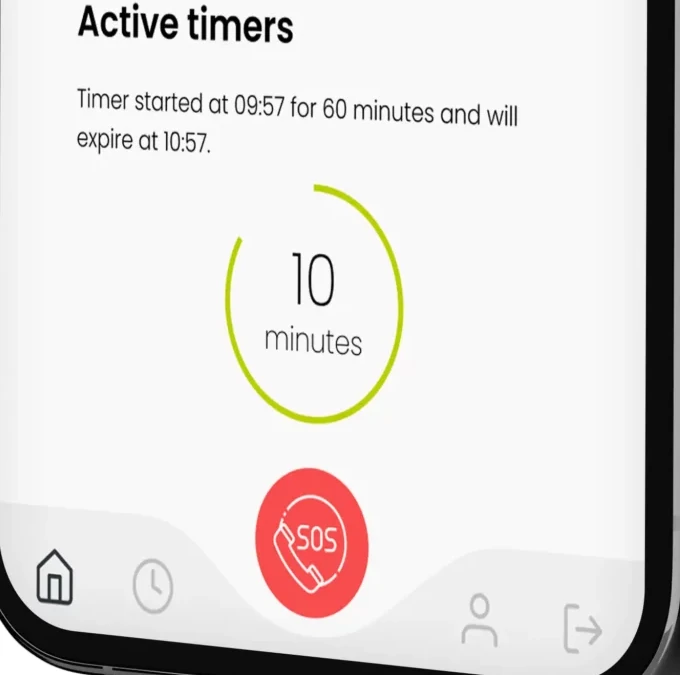
LONEALERT historically connected worker devices and check-in timers to the OWL portal. Its current official notice directs customers and new enquiries to Peoplesafe. Existing customers should review their actual Nexus configuration, transferred records and response contacts instead of assuming every former OWL function migrated unchanged.
LONEALERT (Peoplesafe migration) price on record: Custom quote · No amount published · Pricing checked · See pricing
Evidence: Researched profile
Built from vendor sources checked ; AI-assisted drafting. Documentation review, not a hands-on test. How pages are made
Existing LONEALERT customers checking their Peoplesafe transition and support arrangements. Legacy OWL and device pages remain accessible, but they do not establish current standalone LONEALERT availability or unchanged Nexus functionality. Treat every current Peoplesafe app, device, ARC, tracking, report and roaming feature as conditional on the migrated contract, chosen product and account configuration. A working communications route is required for alarm delivery; GPS, Wi-Fi positioning and What3Words do not replace mobile/data connectivity. Device and app assignments must identify the worker, escalation plans and contacts must be current, and planned alarm tests must be agreed so they do not trigger an unintended emergency response. Location access should be role-restricted and explained to workers; app permissions, MDM settings, battery state, signal and OS compatibility can affect operation. Monitoring technology supports but does not replace the employer's lone-worker risk assessment, procedures, training or emergency planning.
Evaluate the current migration contract and replacement-device costs before extending a legacy arrangement.
The official LONEALERT site says customers have migrated to Peoplesafe Nexus and LONEALERT will shortly cease to operate. This is therefore a legacy/migration profile, not a representation of OWL as a current standalone purchase. Current Peoplesafe app, device, portal and Alarm Receiving Centre capabilities are relevant replacement evidence, but a migrated customer's actual devices, subscriptions, settings, records and entitlements must be reconciled in writing.
LONEALERT (Peoplesafe migration) capabilities, evidence status and source links
Capability
Evidence
Scope and source
Migration to Peoplesafe Nexus
Documented by vendor
The official LONEALERT notice says customers have migrated to Peoplesafe Nexus and LONEALERT will shortly cease operating. It does not enumerate account-level records, device compatibility or preserved feature settings.
Legacy OWL material documents timers, check-ins and alerts. Use it only as a migration checklist and demonstrate the corresponding current Nexus/product workflow rather than assuming identical behavior.
The historical device catalogue does not identify which models remain supported, replaced, reconfigured or commercially covered after migration. Obtain a device-by-device support statement.
24/7 monitored alarm response
Depends on scope
Peoplesafe documents a 24/7 Alarm Receiving Centre that assesses alarms and follows pre-agreed escalation instructions. Confirm that ARC monitoring is active for every migrated device/app, region and working schedule.
Current Peoplesafe app and device pages describe SOS activation and an audio channel to the ARC. Availability and audio behavior depend on the selected product, permissions, signal and account setup.
The current app documents timed alarms, check-in/out and scheduled welfare checks. Verify which functions are enabled for each migrated group and how expiry is escalated.
Supported app and device configurations can include fall detection. It is not evidence that every legacy device, worker activity or fall pattern is covered; test product-specific sensitivity and cancellation behavior.
Supported products can use GPS, Wi-Fi, mobile-network data and What3Words to assist location. Accuracy and transmission depend on the product, permissions, environment and communications path and are not guaranteed by the marketing figures alone.
Nexus supports assigning, swapping and unassigning devices for activated users. Reconcile serial numbers and profiles because correct assignment lets the ARC identify who raised an alarm.
Nexus onboarding guidance documents escalation plans and alarm-response plans. These require customer configuration and maintenance; the platform does not supply accurate contacts or organization-specific emergency procedures automatically.
Nexus documents restricted User access to the user's own profile/device while management functions depend on other roles. Validate administrator and manager permissions and separation of duties in the migrated tenant.
Nexus can restrict map access by role, and Peoplesafe recommends transparent policies. Confirm collection mode, role visibility, retention and lawful-use controls rather than assuming location is visible only during emergencies.
2 additional areas. Status describes reviewed sources, not hands-on performance.
Also watch for: Procurement should confirm configuration, support, data handling and the complete commercial scope.
LONEALERT (Peoplesafe migration) pricing
Custom quote
On 26 September 2026 the LONEALERT site offered "Get a quote" and trial routes and shows no amount; lonealert.co.uk/pricing/ returned page not found and the site search for "price" returned only the terms and conditions of sale. Contact Peoplesafe for a migration or replacement quote covering retained devices, replacement hardware, monitoring, training, historical records, contract term and renewal. Older OWL prices and trial buttons should not be treated as a current offer.
Pricing sources checked : Selected sources checked; no starting price recorded. The current migration notice supersedes legacy sales assumptions.
Which product scope should the quote cover?
Legacy LONEALERT-to-Peoplesafe Nexus migration and continuity checks, with separately scoped current Peoplesafe app, device, portal and monitored-response services.
Ask the vendor to identify the product, region, modules, billing unit, contract term and included services in writing.
Scope-specific connectivity; verify the intended workflow
Historical devices used different cellular, Wi-Fi or satellite arrangements. None establishes alarm delivery without any functioning communication route. Ask Peoplesafe to confirm supported devices, connectivity, alerts and escalation in the migrated account.
The legacy product pages remain visible beneath a migration notice. They do not establish current standalone LONEALERT availability or unchanged Nexus entitlements.
Demo script
Demo exercise: migration and entitlement reconciliation
Prepare an anonymized legacy list of workers, devices, serial numbers, response paths and required records.
Match every item to its Nexus profile, current device/app assignment, enabled features and subscription scope.
Sample historical alarms, contacts and records that were expected to migrate and document any gaps.
Obtain named owners, resolution dates and written confirmation for unsupported or replacement items.
Demo exercise: controlled end-to-end alarm test
Agree a planned-alarm window with Peoplesafe and internal contacts so emergency services are not dispatched unintentionally.
From a representative app and dedicated device, verify identity, SOS/timer behavior, audio and transmitted location context.
Confirm the ARC follows the configured escalation instructions and reaches the expected contacts.
Review the logged alarm classification, timestamps and report, then record corrective actions.
Demo exercise: location privacy and role review
Use User, Manager and Administrator test accounts with representative team assignments.
Compare access to maps, location history, profiles, devices, reports and escalation information.
Change the configured map-access role and verify the permission update after re-login.
Reconcile observed collection, access and retention with the worker notice and internal privacy policy.
Ask the vendor to show you
What written evidence confirms our migration is complete and which legacy LONEALERT contract has been superseded?
Which legacy users, devices, response paths, contacts and historical records transferred to Nexus, and which did not?
Which current Peoplesafe subscription, app or device SKU is assigned to each worker, and which features are enabled?
Will each existing device remain supported for the full contract term, or is replacement hardware required?
Show that every physical device and app is assigned to the correct activated Nexus profile before use.
Who can create or change escalation plans, alarm-response instructions, user roles, device assignments and map permissions?
The official notice says customers migrated to Peoplesafe Nexus and LONEALERT will shortly cease operating. Remaining legacy pages are not evidence of a current OWL offer; direct new procurement questions to Peoplesafe.
Does migration mean every OWL feature and record transferred unchanged?
No public account-level mapping proves that. Reconcile users, devices, timers, response plans, contacts, reports and historical records against the live Nexus account and contract.
Will existing LONEALERT devices continue to work?
The legacy catalogue does not establish current support for each model. Obtain written confirmation for every serial number, network/SIM arrangement, configuration and replacement date.
What does the current monitored service do?
Peoplesafe describes alarms going to a 24/7 Alarm Receiving Centre, where a Controller assesses the situation and follows agreed escalation instructions. Confirm monitoring entitlement, geography, contacts and product configuration for the migrated account.
Can Peoplesafe locate a worker without mobile coverage?
Do not assume so. Location technologies and a communications path solve different problems. Ask for a role-specific signal assessment and demonstrate the proposed app, SIM, roaming or alternative device in real work locations.
Does the system continuously track workers?
It depends on the product and optional settings. Peoplesafe documents emergency/manual location and optional tracking, while Nexus can expose maps to configured roles. Establish collection, access, retention and worker-notice rules before rollout.
Can a device be shared between workers?
Do not assume a generic shared assignment is safe. ARC response depends on correct identity and risk context. Demonstrate the provider-approved sharing method, or assign devices individually, and document who is responsible at each handover.
What must be configured before workers rely on the service?
At minimum reconcile activated profiles, device/app assignments, escalation contacts, alarm-response instructions, roles, app permissions, training and planned tests. Technology does not create correct response data automatically.
What reporting is documented in Nexus?
Nexus support describes usage, alarm, user-status, management and activity reports, with scheduling for most reports. Confirm which roles can access them, authorized email recipients and the retention needed for investigations.
Drawn from the profiles behind the Alternatives list above: most category tags shared with LONEALERT (Peoplesafe migration) first, then the closest overlap in documented capability names, then A to Z. Ratings, search demand and sponsorship are not used; rows are shown A to Z.
This site does not currently collect reader reviews. Star ratings and review counts from the old catalog are not shown: no source for them was recorded.
Reviews elsewhere may be filed under other names
Also recorded as LONEALERT, LoneAlert. Older entries under a previous name may describe a different release or owner.