
    QHSEtech

    Lytx (DriveCam)

    Lytx combines vehicle cameras with driver-safety workflows. Evaluate the complete route from an event captured in a vehicle to a reviewed record and coaching follow-up. Choose the device, service and region before assuming that a fleet-management or compliance feature is included.

    Evidence: Researched profile

    Built from vendor sources checked ; AI-assisted drafting. Documentation review, not a hands-on test. How pages are made

    Who is Lytx (DriveCam) for?

    Fleet teams that need vehicle-event evidence and a repeatable driver-coaching process. Device recording, cloud availability and retention are different questions. Confirm the purchased service and regional privacy settings; a detected event is not a verified conclusion about a driver's conduct.

    Lytx can justify a hardware-and-service proposal when fleet managers will use event video in a defined coaching process and have agreed retention and privacy settings. It is less suitable for buyers seeking a general workplace safety system or expecting camera recording alone to establish responsibility for an incident.

    Watch for: Vehicle hardware and installation must be planned. Capture does not guarantee immediate remote retrieval.

    Sources checked .

    Product tour

    Vendor visuals—not a QHSEtech hands-on test.

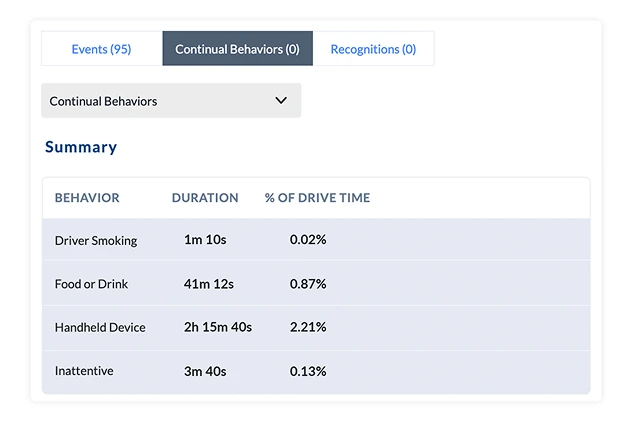
    Report table listing behaviors such as handheld device and food or drink with duration and percentage of drive time

    Continual behavior duration report

    Source
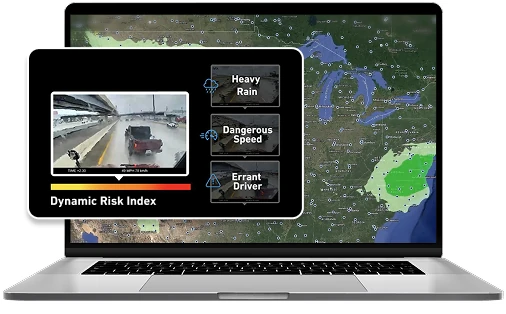
    Laptop showing a weather map with a Dynamic Risk Index panel, a road video frame and labels for heavy rain, dangerous speed and errant driver

    Dynamic Risk Index laptop illustration

    Source

    Capabilities and scope

    This profile focuses on DriveCam hardware and the Driver Safety Program. LytxOne, Lytx+ with Geotab and reseller-delivered Surfsight are separately scoped offers, not interchangeable names.

    Lytx (DriveCam) capabilities, evidence status and source links
    CapabilityEvidenceScope and source
    Vehicle-event recordingDocumented by vendor

    DriveCam hardware records vehicle video; configurations and service options must be identified.

    DriveCam device and product-family scope
    Structured coachingDocumented by vendor

    The Driver Safety Program describes configurable coaching and progress reporting.

    Driver Safety Program coaching
    In-cab alertsDepends on scope

    Published device capability; confirm enabled behaviours and configuration on the proposed model.

    DriveCam device and product-family scope
    Regional video privacy controlsDepends on scope

    The privacy page describes configurable controls and restricts Conceal availability to Europe in the reviewed wording.

    Privacy settings and retention principles
    Guaranteed retrieval while disconnectedNot verified

    No such guarantee was established in the reviewed material.

    Driver self-coaching with timed escalationDocumented by vendor

    Lytx describes guided review and acknowledgment for eligible lower-severity events. A configurable non-completion threshold routes the event to manager coaching; serious or repeated behaviours remain manager-led.

    Driver Self-Coaching routing and escalation
    Driver app performance historyDocumented by vendor

    The iOS and Android Driver App presents video and 90-day performance trends. The same page describes ELD functions, which require the relevant service rather than being assumed included in every safety purchase.

    Driver App and separate ELD service context
    Risk detection without in-cab video recordingDepends on scope

    Risk ID Without Recording can produce behavior metadata, duration reporting and in-cab audio alerts without storing inside-view video. Confirm compatible hardware, behaviors, region and account configuration.

    Risk ID Without Recording configuration and duration metadata
    Continual behavior duration reportingDepends on scope

    Reports can show minutes and percentage of drive time for identified recurring behaviors. Confirm behaviors, devices and tier; the report is risk context, not a finding of fault.

    Continual Driver Behavior Reporting
    Environmental-context risk scoringDepends on scope

    Dynamic Risk adds weather and roadwork context, event tags, weighted scoring and in-cab alerts to selected events. Confirm current regional availability and exclude items marked coming soon.

    Dynamic Risk environmental context and scoring
    Multi-view video search and selective preservationDepends on scope

    Video Search supports frame-by-frame review, simultaneous camera views and saving selected views to a library. Confirm device, channels, service, connectivity and retention.

    Video Search, simultaneous views and Save to Library

    More capability notes

    1 additional areas. Status describes reviewed sources, not hands-on performance.

    Lytx (DriveCam) pricing

    Hardware and service proposal

    Request a quote for the camera model, vehicle count, installation, connectivity, review/coaching service and retention requirements. Separate optional cameras, integrations, replacement equipment, support and renewal terms. The legacy $25/vehicle/month amount was not verified as a current offer.

    Pricing sources checked : Partially verified. DriveCam hardware scope and privacy documentation were accessible; no public subscription amount or complete disconnected recording/upload guarantee was established.

    Which product scope should the quote cover?

    DriveCam devices and the Driver Safety Program. Telematics bundles, compliance tools, extra cameras and reseller services require explicit inclusion.

    Ask the vendor to identify the product, region, modules, billing unit, contract term and included services in writing.

    Capture and remote access differ

    Test capture, upload recovery and remote retrieval separately under your coverage conditions. Local recording capacity must not be represented as cloud retention or guaranteed availability after an incident.

    What we could not verify

    1 not verified · 8 depend on scope · 2 notes

    Demo script

    Vehicle event to coaching follow-up

    1. Capture a representative event using the agreed device and settings.
    2. Have the responsible reviewer assess context and agree an appropriate coaching action.
    3. Record follow-up and review later observations without assuming an automatic risk-reduction result.

    Incident evidence retrieval and preservation

    1. Identify the vehicle, time window and required views.
    2. Retrieve the available evidence under the agreed access controls; document gaps or delayed uploads.
    3. Apply the incident-preservation procedure and confirm the export and retention terms.

    Proposed demo: overdue self-coaching escalation

    1. Assign an eligible lower-severity event to a driver and inspect the guided acknowledgment flow.
    2. Leave another sample task incomplete until the configured threshold and show the manager assignment.
    3. Compare handling of a repeated behaviour and confirm the responsible coach, without treating acknowledgment as proof of improved driving.

    Ask the vendor to show you

    1. Identify every device, service and regional option included in this vehicle quote.
    2. Use a sample event to show review, correction of a mistaken classification and coaching follow-up.
    3. Disconnect the vehicle connection during a permitted test; show what records locally and when the office can retrieve it.
    4. Show who can view, download or share road-facing, in-cab and audio records, and how changes are logged.
    5. Demonstrate preservation and export of one incident, then explain routine deletion, retention exceptions and contract exit.

    Checks specific to this product

    Event review and coaching:
    Ask a reviewer to inspect an event, correct its classification if needed and record the agreed coaching action. Check how later follow-up is linked.
    Use demo checklist

    Questions the sources answer

    Is DriveCam the same as every Lytx service?

    No. The device and purchased software services need separate identification. Check the proposed bundle and region.

    Does recording capacity establish retention?

    No. Ask separately about device capacity, upload availability, cloud retention and incident preservation.

    Is a free trial verified?

    No general free-trial offer was established in the reviewed sources. The official site provides a demo request.

    Does an AI event establish driver fault?

    No. Review the underlying context and the person's response; this profile does not treat an automated classification as a finding.

    Can drivers complete Lytx coaching without a manager meeting?

    For eligible lower-severity events, Lytx documents a guided self-coaching session in the Driver App. Higher-risk and repeated behaviours remain with managers. Ask which thresholds your fleet can configure.

    What happens if a Lytx driver ignores a self-coaching task?

    The vendor describes a configurable deadline after which an incomplete task escalates to manager-led coaching. Demonstrate this with an overdue example and confirm who receives the assignment.

    Does Lytx facial identification require a separate consent step?

    The published workflow collects opt-in through SMS or email before activating identification. Ask the vendor to demonstrate refusal, withdrawal and manual assignment; the reviewed page does not establish those exception workflows.

    Does the Lytx Driver App automatically include electronic logging?

    Do not assume that it does. The app page covers safety features and the Lytx ELD Service, so the quote should name the purchased service and applicable hardware.

    Sources and change log

    13 sources, checked
    • : Targeted documentation review added self-coaching escalation, driver-app service boundaries and consent-before-identification. No subscription, whole-profile or hands-on revalidation is implied.
    • : Replaced unverified price and accuracy claims with device/service boundaries, coaching workflows and evidence-access questions.

    Compare with

    Drawn from the profiles behind the Alternatives list above: most category tags shared with Lytx (DriveCam) first, then the closest overlap in documented capability names, then A to Z. Ratings, search demand and sponsorship are not used; rows are shown A to Z.

    • Samsara

      No shared category tag.

      Differs: offline partial workflow (this profile: unclassified); trial on request (this profile: not established).

      Same: scope and price.

    All Lytx (DriveCam) alternatives

    Reviews on qhsetech.com

    Star ratings and review counts from the old catalog are not shown: no source for them was recorded.