Unified fleet maintenance platform
Official Samsara product video covering the fleet-maintenance workflow. Verify current packages, DVIR behavior and supported assets in the proposed tenant.
Open official sourceSamsara's safety products centre on vehicles and field crews: AI dash cams with in-cab coaching, Driver App inspection and incident forms, a wearable SOS and fall-detection device, and AI video for fixed sites. All run on Samsara hardware and are priced through sales.
Samsara price on record: Quote only · No amount published · Pricing checked · See pricing
Built from vendor sources checked ; AI-assisted drafting. Documentation review, not a hands-on test. How pages are made
Fleet-based operations such as transport, construction, utilities and field service that want driver safety, digital inspections and lone-worker SOS on the same platform as telematics. Safety features depend on Samsara hardware and packages bought per vehicle or asset, with no published prices.
Worth evaluating where the main safety exposure is driving and dispersed field crews, especially if telematics is already needed: dash-cam coaching, digital inspections and SOS alerts sit in one system. The reviewed pages describe no risk register, permit or chemical module; a full EHS programme needs another platform.
Watch for: No published pricing for any package or device. Dashboard form edits overwrite all previous versions.
Trial or demo on request. Sources checked .
Vendor visuals—not a QHSEtech hands-on test.
Official Samsara product video covering the fleet-maintenance workflow. Verify current packages, DVIR behavior and supported assets in the proposed tenant.
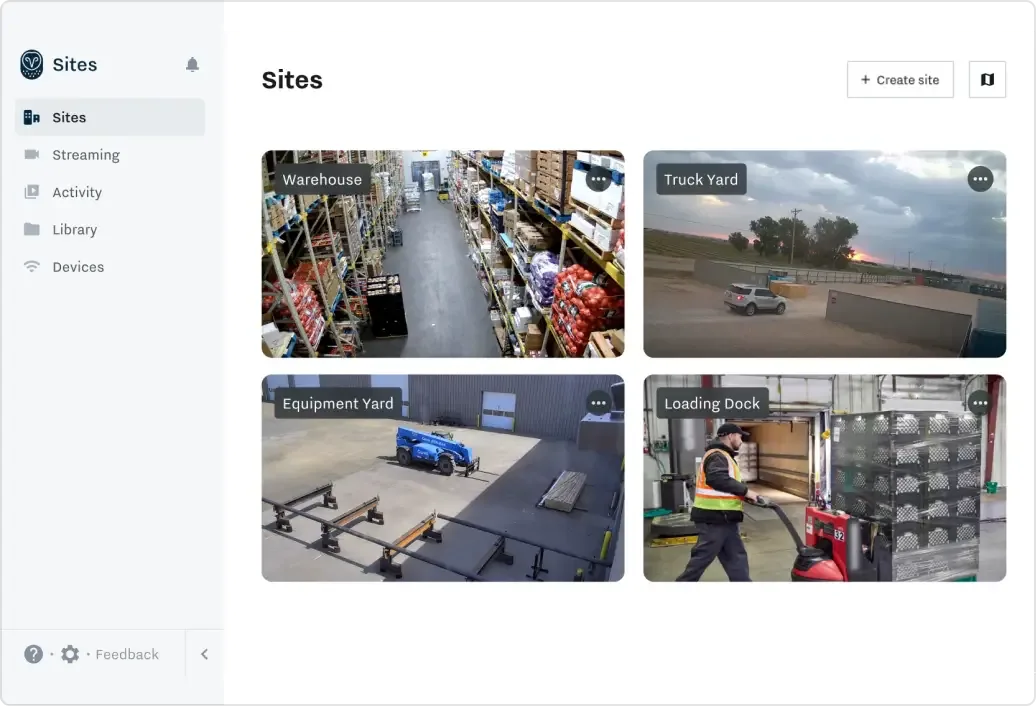
Open official sourceSamsara sells connected-operations hardware and cloud software: vehicle telematics, AI dash cams, site video, equipment trackers and the Samsara Wearable. Its safety offer is fleet-first, sold as Safety Premier and Safety Enterprise packages with separately named add-ons. It is not a general EHS management suite.
| Capability | Evidence | Scope and source |
|---|---|---|
| AI dash cam detection and in-cab coaching | Documented by vendor | Dash cams detect drowsiness, distraction, mobile use, tailgating, forward-collision and lane-departure risk and alert the driver in the cab. Safety Enterprise lists 30+ detections on the plans page; the safety page says 45+. Up to 746 hours of configurable storage. AI dash camsPackages and add-onsSafety and risk overview |
| Digital safety and inspection forms | Documented by vendor | Connected Workflows covers site audits, incident and near-miss reports and equipment inspections. In the Driver App a form can be assigned or started, saved as a draft, filled with photo-based AI autofill, signed, sent to a named approver, and used to raise issues against an asset. Connected WorkflowsComplete a digital form |
| Driver App offline queue | Depends on scope | Actions queue on the phone and upload later; the gateway keeps recording ELD data. Signing out with work pending can lose it. Driver App connectivity states |
| Lone-worker SOS and fall detection | Depends on scope | The Samsara Wearable has one-click SOS and fall detection; nearby Samsara network devices pick up its 2.4 GHz signal for approximate location, and an SOS adds GPS, audio and nearby vehicles. The Driver App also offers SOS and check-ins. Samsara WearableSamsara Wearable and worker safety |
| Site video with AI alerts | Documented by vendor | Site Visibility adds AI detections and real-time alerts, such as a person entering a restricted zone, to existing IP cameras through a Site Gateway, and records at least 30 days of footage. Site Visibility |
| Incident Center and Connected Training | Depends on scope | Incident Center combines video, telematics and reports to review and resolve safety events; Connected Training delivers mobile courses, including courses generated from policy documents. Both are listed as separate products on the plans page. Packages and add-ons |
| Forms API | Documented by vendor | List and retrieve form submissions, create submissions, assign forms to a driver or route, pre-populate fields and list templates; approval-based forms are supported. Forms API |
| Form edit history | Depends on scope | Drafts exist only in the Driver App. Editing a submitted form in the dashboard means setting it back to In Progress, and saving overwrites all previous versions of the form, according to the help article. Complete a digital form |
| US HOS and ELD compliance workflows | Depends on scope | For applicable US fleets, Samsara documents an FMCSA-registered ELD with Driver App countdowns and alerts, GPS-based rulesets, log review and certification, a Compliance Dashboard and roadside Inspection Mode. Confirm jurisdiction, ruleset, Vehicle Gateway hardware and licence coverage; this is not universal EHS compliance. US ELD and HOS compliance workflows — checked 28 September 2026 |
| Connected maintenance from DVIR defects and diagnostics | Depends on scope | Connected Maintenance combines DVIR defects, vehicle fault codes and scheduled maintenance into work-order suggestions, usage-based preventive schedules, repair history and asset status. DVIR records support driver, mechanic or agent and next-driver sign-off. Confirm licence, asset support and approval controls. Connected fleet maintenance and work-order suggestions — checked 28 September 2026Driver vehicle inspection reports and signed defect resolution — checked 28 September 2026Review and completion of open DVIR defects — checked 28 September 2026 |
Also watch for: Routine wearable location depends on nearby Samsara network devices.
Quote only
No amounts are published. The plans page lists Safety Premier and Safety Enterprise behind Get pricing buttons, and the pricing page and former free-trial address open a sales form. Ask for hardware, installation, software per vehicle or user, add-ons, connectivity, term and renewal as separate lines.
Pricing sources checked : Selected sources checked; no starting price recorded. The plans page names the safety packages and add-ons without amounts.
Safety Premier: AI event detection, in-cab alerts, safety inbox and Driver App. Safety Enterprise adds more risk detections, weather alerts, coaching, training and worker safety. Connected Training and Incident Center are listed separately. Equipment Management tracks location, utilisation and fault codes.
Ask the vendor to identify the product, region, modules, billing unit, contract term and included services in writing.
The help centre says the Driver App keeps working without internet: messages, documents, DVIRs and duty-status changes are stored and sent on reconnection, with no live updates meanwhile. Signing out or force-closing while it shows Working offline can lose queued work, and screens needing fresh data do not work. Forms are not named; test one offline.
The Driver App and the Samsara Wearable can be used by field workers, but the wearable's routine location comes from nearby Samsara network devices that detect its signal (with its own GPS added during an SOS).
Yes, in the dashboard, by changing its status back to In Progress. The help article says saving the edit overwrites all previous versions, so ask how the original answers are retained if you need an audit trail.
No self-serve trial is offered on the site; the old free-trial address redirects to the pricing form. Interactive demos are available on the demos page.
The reviewed pages cover driver safety, digital forms including site audits, incidents, training, site video and worker SOS. They do not describe a risk register, permit-to-work or chemical module.
Drawn from the profiles behind the Alternatives list above: most category tags shared with Samsara first, then the closest overlap in documented capability names, then A to Z. Ratings, search demand and sponsorship are not used; rows are shown A to Z.
No shared category tag.
Differs: offline unclassified (this profile: partial workflow); trial not established (this profile: on request).
Same: scope and price.
This site does not currently collect reader reviews. Star ratings and review counts from the old catalog are not shown: no source for them was recorded.