SiteDocs connects field safety paperwork with worker records and office monitoring. Teams can assign forms, collect signatures and check submitted documentation by location. Its mobile app supports disconnected work after preparation; browser access and external-worker participation have distinct conditions. Evaluate the path from a crew completing a form to a supervisor finding the submitted evidence.
SiteDocs price on record: Annual subscription; company-size quote · Amount on record not verified as current · Pricing checked · See pricing
Evidence: Researched profile
Built from vendor sources checked ; AI-assisted drafting. Documentation review, not a hands-on test. How pages are made
Field teams replacing paper inspections, briefings and safety forms with signed records and location-based follow-up. A signed form, GPS point, certification record or reminder does not itself authorize a worker or hazardous task. Confirm Workforce Management, Analytics, permissions and escalation. Analytics is not real-time: official sources describe refreshes approximately every 5–6 hours, daily or weekly depending on dataset.
SiteDocs can justify a company-size annual quote when many field workers need recurring forms and signatures and the prepared mobile workflow meets site conditions. It is less suitable when buyers require an offline web app or expect every historical attachment to be available without prior preparation.
This profile covers SiteDocs safety management at sitedocs.com. SiteDocs Lite is its documented external-worker access workflow; the similarly named clinical-trial SiteDocs Portal is a different product. The vendor calls SiteDocs a GoCanvas company; its news page reports the June 2024 announcement of GoCanvas’s acquisition by the Nemetschek Group.
SiteDocs capabilities, evidence status and source links
Capability
Evidence
Scope and source
Mobile offline capture
Depends on scope
Requires prior login/sync and suitable downloaded content; upload follows connectivity.
Certification connectors can create, update and search records and transfer certificate images. This automates record movement but does not establish worker authorization, permit approval or credential validation.
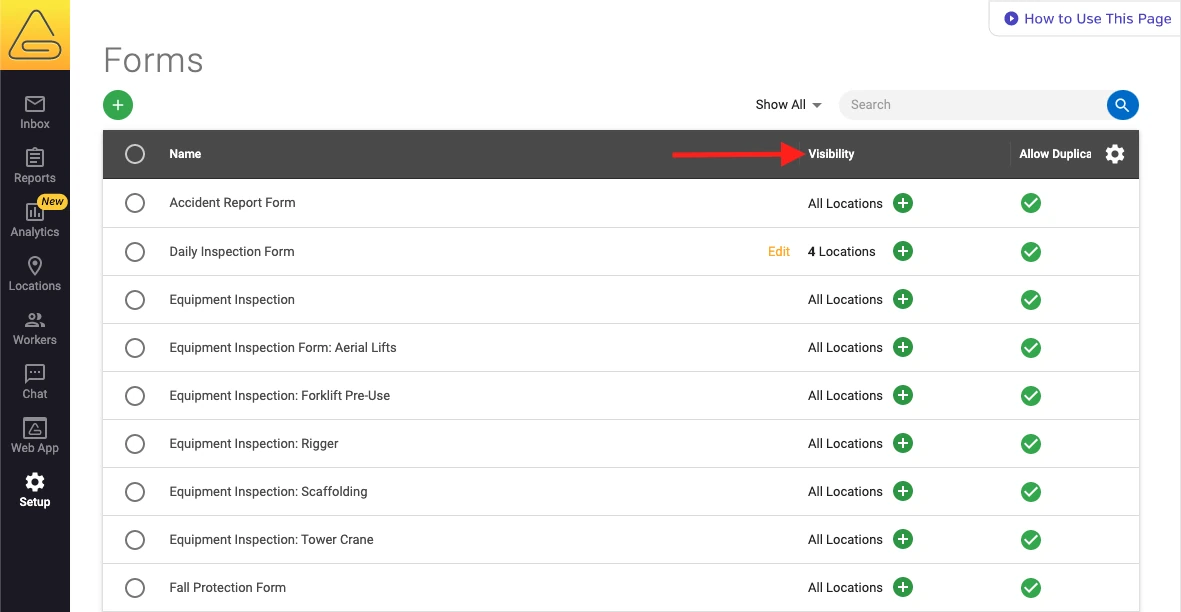
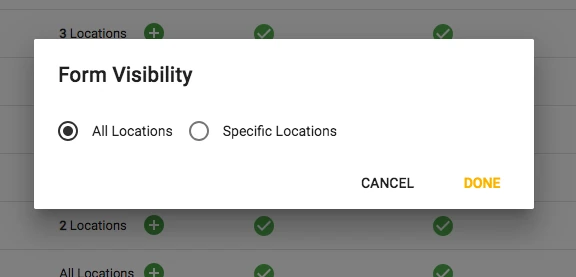
Administrators can restrict templates to selected locations. Templates default to all locations, and workers need the current mobile app for visibility changes.
A flagged item can create a follow-up form for a named worker with a due date and bidirectional links. The assignee needs App Access, and Save as Pending is required for notification.
Dashboards cover certifications, follow-ups, forms, signatures, missing records, participation and GPS maps. Configure access and interpretation; GPS and signature presence do not prove safe work.
Workers receive chat notifications before and at expiry; Analytics can send threshold emails or scheduled reports. Alerts support renewal administration but do not suspend access or confirm competence or authorization.
Also watch for: Browser access is online-only. Offline history and attachments depend on storage settings. Contractor scope and subscription amount need a written quote.
SiteDocs pricing
Annual subscription; company-size quote
The official pricing page describes annual pricing based on company size and needs, with worker logins and unlimited forms and signatures. A call is required for a tailored quote. The earlier $10/user/month catalog amount is not verified. Confirm external-worker scope, analytics, setup, integrations and renewal terms in the proposal. The package announcement page names three packages, SiteDocs Essentials, Pro and Max, and lists the QR Code Access to SiteDocs Lite item under Pro; the pricing page does not name the packages, and neither page shows package amounts.
Pricing sources checked : Partially verified. The vendor also publishes three package levels, but package-specific amounts, add-on prices and final external-worker entitlement remain proposal questions.
Which product scope should the quote cover?
Mobile safety forms, signatures, location-specific distribution, worker certification records, linked follow-up forms and administrator monitoring. Workforce Management, SiteDocs Lite, Analytics and integration connectors require explicit package and access confirmation.
Ask the vendor to identify the product, region, modules, billing unit, contract term and included services in writing.
Prepared mobile offline; web online-only
Log in and synchronize the Mobile App before leaving connectivity. New work queues locally for later upload. Previously signed forms, photos, PDFs and certificate images depend on downloaded content and storage settings; on-demand items need connectivity. Online-Only Mode does not download new historical content in the background, although already downloaded records remain. The Web App is not available offline. Confirm successful upload in the Admin Panel rather than assuming a fixed sync time.
Prepare the Mobile App and required form while connected, using the selected worker permissions.
Record the briefing and permitted worker signatures at the site, including a disconnected test.
Reconnect, check synchronization and retrieve the submitted document in the Admin Panel.
External contractor participation at a location
Set up the external company and relevant location in Workforce Management.
Configure a SiteDocs Lite link and the forms/resources exposed through its menu.
Ask an external worker to participate and verify the resulting company/location record and reviewer access.
Certification expiry to renewed worker record
Create a test certification with issuer, dates and evidence, then verify the notification path.
Use the dashboard and scheduled or threshold alert to identify it while confirming source refresh delay.
Replace the evidence with a renewed credential and verify status, then demonstrate the separate supervisory or permit process for hazardous-work authorization.
Ask the vendor to show you
Complete a crew briefing without connectivity, add permitted signatures and confirm the uploaded record in the Admin Panel.
Show a signed form whose photo or PDF is configured on-demand, then repeat with offline storage enabled.
Create an external company and demonstrate precisely which forms its workers can see through a SiteDocs Lite link.
Demonstrate who can add another worker signature, review a private form and follow up on a missing record.
Provide the annual quote with the selected contractor package, analytics, implementation and integrations itemized.
Checks specific to this product
Field capture to office receipt:
Complete a form offline, inspect the upload queue and verify the received record from the office. Test your connectivity and attachment conditions rather than accepting a fixed upload-time promise.
Can contractors participate without a full worker login?
The Workforce Management documentation describes SiteDocs Lite links for external workers. Confirm the package, permitted menus and commercial terms; the documentation does not establish universally free contractor access.
Can several workers sign one form?
Yes, with the appropriate permission enabled. The documented process adds worker signatures and closes the document for submission. Test identity and reviewer access with your crew.
Does Online-Only Mode prevent all new offline work?
The guide says new Forms or Resources can still be completed and signed, but previously signed documents cannot be downloaded offline for viewing, revision or more signatures. Already downloaded content is retained.
Is there a verified free trial?
A demo and proposal process is published. A self-service free trial was not established from the reviewed official sources.
Categories describe the product or separately scoped applications.
Appears in these guides
Each guide lists SiteDocs under its published rule, in documented-match order. That order reflects documentation, not quality; no product is recommended.
Drawn from the profiles behind the Alternatives list above: most category tags shared with SiteDocs first, then the closest overlap in documented capability names, then A to Z. Ratings, search demand and sponsorship are not used; rows are shown A to Z.
This site does not currently collect reader reviews. Star ratings and review counts from the old catalog are not shown: no source for them was recorded.