QHSEtech

    TuMeke Ergonomics

    TuMeke turns phone or uploaded task video into 3D movement estimates, method-based ergonomic risk outputs, visual explanations and intervention workflows. It supports screening, prioritization and before-and-after review; it does not diagnose injury, certify that a task is safe or replace a qualified ergonomist's judgment.

    Evidence: Researched profile

    Built from vendor sources checked ; AI-assisted drafting. Documentation review, not a hands-on test. How pages are made

    Who is TuMeke Ergonomics for?

    Safety and ergonomics teams that need repeatable industrial or office task assessments, visual coaching and portfolio-level prioritization across sites. Treat scores and AI guidance as decision support. Confirm that the assessment method fits the task; capture representative work; review occlusion, PPE, lighting, camera angle, loads, force, grip, pace and worker variability; and have a qualified person approve interventions. Vendor injury-reduction, speed and ROI figures are marketing or vendor case-study claims, not forecasts for another workforce.

    Worth evaluating when repeated task assessments and before-and-after comparisons take substantial staff time. Judge value using completed, reviewed assessments and implemented improvements, not vendor headline injury-reduction percentages.

    Free trial documented. Sources checked .

    Product tour

    Vendor visuals—not a QHSEtech hands-on test.

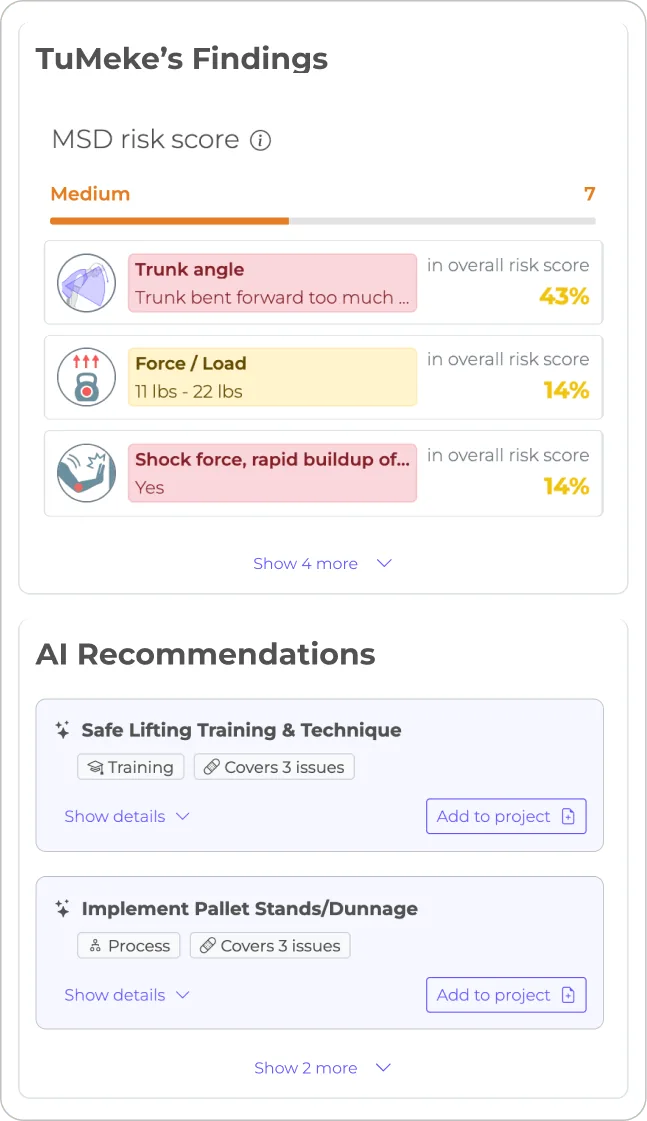
    Findings panel showing a medium MSD risk score of 7, three weighted risk factors and two AI recommendations with Add to project buttons

    Findings panel with AI recommendations

    Source
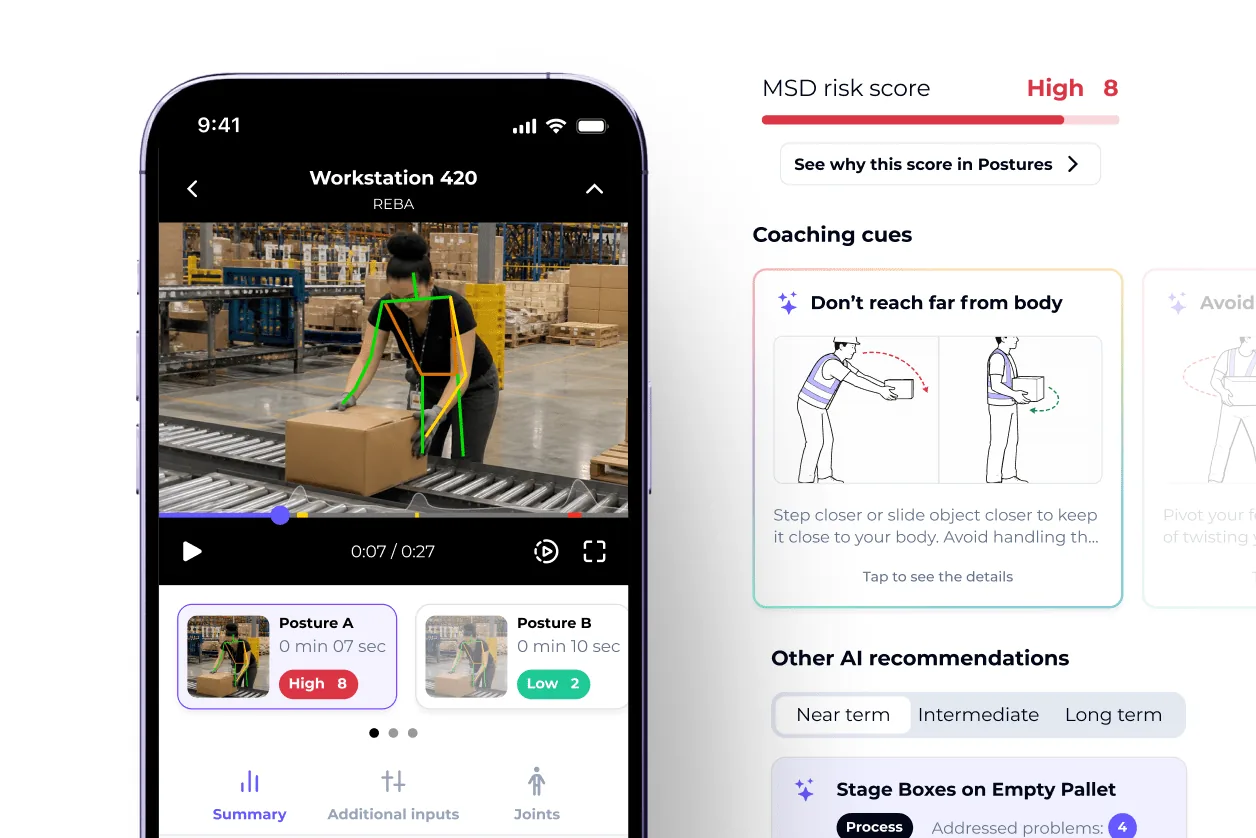
    Phone screen showing a REBA assessment video with skeleton overlay and a high score of 8, next to a coaching cue and a recommendation list

    Mobile REBA result with coaching cues

    Source

    Capabilities and scope

    This listing covers TuMeke Ergonomics Risk Suite for phone-video industrial and office ergonomic assessments. Coach Pro is a separately named airline-training product; its workflows, content and entitlements should not be treated as included in Risk Suite.

    TuMeke Ergonomics capabilities, evidence status and source links
    CapabilityEvidenceScope and source
    Phone and uploaded-video captureDocumented by vendor

    Record a task in the mobile app or analyze an existing recording; no specialized camera or wearable is described as required.

    Capture and assessment workflowCamera, 3D-joint, method and PDF detail
    3D pose and joint-angle estimationDocumented by vendor

    The vendor describes extracting 3D joint positions and angles from 2D video. Treat this as an estimate and test representative occlusion, PPE, body positions and camera views.

    Camera, 3D-joint, method and PDF detailMethod fit, representative capture and validation guidance
    RULA, REBA and Revised NIOSH scoringDocumented by vendor

    These methods are named in current official product materials. Select the method that fits the exposure rather than treating methods as interchangeable.

    Camera, 3D-joint, method and PDF detailMethod fit, representative capture and validation guidance
    RSI and Snook or Liberty Mutual methodsDocumented by vendor

    The insurance-provider product page lists Revised Strain Index and Snook or Liberty Mutual manual-material-handling equations. Confirm method availability and automation in the purchased package.

    RULA, REBA, NIOSH, RSI and Snook method scope
    Movement and task-context analysisDocumented by vendor

    Risk Suite describes analysis beyond posture, including repetition, duration, job context, grip, force and balance. Validate inferred or entered contextual factors against actual work.

    Risk Suite capabilities
    Office workstation assessmentDocumented by vendor

    The office offering describes ROSA-based workstation assessment. Confirm package inclusion and the worker-input workflow.

    Office ergonomics and ROSA scopeAnnual packages, Enterprise boundaries and trial
    Visual risk explanationDocumented by vendor

    Risky postures, body-region scores, joint-angle charts and video or skeleton visuals are described to support review and worker conversations.

    Camera, 3D-joint, method and PDF detailRisk, improvement, training and reporting use cases
    AI recommendations and Coaching CuesDocumented by vendor

    AI recommendations address task or workplace changes; Coaching Cues show triggering moments and technique guidance. A qualified reviewer should approve recommendations, and technique coaching must not displace work-design controls.

    Risk, improvement, training and reporting use casesCoaching Cues and human-factors boundary
    Before-and-after comparisonDocumented by vendor

    The platform describes baseline, side-by-side and repeat-assessment comparisons. Compare reasonably similar loads, work-cycle stages, pace and setup, and inspect for newly introduced exposures.

    Risk, improvement, training and reporting use casesBefore-and-after reassessment guidance
    Improvement assignment and trackingDocumented by vendor

    The Improvements feature is described as assigning, tracking and confirming interventions. Define owners, evidence and qualified closure approval in the operating procedure.

    Risk, improvement, training and reporting use cases
    Centralized multi-site dashboardDocumented by vendor

    Risk Suite centralizes assessment data and provides aggregate visibility across tasks, jobs and sites for prioritization.

    Risk, improvement, training and reporting use casesMulti-site dashboard guidance
    App-to-web synchronization and remote uploadDocumented by vendor

    The use-case page describes remote video uploads and synchronization between the app and web-based Risk Suite; it does not establish offline queue behavior.

    Risk, improvement, training and reporting use cases

    More capability notes

    5 additional areas. Status describes reviewed sources, not hands-on performance.

    Also watch for: No public numeric subscription verified. Recording quality and reviewer judgment affect usefulness.

    TuMeke Ergonomics pricing

    Subscription and custom quote

    Official packaging describes annual subscriptions licensed by facility or user; users, sites and assessment volume can affect the quote, and multi-year discounts may apply. Standard setup is advertised without a fee, while customized Enterprise onboarding or integrations may add fees. The vendor advertises a 14-day no-card trial with unlimited assessments and says trial data is stored for 30 days afterward. Confirm currency, usage limits, renewal, retention, deletion and all Enterprise services in writing.

    Pricing sources checked : Selected sources checked; no starting price recorded. No numeric subscription was verified; enterprise setup scope requires a proposal.

    Which product scope should the quote cover?

    Risk Suite covers phone/video ergonomic assessment, industrial and office methods, visual findings, intervention tracking and dashboards. Coach Pro is separate.

    Ask the vendor to identify the product, region, modules, billing unit, contract term and included services in writing.

    Offline work and integrations

    Test each required disconnected workflow and recovery behavior before purchase.

    What we could not verify

    1 not verified · 3 depend on scope · 3 notes
    • Not verified in the sources: Offline operation.
    • Depends on plan or configuration: Enterprise administration; Custom assessment logic; Security and privacy assurance.
    • SSO, customized reports, onboarding and integrations are Enterprise or proposal-dependent; custom assessment logic is separately scoped; API and offline operation were not established in reviewed public documentation.
    • Official pages document phone capture, mobile analysis, remote video upload and app-to-Risk-Suite synchronization, but do not establish offline capture, offline scoring, queued synchronization or report access.
    • Offline analysis and API entitlements remain unverified.

    Demo script

    Pilot: representative task and method validation

    1. Choose a real task and the ergonomic method that matches its exposure; document why.
    2. Record representative work across relevant cycle stages, loads, pace and worker variation, including a deliberate occlusion or PPE challenge.
    3. Compare pose, inputs, body-region findings and score with a qualified ergonomist's observation; document corrections and uncertainty.
    4. Approve the result for prioritization only when capture quality, context and method fit are acceptable.

    Intervention and repeat-assessment closure

    1. Record the baseline risk driver and the condition that prompted action.
    2. Assign a work-design, equipment, process or coaching intervention with an owner and due date.
    3. Repeat the assessment under reasonably comparable load, pace, cycle stage and camera conditions.
    4. Review the targeted exposure and any new risks; close, revise or continue the action with worker feedback and reviewer sign-off.

    Office ROSA review

    1. Capture the workstation and collect the worker and context inputs required for ROSA.
    2. Have a competent reviewer verify setup, posture, task duration and equipment assumptions.
    3. Implement practical workstation or work-practice changes without treating the score as a diagnosis.
    4. Reassess, record worker feedback and retain only the minimum necessary personal data.

    Ask the vendor to show you

    1. Which assessment methods are currently supported in our package, and which task or exposure is each intended to evaluate?
    2. Which inputs are inferred from video and which, such as load, force, grip, frequency or task context, must be entered, reviewed or overridden by a person?
    3. What method-specific and joint-level validation evidence is available for our tasks, workers, PPE, camera positions and occlusion conditions?
    4. How does the product expose low-confidence, failed or incomplete pose estimates rather than presenting every result as reliable?
    5. What phone, operating-system, camera, video-length, lighting and connectivity requirements apply, and what works offline?
    6. What are the lawful-basis, notice or consent, retention, deletion, hosting, subprocessor, cross-border and model-training rules for worker video and derived movement data?
    Use demo checklist

    Questions the sources answer

    Which assessment methods does TuMeke support?

    Official pages name RULA, REBA, Revised NIOSH Lifting Equation, Revised Strain Index, Snook or Liberty Mutual methods and ROSA for office work. Confirm which are in your package and use the method appropriate to the task.

    Does TuMeke require special cameras or wearables?

    The vendor describes phone or existing-video capture without specialized cameras, wearables or goniometers. A pilot should still test camera placement, lighting, PPE, occlusion and device requirements.

    Are TuMeke's AI recommendations automatically safe to implement?

    No. Use them as proposals for qualified review with workers and operations. Technique coaching is only one control; workstation, tool, load, pace, process and environment may need redesign.

    Does a TuMeke score diagnose injury or certify a task as safe?

    No. It supports ergonomic screening, prioritization and improvement review; it is not medical diagnosis, regulatory certification or assurance that injury cannot occur.

    How should worker video be governed?

    Set a lawful basis and clear notice or consent process as applicable, minimize recordings, restrict access, and contract for retention, deletion, hosting, subprocessors and model-training use. The public policy landing page did not expose enough detail to resolve these points.

    Is TuMeke SOC 2 certified?

    The packages page advertises SOC 2 Type II. Buyers should review the current report, covered systems, period, exceptions and complementary customer controls rather than relying on the badge alone.

    Do vendor injury-reduction or ROI figures guarantee our result?

    No. Treat percentages and case-study outcomes as vendor claims. Build a baseline, define comparable follow-up conditions and measure your own implemented controls and outcomes.

    Is Coach Pro included with Risk Suite?

    Coach Pro is presented as a separate airline-training offering. Do not assume its workflows, content or licensing are included in a Risk Suite quote.

    Sources and change log

    15 sources, checked

    Compare with

    Drawn from the profiles behind the Alternatives list above: most category tags shared with TuMeke Ergonomics first, then the closest overlap in documented capability names, then A to Z. Ratings, search demand and sponsorship are not used; rows are shown A to Z.

    • Cardinus Risk Management

      Shared category tags: 1 (Occupational Health).

      Differs: trial on request (this profile: free trial documented).

      Same: scope, offline and price.

    • SoterAI and SoterCoach

      Shared category tags: 2 (Occupational Health, Risk Assessment).

      Differs: price amount published (this profile: no verified amount).

      Same: scope, offline and trial.

    All TuMeke Ergonomics alternatives

    Reviews on qhsetech.com

    Reviews may be filed under other names

    Also recorded as TuMeke, TuMeke Risk Suite. Older entries under a previous name may describe a different release or owner.

    Star ratings and review counts from the old catalog are not shown: no source for them was recorded.