
    QHSEtech

    Assignar

    Assignar is relevant to QHSE buyers who want safety records close to construction operations. It combines workforce context with configurable site forms, allowing buyers to assess the handoff between field reporting and office review.

    Evidence: Researched profile

    Built from vendor sources checked ; AI-assisted drafting. Documentation review, not a hands-on test. How pages are made

    Who is Assignar for?

    Construction contractors coordinating crews, qualification records and recurring site paperwork. A form for an incident or permit does not itself establish a specialist investigation or permit-to-work system. Confirm workflow depth, regional product scope and integration charges.

    Worth shortlisting when construction scheduling and field paperwork share the same operational bottleneck. A team needing only inspections should compare the full quoted scope with simpler form tools.

    Watch for: No public subscription amount. API access is separately scoped.

    Sources checked .

    Product tour

    Vendor visuals—not a QHSEtech hands-on test.

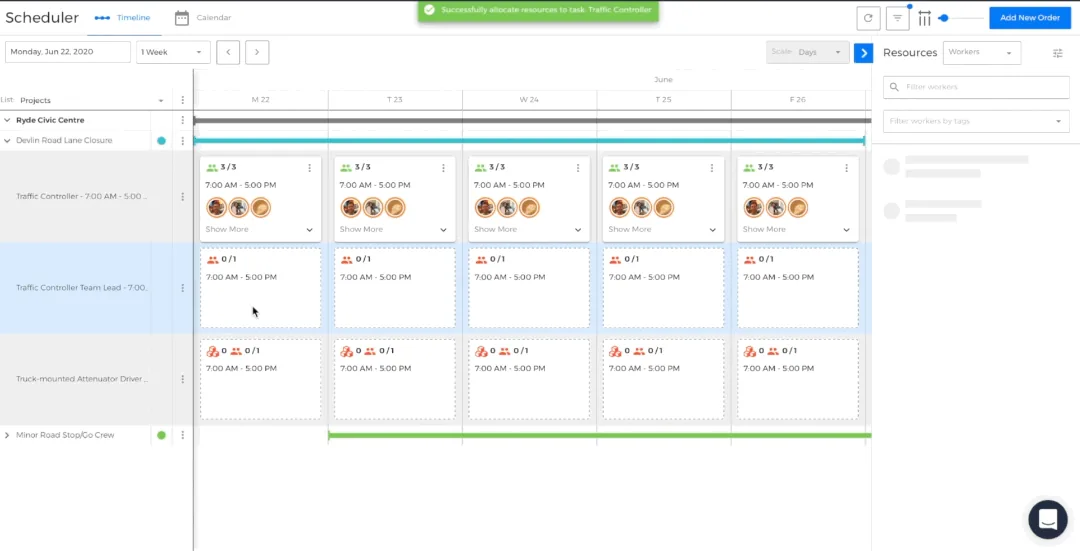
    Assignar drag-and-drop scheduler with project roles, daily allocations and worker resources

    Drag-and-drop crew scheduler

    Source
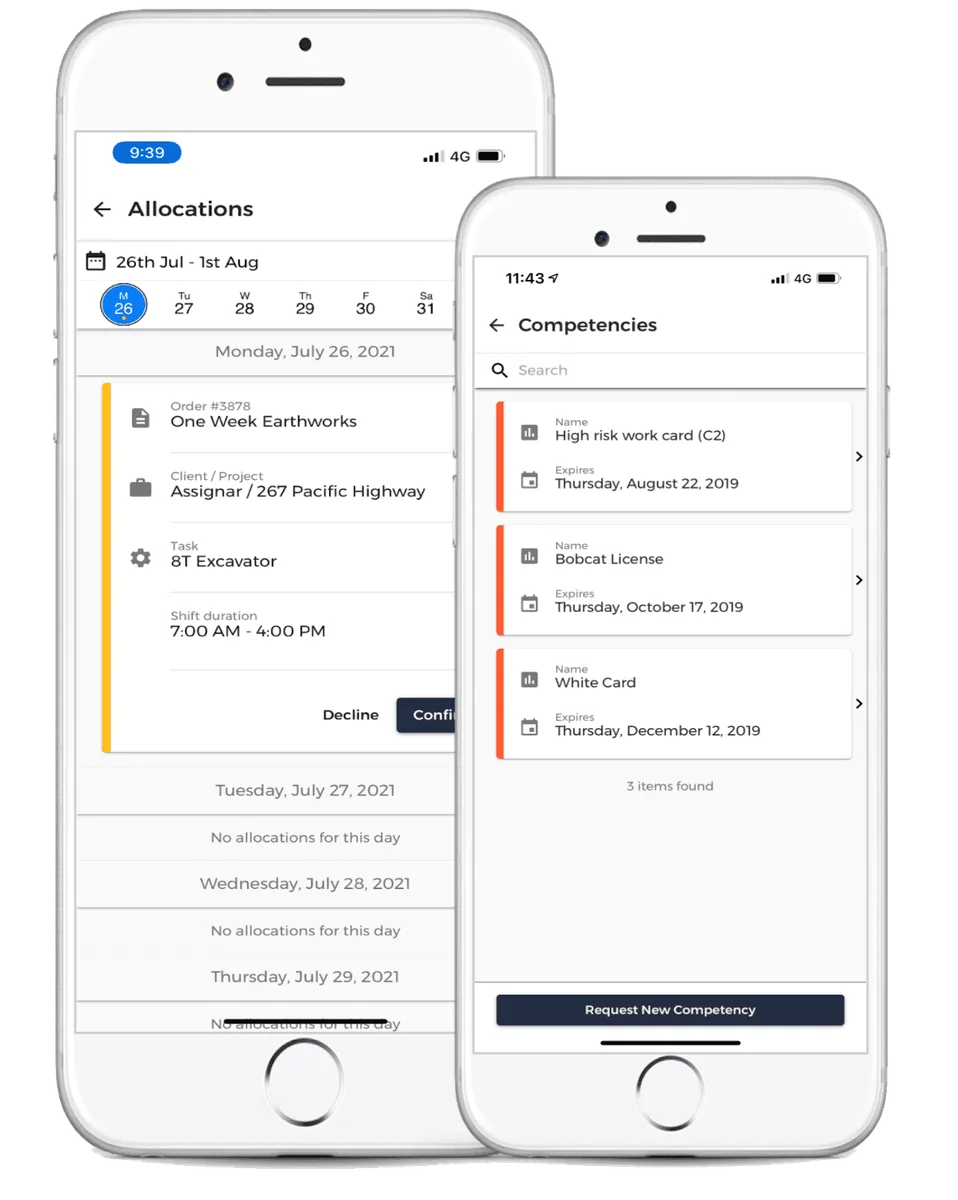
    Assignar mobile allocation details and worker competency records on two phone screens

    Mobile allocations and competencies

    Source
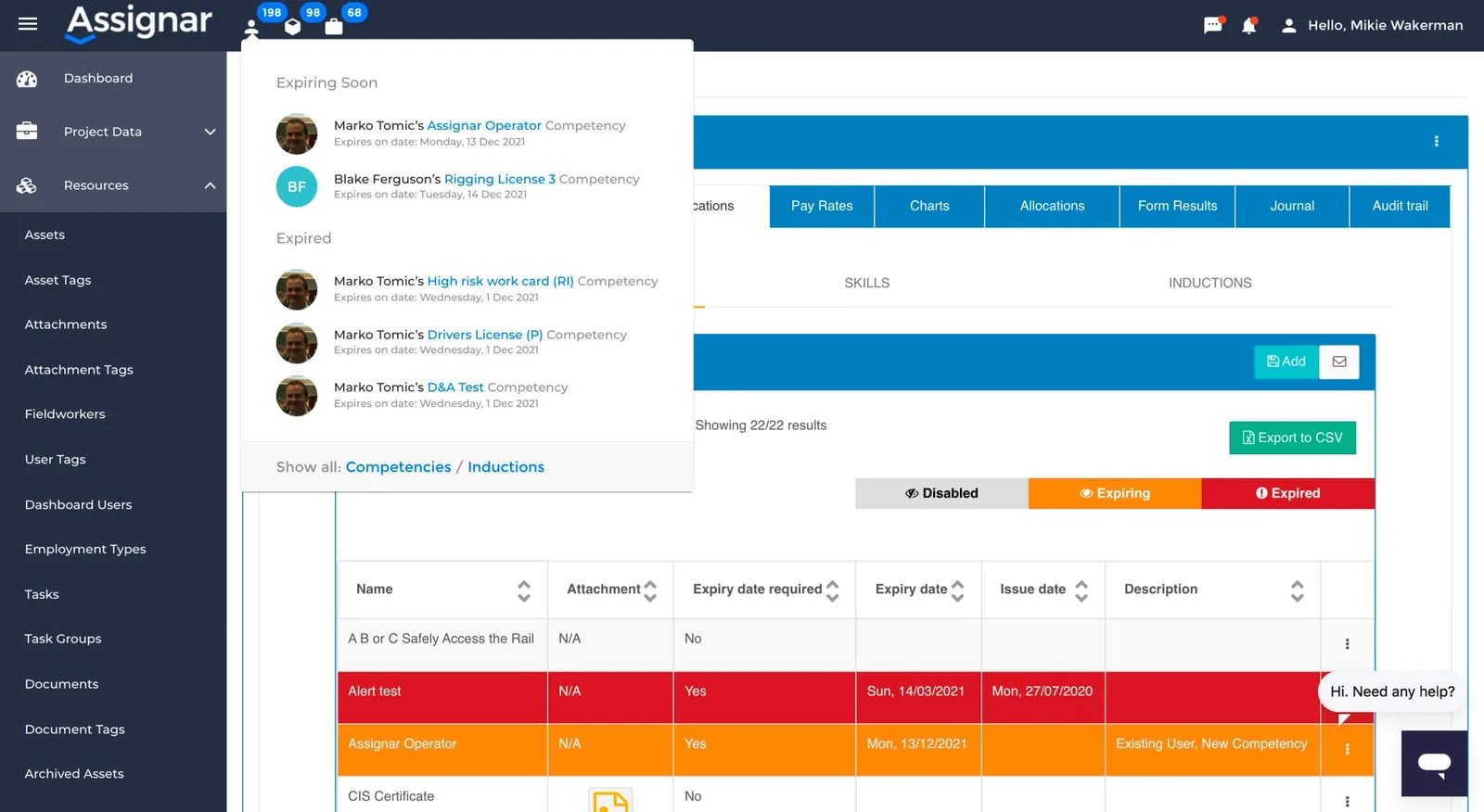
    Assignar web dashboard with expiring and expired worker competency alerts and records

    Competency expiry dashboard

    Source

    Capabilities and scope

    Assignar is a construction operations platform. This profile focuses on Operations, worker compliance and field forms; Assignar Pay and other offerings require separate scope confirmation.

    Assignar capabilities, evidence status and source links
    CapabilityEvidenceScope and source
    Field formsDocumented by vendor

    Custom forms cover site data such as equipment pre-checks and incident reports. Specialist investigation depth needs demonstration.

    Construction field forms
    Form routing and accessDocumented by vendor

    Configuration supports assigned owners, submission statuses, association fields and user-tag access.

    Form configuration and access
    Mobile offline modeDepends on scope

    The help article describes automatic and manual offline modes. It lists assignments within about three days either side, timesheets, forms other than Collaborative Forms and dockets outside an assignment, from app version 11.4.8. Attachment handling, conflict behavior and recovery scope remain unverified.

    Help article: working offline in the mobile app (automatic and manual offline modes)
    Qualification and expiry trackingDocumented by vendor

    The workforce offering stores qualifications and documents with expiry alerts, including subcontractor records.

    Workforce compliance records
    Integration routesDepends on scope

    The vendor distinguishes partner-connected integrations from import/export. Public API access is an add-on.

    Integration routes and API add-on
    Published form lifecycleDocumented by vendor

    Saving does not publish a form. Published changes take effect immediately; questions with submitted results cannot be deleted.

    Form configuration and access
    Compliance-aware scheduling signalsDocumented by vendor

    Scheduler signals surface double-booking, missing certifications and role or skill mismatches before and after allocation. These are decision aids, not a documented hard block on dispatch.

    Scheduling conflict and compliance signals — checked 29 September 2026Role-based compliance and scheduling — checked 29 September 2026
    Supervisor Site DiariesDocumented by vendor

    Supervisors can capture crew time, progress, chargeable items, photo notes, questions and weather, collect a client signature and produce PDFs. Dashboard edits can replace the supervisor signature and remove the client signature, so amendment controls need review.

    Supervisor Site Diary workflow — checked 29 September 2026Dashboard Site Diary review and signature behavior — checked 29 September 2026
    Timesheet approval and payroll handoffDocumented by vendor

    Authorized users can review, edit, approve, mark processed and export timesheets, with summaries and configured overtime calculations. Confirm the target payroll connector or file-import process separately.

    Web timesheet review and approval — checked 29 September 2026
    Asset document expiry alertsDocumented by vendor

    Asset registrations, licences, certificates and service records can carry date- or usage-based expiry thresholds and alerts. This is expiry tracking, not a full preventive-maintenance work-order engine.

    Asset document expiry alerts — checked 29 September 2026

    Assignar pricing

    Custom quote

    Pricing is not publicly available, contact vendor. Request the required Operations features, dashboard and field users, onboarding, contract term, regional scope and any Pay offering as separate line items. Public API access is documented as an add-on.

    Pricing sources checked : Selected sources checked; no starting price recorded. Quote-only pricing and demo-led evaluation confirmed; public API is an add-on.

    Which product scope should the quote cover?

    Construction workforce coordination, qualification records and site data capture.

    Ask the vendor to identify the product, region, modules, billing unit, contract term and included services in writing.

    Mobile offline mode documented; workflow details need verification

    The official mobile guide documents automatic offline mode when reception is lost and a manual Go Offline option. The article lists viewing assignments for about three days either side, completing timesheets, forms other than Collaborative Forms and dockets outside an assignment, from app version 11.4.8; work created offline is saved on the device and synchronizes later. Demonstrate the precise inspection and synchronization flow rather than assuming the entire platform works offline.

    What we could not verify

    2 depend on scope · 3 notes
    • Depends on plan or configuration: Mobile offline mode; Integration routes.
    • The pricing page offers a demo-led test drive; it does not establish an unrestricted free trial.
    • It does not establish the full record cache, attachment queue or conflict behavior.
    • Full offline workflow parity is not established.

    Demo script

    Demo exercise: site finding to reviewed record

    1. Build a representative equipment check with required evidence and a review status.
    2. Associate the form with the project and asset, then complete it as a field worker.
    3. Inspect assignment, notification and reviewer access from the office.
    4. Repeat while disconnected and verify the final synchronized record.

    Demo exercise: qualification expiry before dispatch

    1. Create test workers with current and expired required credentials.
    2. Try assigning both workers to the same job and observe the actual control.
    3. Update the credential and inspect notification and scheduling changes.
    4. Check subcontractor visibility using a restricted account.

    Demo exercise: compliant dispatch to signed daily record

    1. Define a role with required competencies and create one compliant and one non-compliant worker.
    2. Schedule both candidates and verify the conflict or compliance signals without assuming warnings hard-block dispatch.
    3. Have the supervisor complete a Site Diary with crew time, a photo note, weather and client signature.
    4. Review and edit the diary from the dashboard, then inspect signature changes, PDF output and timesheet approval or export.

    Ask the vendor to show you

    1. Which assignments, forms and documents remain available offline?
    2. How does a submitted hazard reach an accountable reviewer?
    3. Does an expired worker credential warn or block scheduling in our configuration?
    4. What are the API add-on and integration maintenance costs?
    Use demo checklist

    Questions the sources answer

    Is Assignar a dedicated EHS platform?

    Its core context is construction operations. Field forms and workforce compliance can support safety work, but complex investigations or permit controls need explicit validation.

    Does Assignar work offline on construction sites?

    Its mobile guide documents offline mode. The precise forms, records and attachments available without reception should be tested in the proposed deployment.

    Does Assignar include public API access?

    The integration page describes the public API as an add-on. Confirm the required endpoints, connection owner and fees in the quote.

    Can Assignar track subcontractor document expiry?

    The workforce page documents subcontractor licence and document records with alerts. Test site requirements and account visibility before using this as a dispatch control.

    Sources and change log

    15 sources, checked

    Compare with

    Drawn from the profiles behind the Alternatives list above: most category tags shared with Assignar first, then the closest overlap in documented capability names, then A to Z. Ratings, search demand and sponsorship are not used; rows are shown A to Z.

    • Fieldwire by Hilti

      No shared category tag.

      Differs: price amount published (this profile: no verified amount); trial free trial documented (this profile: not established).

      Same: scope and offline.

    • Raken

      No shared category tag.

      Differs: trial free trial documented (this profile: not established).

      Same: scope, offline and price.

    Browse the category

    Reviews on qhsetech.com

    Star ratings and review counts from the old catalog are not shown: no source for them was recorded.