QHSEtech

    Fieldwire by Hilti

    Fieldwire connects site drawings with tasks, photographs and inspection records. Its project context can help construction teams locate a defect and coordinate follow-up. Plan selection matters: custom forms sit above the entry paid tier, and an invitation can affect the account owner's bill.

    Evidence: Researched profile

    Built from vendor sources checked ; AI-assisted drafting. Documentation review, not a hands-on test. How pages are made

    Who is Fieldwire by Hilti for?

    Construction teams that need inspections and follow-up tied to drawings and project locations. Custom forms require Business or Business Plus, while reports and exports begin lower in the tier structure; quote the exact roles, projects, invited contractors, templates, API, SSO, storage sync and support scope. Account or project template edits do not automatically update every checklist already in use. OCR-assisted plan naming and versioning require administrator review. Mobile offline work requires prior authentication and project download and differs by platform. A status, checked item or signature does not by itself prove inspection quality, signer identity or approval. 'Sign as someone else' and external PDF signing need explicit governance. Fieldwire supports construction coordination, not a complete preconfigured EHS control system.

    Worth evaluating when inspection findings must be coordinated against drawings. Compare the Business cost with a dedicated inspection app using the same crew size and contractor-access assumptions.

    Limited 14-day Business beta trial for eligible new US/Canada accounts; availability not guaranteed. Sources checked .

    Product tour

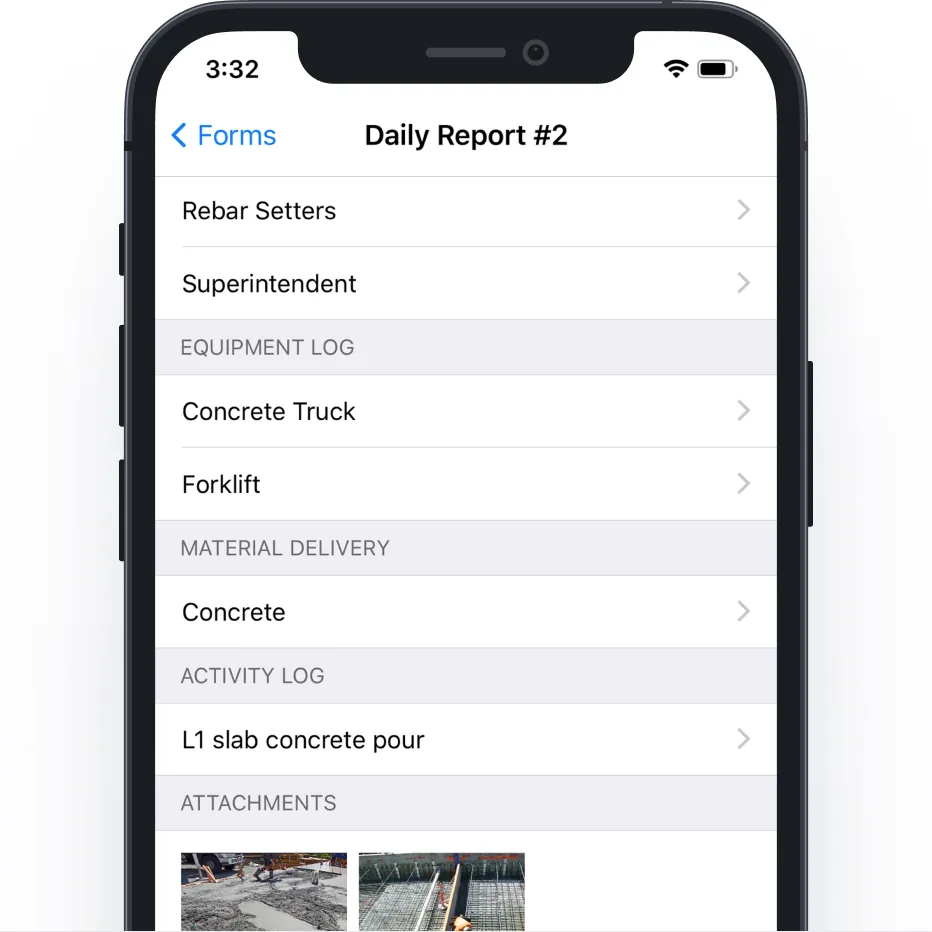
    Vendor visuals—not a QHSEtech hands-on test.

    Phone screen of a Daily Report form listing a crew entry, equipment log, material delivery, activity log and photo attachments

    Mobile daily report form with logs and attachments

    Source

    Capabilities and scope

    Fieldwire by Hilti is construction field-management software. This profile evaluates plan-linked tasks and inspection forms, not a complete enterprise EHS, ESG or quality-management suite. Fieldwire by Hilti construction field-management capabilities for drawings, version-linked tasks, checklists, reports and Business-tier custom forms. Forms, APIs, SSO, cloud-storage sync, account templates and security or data-region commitments depend on plan and contract scope.

    Fieldwire by Hilti capabilities, evidence status and source links
    CapabilityEvidenceScope and source
    Drawing-linked tasksDocumented by vendor

    Tasks and photographs provide construction-plan context for follow-up.

    Business workflow scopePlan upload, OCR naming and version-conflict workflow : checked 29 September 2026
    Custom safety formsDepends on scope

    Business supports custom templates, including safety audits; Pro should not be quoted as the custom-form package.

    Business workflow scope
    Reports and exportsDepends on scope

    Pro adds reporting and exports. Verify the exact output needed by the client.

    Current plan comparison
    Offline mobile workDepends on scope

    Previously downloaded projects can be used on iOS/Android; authenticate first and keep the app open when reconnecting.

    Mobile offline requirements
    API and SSODepends on scope

    Commercial terms are discussed separately rather than assumed in a standard self-service licence.

    Current plan comparison
    Account-wide templatesDocumented by vendor

    Premium setup guidance describes reusable form templates across projects.

    Premium feature configuration
    Task checklists with timestamped line-item historyDepends on scope

    Fieldwire supports task checklists, reusable project and account templates, mobile completion, up to 500 checklist items per task, and reports containing who checked each item and when. Editing a template does not update checklists already placed in tasks, and account-template changes are not automatically propagated to imported project copies. Confirm template governance, obsolete-version warnings, reopening, evidence and independent verification.

    Task checklists, timestamped completion and account templates : checked 29 September 2026Checklist template management and update behaviour
    Role- and form-specific permissionsDepends on scope

    Form templates can restrict who may create, view and edit forms by project role, while deleting and reopening follow default role rules and status settings, allowing different treatment for safety violations, JHAs or inspections. Mobile users need supported app versions for newer permission behavior. Test Admin, Member and Follower access, form assignees, sensitive-form visibility, offline cached access, deleted and reopened records, stale clients and permission changes during a project.

    Form permissions by project role, form type and mobile-version dependency : checked 29 September 2026
    Form signatures and external-signer workaroundDepends on scope

    Custom forms support signature sections and configurable minimum and maximum counts. An onsite Fieldwire user can select 'Sign as someone else' and type the person's name; an offsite non-user is handled through an exported PDF and third-party PDF editor. These routes do not by themselves establish identity assurance, electronic-signature compliance or reintegration into the authoritative Fieldwire record. Define allowed signers, witnessing, attribution, tamper evidence, external-PDF import and retention.

    Custom forms, statuses, attachments, links and signature configuration : checked 29 September 2026Third-party form signature limitations and PDF workaround : checked 29 September 2026
    Plan OCR, versioning and conflict resolutionDepends on scope

    Project Admins can upload plans; Fieldwire uses OCR to scan, name, version and hyperlink sheets and provides a workflow to resolve version conflicts. Premium cloud-storage syncing is separately scoped. Confirm supported file quality and fonts, admin review, revision identifiers, superseded-sheet access, carried markups and tasks, conflict handling, notification of field users and the authoritative drawing register; OCR output is not guaranteed correct.

    Plan upload, OCR naming and version-conflict workflow : checked 29 September 2026
    Documented security and data-location controlsDepends on scope

    Fieldwire's security article describes AWS hosting, access controls, data regionalization topics and multiple export routes. Treat these as vendor documentation, not proof that every standard, region or control applies to the proposed account. Request current reports, contractual region, subprocessors, encryption and key scope, support-access controls, retention, backups, incident terms and tested export and deletion behavior.

    Fieldwire data-security, access and regionalization documentation : checked 29 September 2026

    Also watch for: Custom forms are not included in Basic or Pro. Invited users can create extra charges. Offline behavior differs by device platform.

    Fieldwire by Hilti pricing

    Free tier and per-user subscription

    First listed price: $39 per user, per month (Pro).

    Pricing sources checked : Checked against the vendor's published pricing.

    The Fieldwire by Hilti pricing page has 6 published prices (unit, term, minimum and source) and annual against monthly billing.

    See the full Fieldwire by Hilti price table →

    Prepared iOS/Android project content offline; synchronization and conflicts require device testing

    Supported iOS and Android apps allow previously downloaded project content to be viewed offline and new content to be added, which is synchronized after reconnection while the app is open. Preparation, available storage, Smart Sync settings and platform versions affect content availability and upload. Demonstrate the exact project, drawings, forms, checklists, attachments and users before disconnection; then test app restart, stale plan revisions, simultaneous edits, permission changes, partial photo or file upload, conflict handling, retry, duplicate prevention and final server state. Do not use an unsynchronized task, form status or signature as current work authorization.

    What we could not verify

    10 depend on scope · 1 note

    Demo script

    Demo exercise: drawing-linked safety finding

    1. Place a defect on a real project drawing and add a photo.
    2. Assign responsibility and a deadline to a subcontractor.
    3. Complete the proposed safety form and request correction.
    4. Export the record and verify that its location, attachments and follow-up remain understandable.

    Demo exercise: remote project and licence control

    1. Download the project onto the crew's actual phones.
    2. Disconnect, add a task and a form, then close and reopen the app.
    3. Reconnect and inspect duplicates, missing photos and synchronization status.
    4. Invite a short-term subcontractor and demonstrate the resulting licence and billing treatment.

    Demo exercise: plan revision through offline inspection and verified closure

    1. Upload a fictional revised plan with a deliberately ambiguous sheet number, resolve the version conflict and verify which tasks, links, markups and users move to or see the new revision.
    2. Place a version-controlled checklist and Business-tier safety form on the sheet, download the project to two supported phones and complete conflicting offline updates with photos and signatures.
    3. Reconnect one device first, change a form permission and template centrally, then reconnect the second device to inspect stale content, conflicts, duplicate records, attachment completion and access enforcement.
    4. Reject insufficient evidence, reopen the submitted form, complete independent review and export the drawing revision, task checklist timestamps, form history, signatures, photos, permissions and final closure evidence.

    Ask the vendor to show you

    1. Which invited contractors will generate licence charges?
    2. Which safety form fields and approvals are included in Business?
    3. Can the crew complete and recover our actual task after airplane mode?
    4. What API, SSO and onboarding charges sit outside the subscription?
    5. Show how account and project template changes reach existing checklists and forms, including obsolete-version warnings and reapproval.
    6. Demonstrate signer identity and record integrity for self-signing, 'Sign as someone else' and an offsite third-party PDF signature.
    Use demo checklist

    Questions the sources answer

    Does Fieldwire work without a signal?

    Its iOS and Android apps support downloaded project content and new offline records. Login and project preparation need connectivity. Demonstrate synchronization on your device mix before a remote-site rollout.

    Is the Fieldwire trial available to everyone?

    No. The reviewed guide describes a 14-day Business beta for eligible new accounts in the US or Canada, with availability not guaranteed. Basic is separately free for up to five users, three projects and 100 sheets.

    Do updated Fieldwire checklist templates change checklists already used in tasks?

    No. Official documentation says editing a populated checklist template does not update the checklist already in the task, and account-template updates are not automatically propagated to imported project copies. Define versioning, replacement and reinspection rules.

    Does Fieldwire automatically guarantee that crews use the latest drawing revision?

    Fieldwire provides OCR-assisted naming, automatic versioning and conflict resolution, but Project Admins still need to review uploads and resolve ambiguity. Test superseded-sheet visibility, linked tasks and notifications with representative drawings.

    Can a person without a Fieldwire account sign a form?

    Onsite, a Fieldwire user can use 'Sign as someone else' and enter the person's name. Offsite, the documented workaround exports a PDF for signing in another editor. Neither route alone establishes identity or reinserts a controlled signature into the authoritative record; set explicit acceptance rules.

    Do Fieldwire form permissions work on every mobile app version?

    The permission guide specifies minimum Android and iOS app versions for newer form-permission behavior. Enforce supported versions and test cached sensitive forms, access changes and offline devices before relying on the controls.

    Is Fieldwire a complete construction EHS platform?

    The reviewed evidence supports construction plans, tasks, checklists, reports and configurable forms such as safety audits and JHAs. It does not establish a complete enterprise incident, occupational health, compliance-obligation or ESG suite. Map missing processes and integrations explicitly.

    Sources

    15 sources, checked

    Compare with

    Drawn from the profiles behind the Alternatives list above: most category tags shared with Fieldwire by Hilti first, then the closest overlap in documented capability names, then A to Z. Ratings, search demand and sponsorship are not used; rows are shown A to Z.

    • Assignar

      No shared category tag.

      Differs: price no verified amount (this profile: amount published); trial not established (this profile: free trial documented).

      Same: scope and offline.

    • Raken

      No shared category tag.

      Differs: price no verified amount (this profile: amount published).

      Same: scope, offline and trial.

    Browse the category

    Reviews on qhsetech.com

    Reviews may be filed under other names

    Also recorded as Fieldwire. Older entries under a previous name may describe a different release or owner.

    Star ratings and review counts from the old catalog are not shown: no source for them was recorded.