
    QHSEtech

    Raken

    Raken is built around the field daily report: crews log notes, photos, weather, work logs and time from the mobile app, and office users review, approve and report on the web. Its safety tools live inside each project, so a checklist or incident belongs to the same project record as the daily report. Evaluate it as a contractor field app with safety records rather than as a stand-alone enterprise EHS system.

    Evidence: Researched profile

    Built from vendor sources checked ; AI-assisted drafting. Documentation review, not a hands-on test. How pages are made

    Who is Raken for?

    US general and specialty contractors who want jobsite safety records captured in the same mobile app crews already use for daily reports and time. Raken's own help articles state the plan boundary differently: the Safety & QC overview says every Safety & QC feature needs Performance, while the checklist article allows library templates on Basic and the toolbox-talk article lists all plans. Get the included features in writing.

    Worth evaluating for contractors who already run, or want to run, a mobile daily report, because the safety tools extend that project record instead of adding a separate EHS system. Less suited to buyers who need enterprise EHS workflows beyond project records or injury reporting outside OSHA ITA.

    Published price: $23 per user (Basic, $69 total per month, minimum 3 users, in USD billed annually). Free trial documented. Sources checked .

    Product tour

    Vendor visuals—not a QHSEtech hands-on test.

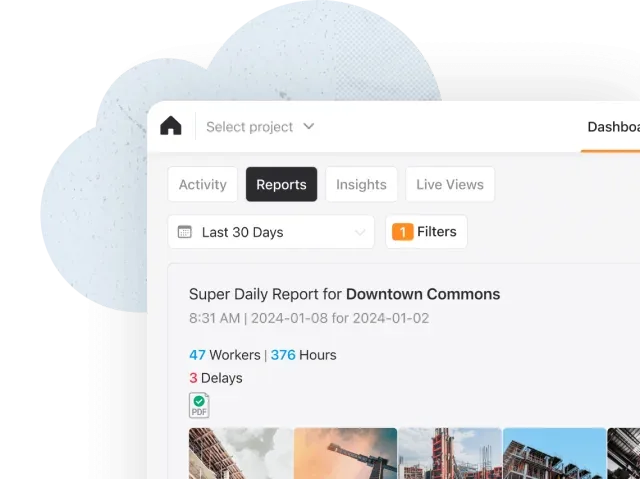
    Raken Reports dashboard with a super daily report, worker hours, delays and project photos

    Daily-report dashboard

    Source
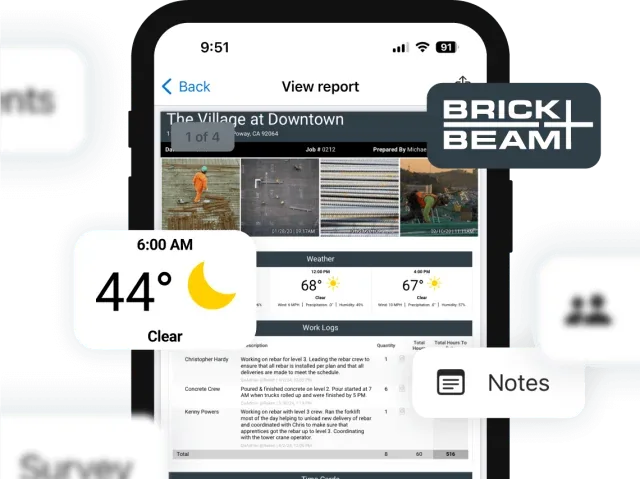
    Raken mobile daily-report preview with project photos, weather, work logs and notes

    Mobile daily-report preview

    Source
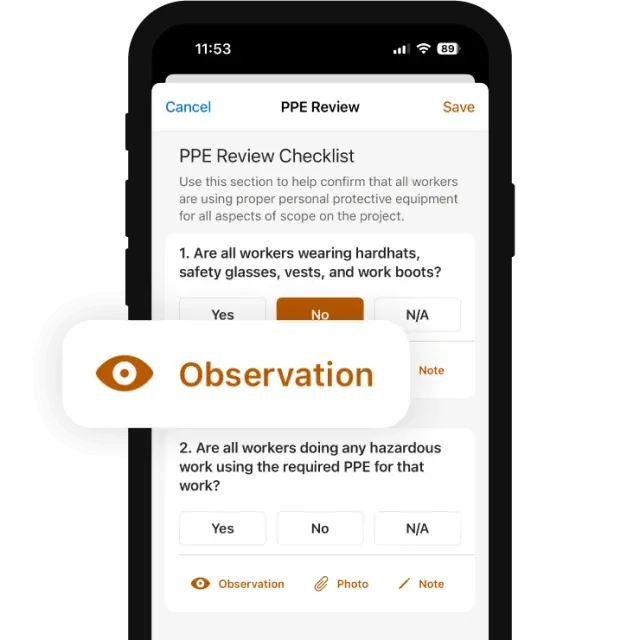
    Raken mobile PPE review checklist with observation, photo and note controls

    PPE review checklist

    Source

    Capabilities and scope

    Raken is construction field-management software with a web app for office users and iOS and Android apps for crews. Its help centre names two plans, Basic and Performance. Safety & QC is a section inside each project that holds checklists, toolbox talks, observations, incidents and insights dashboards. Daily reports, time tracking, production tracking, documents and RFIs, plus the Safety & QC section and OSHA ITA submission. Performance is required for the Procore, Autodesk Forma and InEight integrations and for OSHA ITA submission; the Time Clock is a paid add-on on all plans.

    Raken capabilities, evidence status and source links
    CapabilityEvidenceScope and source
    Daily field reportsDocumented by vendor

    Crews log notes, photos, weather, work logs and survey responses on mobile; signed daily reports are distributed to stakeholders and stored.

    What is Raken: plans, platforms and offline scope
    Safety checklistsDepends on scope

    Templates, scheduling, photos per item and a PDF on completion; Sign & Complete locks it. Help articles disagree on whether Basic includes library templates or all checklists need Performance.

    Completing checklists in the mobile appSafety & Quality Control overview and plan requirements
    Toolbox talksDepends on scope

    Topic library or custom topics, attendance and per-attendee signatures on one device or each worker's own, with attendance and compliance reports. The toolbox-talk article lists all plans; the overview lists Performance.

    Completing a toolbox talkSafety & Quality Control overview and plan requirements
    Observations with assigned follow-upDepends on scope

    Performance plan. Positive or negative type, priority, location, assignee, due date and photos; status moves Open, In Progress, Resolved, Closed, and assignees are notified by email.

    Creating and managing observations
    Incidents and OSHA ITA submissionDepends on scope

    Performance plan. Incident types include near miss, first aid and recordable injury, with contributing factors, corrective actions and timestamped edit history. OSHA 300 data is submitted to the ITA from the web app by an Account Administrator, one establishment per connection.

    Reporting and tracking incidentsOSHA ITA integration
    Offline mobile captureDocumented by vendor

    Offline daily reports, time cards, checklists, talks, observations and incidents for cached projects, on all plans.

    Working with Raken offlineOffline mode blog post (July 2024)Reporting and tracking incidents
    Project management integrationsDepends on scope

    Procore and Autodesk Forma receive daily reports, photos, checklists and toolbox talks; InEight receives reports and attachments. Requires Performance, an active third-party account and an Account Administrator.

    Project management integrations
    Single sign-onDepends on scope

    OpenID and SAML providers after an account review by Raken support; SSO covers login only and roles stay in Raken. Eligibility is confirmed with the account manager.

    Single sign-on
    Production tracking by cost codeDepends on scope

    Production Tracking combines cost codes, materials, equipment, worked hours, quantities and budget comparisons. Confirm the purchased tools and reconcile exported totals against the accounting or project-control system that remains authoritative.

    Production tracking, cost codes, materials and equipment — checked 28 September 2026
    Crew time cards and optional geofencingDepends on scope

    Performance supports individual or crew time cards split by cost code; the Time Clock add-on adds location rules that can flag or prevent off-site clock-ins and export violations. Supervisor-entered cards do not carry punch GPS evidence.

    Time cards for crews, cost codes and equipment — checked 28 September 2026Time-clock geofencing, violations and plan boundary — checked 28 September 2026

    Also watch for: Public prices cover Basic and Performance only; both plans are sold through sales or the in-app subscription screen, and the Time Clock add-on has no published price. Observations are project-level records and are not shared across projects. The web app does not work offline and the Time Clock needs a connection. Integration sync waits for daily reports to be signed; unsigned reports are not transferred.

    Raken pricing

    Per-user subscription (Basic and Performance plans)

    Entry price as recorded: $23 per user (Basic, $69 total per month, minimum 3 users, in USD billed annually).

    Pricing sources checked : Checked against the vendor's published pricing.

    The Raken pricing page has 2 published prices (unit, term, minimum and source), the entry cost worked out and 1 Construction Safety product priced in the same unit.

    See the full Raken price table →

    Mobile offline for cached projects; web app online only

    The mobile app works offline for cached projects (the five most recent by default, or chosen ones): daily reports, time cards, checklists, toolbox talks, observations and incidents sync on reconnection. The web app, the Time Clock and OSHA ITA submission need a connection. Help's Refresh cache clears stored offline data, so confirm what happens to unsynced entries.

    What we could not verify

    8 depend on scope

    Demo script

    Proposed demo: offline incident to an OSHA-ready record

    1. Cache a project, disconnect a phone and record a near miss and a recordable injury with photos.
    2. Reconnect and check both records, their attachments and their edit history on the web.
    3. Enter the establishment's submission settings and open the ITA submission review without sending, then correct one record and show how it would be resubmitted.

    Proposed demo: scheduled checklist through observation closure

    1. An administrator schedules a checklist from a custom template and assigns it to a crew member.
    2. The crew member completes it offline, signs it and logs a separate observation for a failed item with an assignee and due date.
    3. The assignee resolves the observation, a supervisor closes it, and the observation report is exported.

    Proposed demo: signed report reaching Procore

    1. An Account Administrator links a Raken project to a Procore or Autodesk project.
    2. A foreman signs a daily report and completes a toolbox talk with attendee signatures.
    3. Confirm each record arrives once in the connected Documents area and that an unsigned report is not sent.

    Ask the vendor to show you

    1. Put in writing which of checklists, toolbox talks, observations, incidents and custom templates our quoted plan includes, since your help articles state the Basic boundary differently.
    2. Complete a checklist and an incident on a phone with the project cached and no signal, then show the synced records, photos and signatures on the web.
    3. Show what Refresh cache does to entries that have not yet synced, and how a supervisor confirms nothing was lost.
    4. Walk through the OSHA ITA submission review screen for our establishment, and show how a corrected incident is resubmitted.
    5. Link a project to Procore or Autodesk and show a signed daily report, a checklist and a toolbox talk arriving once in Documents.

    Checks specific to this product

    Plan boundary for safety tools:
    Reconcile the Safety & QC overview with the checklist and toolbox-talk articles and write the agreed feature list into the order form.
    Use demo checklist

    Questions the sources answer

    Can crews complete safety records without signal?

    Yes, for cached projects: help documents offline checklists, toolbox talks, observations and incidents on mobile, syncing on reconnection. Only the five most recently active projects are cached unless users choose others.

    Can a signed checklist be corrected?

    Not on mobile: Sign & Complete locks the checklist, and help directs users to an administrator for errors in a submitted checklist. Drafts saved with Save as draft stay editable.

    Does Raken submit injury data to OSHA?

    Its OSHA ITA integration sends OSHA 300 log data for recordable cases from Raken incident records, using an ITA API token. It runs in the web app, needs Performance and an Account Administrator, and links one establishment per connection.

    Where is Raken data hosted?

    The system security page states AWS data centres in the US, with encryption at rest and in transit. The ISO 27001, PCI and SOC references on that page describe AWS's environment, not a Raken certification.

    Sources and change log

    15 sources, checked
    • : Added current Production Tracking and time-card boundaries, including the separate Time Clock geofencing add-on and the absence of GPS on supervisor-entered cards; the profile now reaches the directory's deep-evidence threshold.
    • : Replaced the mechanically assembled profile with a re-research of Raken's current help centre: offline scope now covers checklists, toolbox talks, observations and incidents; added OSHA ITA submission, SSO and hosting; recorded that the help articles state the Basic plan boundary differently.
    • Desk research dated 25 September 2026 against Raken's pricing page, help centre articles (updated 21 August 2026) and security page.

    Compare with

    Drawn from the profiles behind the Alternatives list above: most category tags shared with Raken first, then the closest overlap in documented capability names, then A to Z. Ratings, search demand and sponsorship are not used; rows are shown A to Z.

    • Assignar

      No shared category tag.

      Differs: price no verified amount (this profile: amount published); trial not established (this profile: free trial documented).

      Same: scope and offline.

    • Fieldwire by Hilti

      No shared category tag.

      Same: scope, offline, price and trial.

    Browse the category

    Reviews on qhsetech.com

    Star ratings and review counts from the old catalog are not shown: no source for them was recorded.