
    Safety Evolution

    Safety Evolution describes a single platform for field-based companies that replaces paper with a mobile app and a manager dashboard. The module pages describe a form builder with a template library, incident and near-miss reporting with an investigation tool, a learning management system with a training matrix, onboarding checklists and equipment inspections linked to work orders. Incident and asset data feed Power BI dashboards. Pricing is by quotation, and a free trial is offered.

    Evidence: Researched profile

    Built from vendor sources checked ; AI-assisted drafting. Documentation review, not a hands-on test. How pages are made

    Who is Safety Evolution for?

    Field-based companies, which the pages describe as contractors and teams in construction and other industrial sectors, that want forms, training records, incident follow-up and equipment inspections in one system. No amounts are published and the trial length differs between pages: the home, mobile app and trial pages state 30 days (the trial and mobile app pages say a card is required), while five module pages (forms, incident, learning, asset, onboarding) still say 60 days. Security certifications, hosting and an open API are not described.

    Watch for: How the listed contractor-portal connections work is not described.

    30-day trial, card required (trial page); five module pages say 60 days. Sources checked .

    Product tour

    Vendor visuals—not a QHSEtech hands-on test.

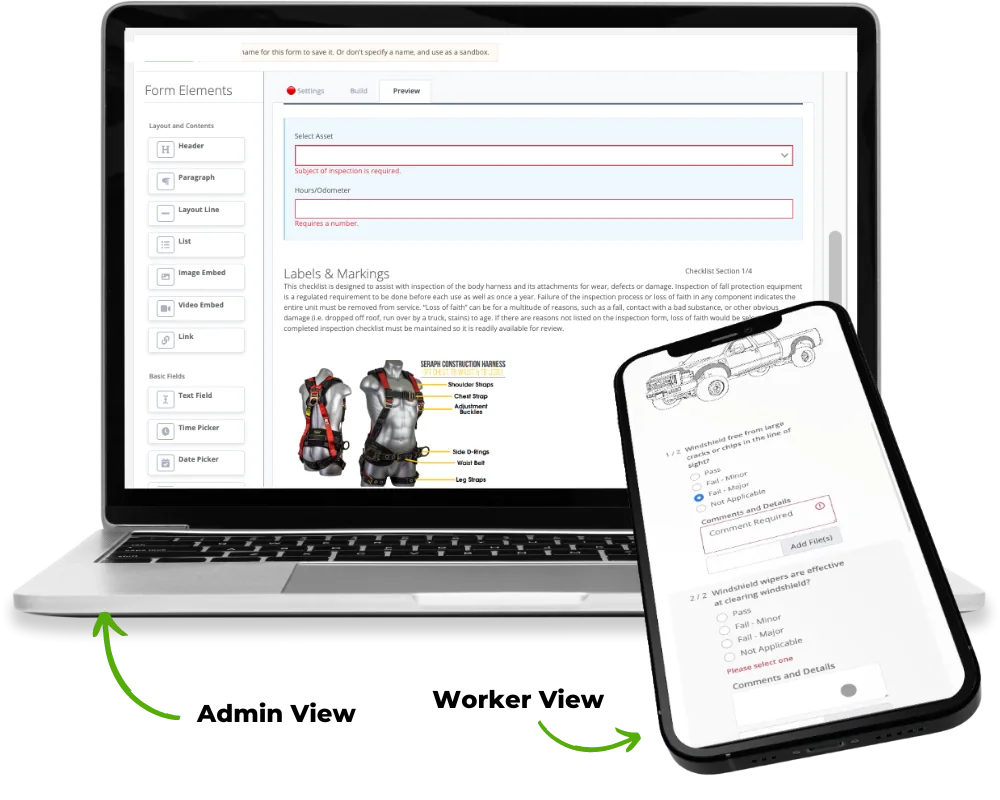
    Laptop with the form elements panel and a preview of an inspection checklist, plus a phone showing checklist questions

    Form designer (admin view) and mobile form (worker view)

    Source

    Capabilities and scope

    Safety Evolution is a safety management software vendor. A SourceForge listing gives Canada as its headquarters and 2016 as the founding year; the vendor pages reviewed state no headquarters, street address or ownership. The site also links to training courses and safety services, which this profile does not cover.

    Safety Evolution capabilities, evidence status and source links
    CapabilityEvidenceScope and source
    Mobile forms with offline useDocumented by vendor

    The mobile app page describes completing forms, inspections and incident reports on a phone or tablet, offline completion with automatic sync, attached media, and signatures with date and time stamps. Platform availability is not stated.

    Safety Evolution mobile safety app, checked 2 October 2026Safety Evolution home page, checked 2 October 2026
    Form builder and template libraryDocumented by vendor

    The forms page describes more than 20 form elements, repeatable sections, inspection and risk assessment elements and a library of 100 or more pre-built forms. Conditional logic is not described.

    Safety Evolution digital safety forms, checked 2 October 2026
    Corrective actions and work ordersDocumented by vendor

    The pages describe corrective actions triggered from forms, assigned to owners with due dates, and work orders created from reported deficiencies.

    Safety Evolution digital safety forms, checked 2 October 2026Safety Evolution mobile safety app, checked 2 October 2026Safety Evolution asset management, checked 2 October 2026
    Incident reporting and investigationDocumented by vendor

    The incident page describes reporting of incidents and near misses with guided questions, notification to managers, assignment of investigations, a root cause factor checklist and action items. Regulator submission formats are not described.

    Safety Evolution incident reporting and investigations, checked 2 October 2026
    Learning management and training matrixDocumented by vendor

    The LMS page describes an online course library, assignment and progress tracking, generated certificates that update the training matrix, and notifications 30 days before and on the day of expiry.

    Safety Evolution learning management system, checked 2 October 2026
    Onboarding and orientation trackingDocumented by vendor

    The onboarding page describes custom onboarding checklists and orientations that are assigned, tracked and stored, with certificates showing manager and employee signatures.

    Safety Evolution onboarding and orientation, checked 2 October 2026

    More capability notes

    5 additional areas. Status describes reviewed sources, not hands-on performance.

    Safety Evolution pricing

    Custom quotation based on active workers; no amounts published on the reviewed pages

    The get-a-quote page shows no amount and lists no plan names. It says pricing is custom-built around the operation, that customers pay only for active workers using the system, and that operations with 100 or more active users are automatically given a lower per-user rate. Its FAQ adds that some clients need setup or form configuration outlined in the quote, and that annual and monthly options are quoted. A free trial is described separately. Confirm the billing basis, minimums, fees, currency and renewal terms in writing.

    Separate pricing recheck date not recorded. Confirm current pricing with the vendor.

    Which product scope should the quote cover?

    Mobile safety forms, incident and near-miss investigation, learning management and training matrix, onboarding checklists, asset inspections and work orders, and analytics.

    Ask the vendor to identify the product, region, modules, billing unit, contract term and included services in writing.

    Offline work and integrations

    The mobile app page says forms can be completed offline in low-service areas and sync automatically when a connection returns. Conflict handling is not described.

    What we could not verify

    1 not verified · 2 depend on scope
    • Not verified in the sources: Security certifications, hosting and open API.
    • Depends on plan or configuration: SE-AI assistant; Procore, Avetta and ISNetworld connections.

    Demo script

    Proposed demo: field inspection to closed corrective action

    1. Build or edit a form from the template library and issue it to a worker on a phone.
    2. Complete it offline with a photo and signature, then reconnect and confirm the sync.
    3. Show the corrective action or work order created and assign an owner and due date.
    4. Raise a near miss, assign an investigation and record root cause factors.
    5. Open the manager dashboard and training matrix to show the resulting records.

    Ask the vendor to show you

    1. Which trial length applies, given pages state 30 and 60 days, and what happens to data afterwards?
    2. How is an active worker counted for billing, and what are the minimums and fees?
    Use demo checklist

    Sources

    10 sources, checked

    Reviews on qhsetech.com

    Star ratings and review counts from the old catalog are not shown: no source for them was recorded.