
    QHSEtech

    Workhub

    Workhub brings worker compliance records and routine safety administration into a common account. Teams can configure inspections against locations or equipment and follow up on deficiencies. It deserves consideration where a small budget matters, provided its connectivity model and administrator workload match the operation.

    Evidence: Researched profile

    Built from vendor sources checked ; AI-assisted drafting. Documentation review, not a hands-on test. How pages are made

    Who is Workhub for?

    Small and midsize teams coordinating worker training, safety inspections and incident records. Workhub is a worker-compliance and safety-administration platform, not a complete QMS. Acknowledgements and course completions do not prove comprehension or competence, certificate approval does not verify an external issuer, and contractor orientations are described as globally visible. Offline inspections use a blank-form handoff rather than automatic synchronization.

    Worth evaluating for budget-conscious teams with straightforward worker-safety administration. Include the labor required to transfer disconnected inspections into the system when comparing it with an offline-sync app.

    Watch for: Remote inspection workflow includes a later administrative handoff.

    Published price: USD 3/user/month, minimum 3 users. Sources checked .

    Product tour

    Vendor visuals—not a QHSEtech hands-on test.

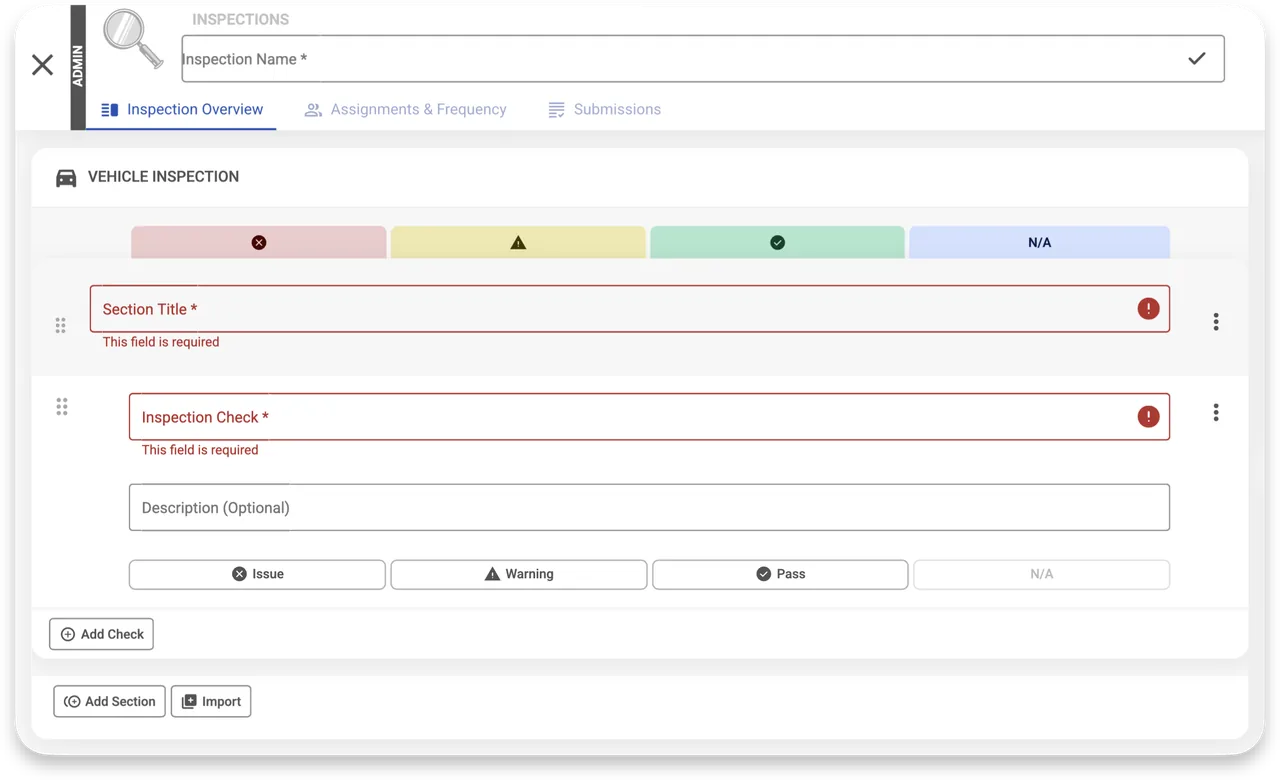
    Admin inspection editor with empty section and check fields, Issue, Warning, Pass and N/A options, and Add Check button.

    Inspection builder with check options

    Source
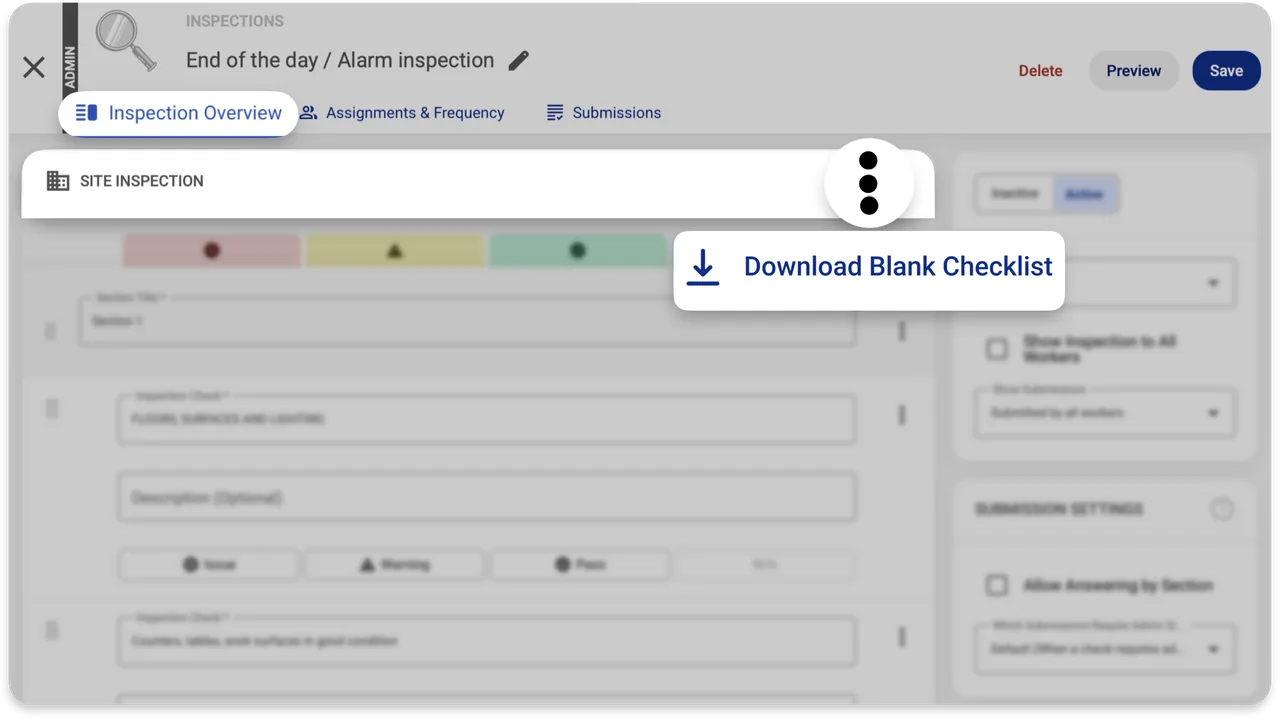
    Inspection editor with a menu option labelled Download Blank Checklist over a blurred site inspection checklist.

    Download Blank Checklist menu option

    Source
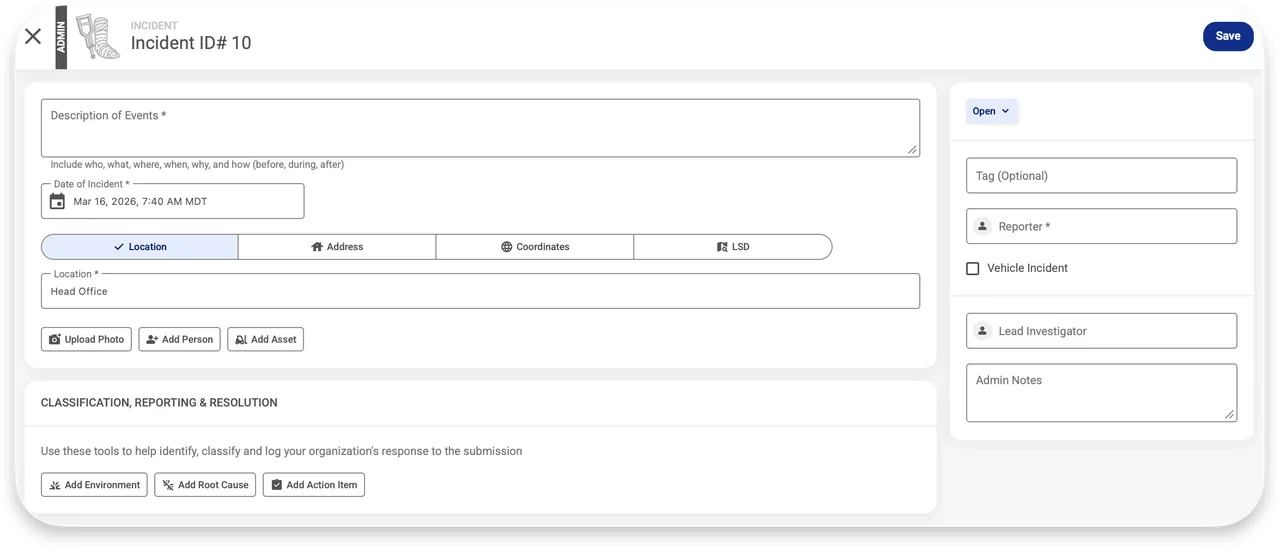
    Incident ID 10 form with description, date, location and reporter fields, Open status, and add environment, root cause, action item buttons.

    Incident record form for administrators

    Source

    Capabilities and scope

    Workhub is the safety and worker-compliance platform from Workhub Software Corp. Its WorkerID companion displays compliance credentials; that offline capability should not be confused with automatic offline inspection submission. Worker safety administration covering training, certificate records, policies, procedures, competency assessments, contractor orientations, incidents, inspections and action items, with plan-dependent permissions, exports and location controls.

    Workhub capabilities, evidence status and source links
    CapabilityEvidenceScope and source
    Quality-management boundaryNot verified

    The current portfolio documents safety policies and procedures, inspections, incidents, corrective actions, surveys and safety-audit preparation. It does not establish product or supplier nonconformance, a quality-specific CAPA process or a complete QMS, so Workhub is not admitted to the full-QHSE comparison on this evidence.

    Scheduled inspectionsDocumented by vendor

    Inspections can be assigned to assets or locations and reviewed by an administrator.

    Inspection assignment and review
    Deficiency follow-upDocumented by vendor

    Checks can require comments, photographs or actionable deficiencies. Workers can complete an assigned action, while an administrator must verify and sign it off; changes remain in the activity feed.

    Action-item completion and administrator verification
    Incident and hazard recordsDocumented by vendor

    Help documentation distinguishes incident, near-miss and hazard report types.

    Incident, near-miss and hazard records
    Disconnected inspection fallbackDepends on scope

    An administrator distributes a blank PDF for digital or paper completion, followed by later logging.

    Disconnected blank checklist instructions
    Offline credentialsDepends on scope

    WorkerID caches compliance information after opening online; logging out removes local access.

    WorkerID offline credential scope
    Automatic offline inspection synchronizationNot verified

    The reviewed instructions establish a PDF fallback, not an automatic mobile inspection queue.

    Online safety trainingDepends on scope

    Administrators can enable or create courses, assign them and configure lessons, quizzes, scores and expiry. Completion is not practical competence or an external qualification.

    Online-training assignment and course settingsTraining feature scope
    Certificate and qualification trackingDepends on scope

    Certificate types can be assigned with issue and expiry data, approval settings and uploads. Administrator approval is internal review, not issuer verification.

    Certificate types, expiry and submission controlsCertificate administration
    Policy versioning and acknowledgementsDepends on scope

    Policies can be authored, uploaded, organized, assigned and acknowledged. Acknowledgement does not establish comprehension.

    Policy authoring, assignment and compliance trackingCurrent feature portfolio and quality-management boundary — checked 28 September 2026
    Operating procedures with hazard contextDocumented by vendor

    Procedures may include steps, hazards, risk levels, controls and JHA information. This does not establish full engineering document-control approval.

    Operating procedures and job-hazard-analysis contentCurrent feature portfolio and quality-management boundary — checked 28 September 2026
    Competency assessmentsDepends on scope

    Workers can request assessment after prerequisites and authorized assessors rate criteria as Competent or Requires Supervision. Reliability depends on prerequisites, authorization and criteria quality.

    Competency assessment lifecycle

    More capability notes

    2 additional areas. Status describes reviewed sources, not hands-on performance.

    Also watch for: Advanced exports and access controls sit in the paid plan.

    Workhub pricing

    Free tier and per-user subscription

    Entry price as recorded: USD 3/user/month, minimum 3 users.

    Pricing sources checked : Checked against the vendor's published pricing.

    The Workhub pricing page has one published price (unit, term, minimum and source) and the entry cost worked out.

    See the full Workhub price table →

    Offline work and integrations

    Workhub documents downloading a blank checklist through an administrator, completing it digitally or on paper without connectivity, then logging the inspection afterward. WorkerID can separately cache compliance information after online preparation.

    What we could not verify

    2 not verified · 8 depend on scope · 1 note

    Demo script

    Demo exercise: safety inspection to closed deficiency

    1. Assign a checklist to one location and one asset.
    2. Have a worker record a defect with a photo.
    3. Ask an administrator to review and assign the follow-up.
    4. Verify the closed action and export available under the selected plan.

    Demo exercise: remote-site handoff

    1. Have an administrator distribute the current blank checklist.
    2. Complete it on the crew's actual device without connectivity.
    3. Restore connectivity and demonstrate every step needed to log the result.
    4. Compare the original evidence, timestamps and required data with the resulting record.

    Demo exercise: worker onboarding to verified competence

    1. Assign required training, certificate, policy, procedure and orientation through the intended position and location.
    2. Complete learning and acknowledgements, upload a certificate and have an administrator approve or reject it.
    3. Request a competency assessment, verify prerequisites, and have an authorized assessor rate every criterion.
    4. Inspect compliance and WorkerID views, confirming that acknowledgement or course completion is not presented as practical competence.

    Ask the vendor to show you

    1. How much later entry is needed after a disconnected inspection?
    2. Which Free-plan limitations affect our exports and permissions?
    3. How are active seasonal workers counted on the monthly invoice?
    4. Can contractor access be restricted to the correct location and records?
    Use demo checklist

    Questions the sources answer

    What can Workhub WorkerID do offline?

    It can display previously populated compliance information. This helps workers show credentials when disconnected. It is a different task from creating and synchronizing an inspection.

    Can Workhub handle hazards and near misses?

    Yes, the official help describes separate report types for hazards, near misses and incidents. Demonstrate visibility and follow-up with your actual worker roles. A report in the system does not by itself establish that corrective work is complete.

    Sources

    15 sources, checked

    Compare with

    Drawn from the profiles behind the Alternatives list above: most category tags shared with Workhub first, then the closest overlap in documented capability names, then A to Z. Ratings, search demand and sponsorship are not used; rows are shown A to Z.

    • 1Life

      Shared category tags: 2 (Incident Management, Safety Management).

      Differs: scope EHS Management (this profile: QHSE Management); trial free trial documented (this profile: not established).

      Same: offline and price.

    • Benchmark Gensuite

      Shared category tags: 2 (Incident Management, Audits & Inspections).

      Differs: scope EHS Management (this profile: QHSE Management); price no verified amount (this profile: amount published).

      Same: offline and trial.

    • SafetyAmp

      Shared category tags: 3 (Incident Management, Audits & Inspections, others).

      Differs: scope EHS Management (this profile: QHSE Management).

      Same: offline, price and trial.

    All Workhub alternatives

    Reviews on qhsetech.com

    Star ratings and review counts from the old catalog are not shown: no source for them was recorded.