
An office closure drill
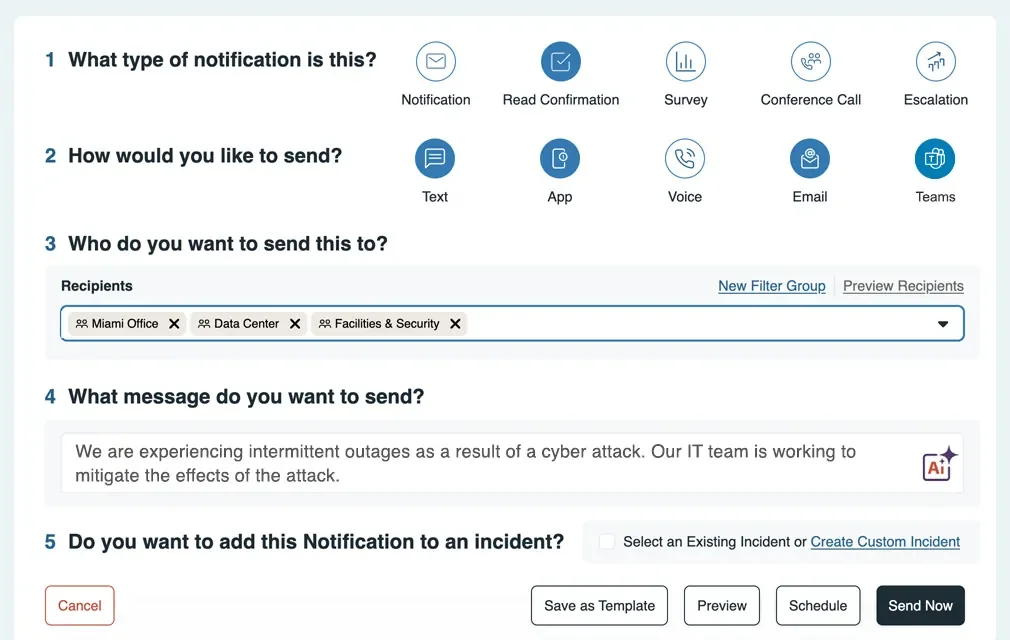
- Load an approved test roster and target the affected office.
- Send a prepared message, inspect response states and follow up on missing acknowledgements.
- Export the drill record and identify any manual reconciliation.
AlertMedia combines employee communications with incident response, travel-risk and lone-worker options. Mass Notification addresses targeting and responses; Incident Response adds plans and tasks; Travel Risk Management adds itinerary and traveler-risk workflows; Employee Safety Monitoring adds timed sessions, SOS and professional monitoring. Identify every solution used in the required sequence before comparing the quote.
AlertMedia price on record: Custom quote; selectable solutions · Amount on record not verified as current · Pricing checked · See pricing
Built from vendor sources checked ; AI-assisted drafting. Documentation review, not a hands-on test. How pages are made
Teams evaluating employee communications with a defined incident, traveler-safety or lone-worker response workflow. The platform can be purchased by solution. Confirm which workflows and integrations are included, how channel usage is charged and what happens when contact data or connectivity fails.
AlertMedia may be worth its quoted price when employee notification must continue into incident tasks, traveler protection or monitored lone-worker sessions and the proposal names every required solution. It is less suitable if the purchase depends on a single bundled price, an unproven disconnected incident workflow or live alarm transmission through unavailable coverage.
Watch for: Native app capability and mobile-responsive incident access need separate verification.
Sources checked .
Vendor visuals—not a QHSEtech hands-on test.
AlertMedia presents a platform of selectable solutions. This profile covers Mass Notification, Incident Response, Travel Risk Management and Employee Safety Monitoring where specifically sourced; threat intelligence and social intelligence still require their own scope confirmation.
| Capability | Evidence | Scope and source |
|---|---|---|
| Targeting and response tracking | Documented by vendor | Mass Notification describes audience selection and response visibility; test the states supported by each channel. Mass notification, integrations and access controls |
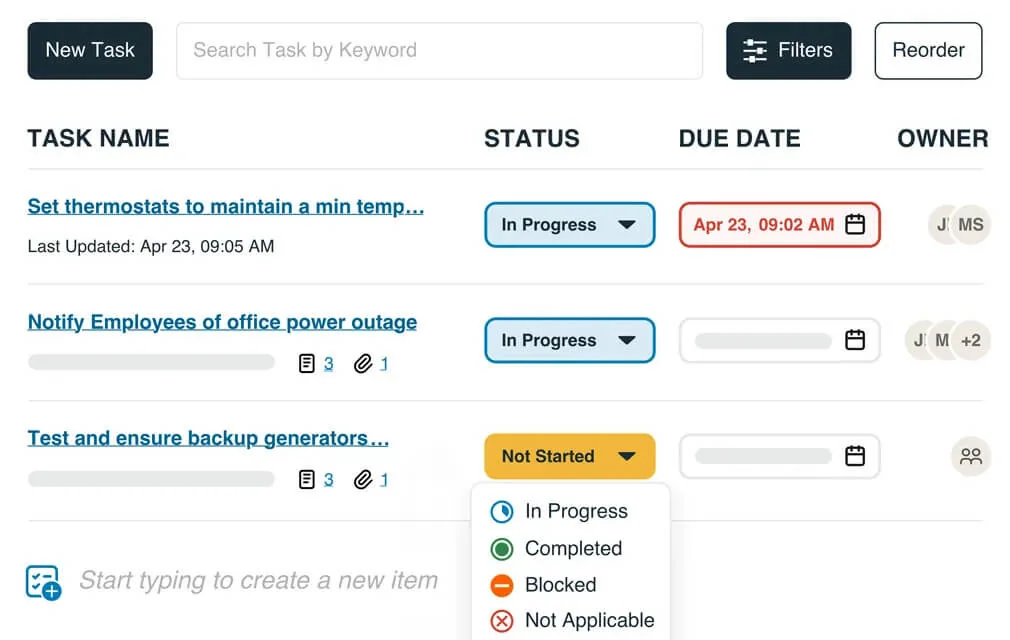
| Plans and assigned response tasks | Depends on scope | Documented for Incident Response. Confirm that this solution is included in the proposed purchase. Incident Response tasks, reporting and mobile scope |
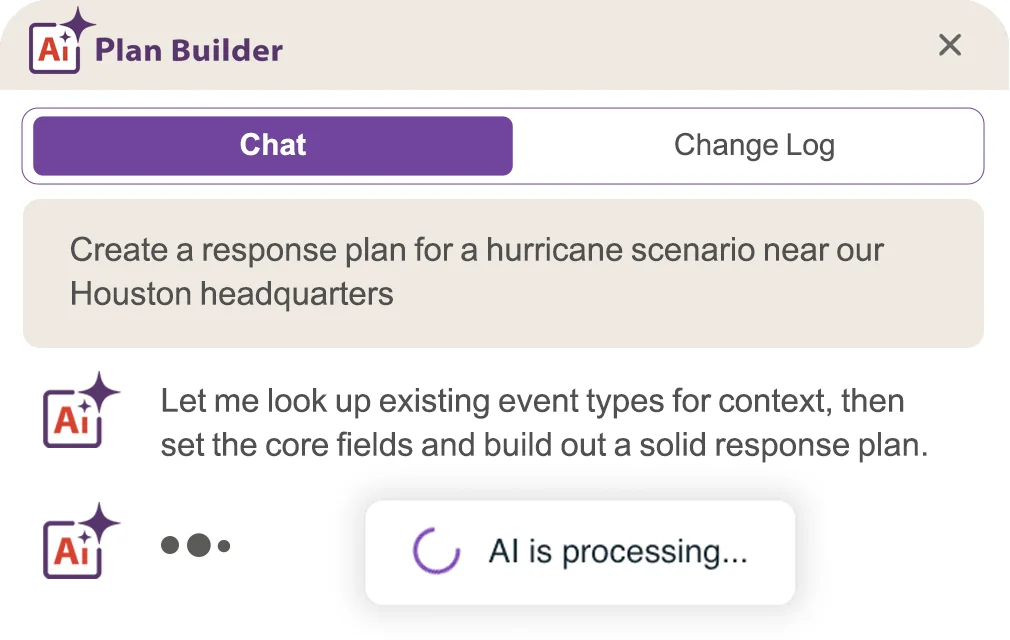
| AI-assisted response-plan drafting and importing | Depends on scope | Incident Response lists an AI Plan Builder and an importer that maps an uploaded plan into a template draft. Treat the result as a draft: require an authorized plan owner to verify roles, contacts, instructions and approvals before activation. Incident Response tasks, reporting and mobile scope |
| HR and identity integration | Depends on scope | Employee-safety materials name Workday, Oracle PeopleSoft, ADP, Ceridian, Azure Active Directory and Okta. Those names do not establish connector entitlement, transferred fields, direction, lifecycle behavior or the boundary between contact sync and account access; verify each requirement. Employee Safety Monitoring sessions, SOS, connectivity and monitoringEmployee safety and named HR or identity integrations |
| Disconnected incident workflow | Not verified | Not established by this review. Mobile-responsive access and a native app are different delivery surfaces. |
| Multilingual message creation | Documented by vendor | Mass Notification lists automatic translation and permission-controlled templates. Language coverage and approval behavior should be demonstrated for your workforce. Mass notification, integrations and access controls |
| Custom map data and saved geofences | Depends on scope | Visual Intelligence accepts KML, CSV, KML URLs and public Feature Service URLs. Specific premium map layers can cost extra; confirm entitlement. Visual Intelligence imports, shared views and premium layer boundaries |
| Shared mapping workspaces | Documented by vendor | Visual Intelligence describes saved and shared views with layers and filters. The vendor recommends only five or six active layers for usability, not as a library storage limit. Visual Intelligence imports, shared views and premium layer boundaries |
| Traveler itinerary import and risk alerts | Depends on scope | Travel Risk Management imports trip data through named travel-management integrations, API connections or booking-email parsing, then links destinations and travelers to localized risk alerts. Confirm the purchased solution and data sources. Travel Risk Management itineraries, briefs, alerts and integrations |
| Pre-trip briefs and traveler assistance button | Depends on scope | Travel Risk Management lists customizable briefs for 300 countries and cities and a mobile assistance button that connects to a configured internal support line or travel-assistance provider. Travel Risk Management itineraries, briefs, alerts and integrations |
| Lone-worker timed sessions and SOS | Depends on scope | Employee Safety Monitoring lists locked-phone panic activation, tether pull, timed sessions, 20-second GPS updates during use, custom escalation and a 24/7 monitoring centre. It is a selectable solution, not established as part of Mass Notification. Employee Safety Monitoring sessions, SOS, connectivity and monitoring |
| Offline lone-worker session countdown | Depends on scope | The active countdown continues without cell service and data syncs after reconnection. The vendor says assistance is deployed to the last known location; this does not establish real-time alarm transmission while disconnected. Employee Safety Monitoring sessions, SOS, connectivity and monitoring |
Also watch for: Delivery outcomes and synchronization behavior require your own controlled test.
Custom quote; selectable solutions
AlertMedia states that pricing is customized and solutions can be purchased individually or as a platform. It says there are no setup fees and lists onboarding guidance and training among included services. The previously listed $1.50/user/month is not substantiated by this source and is not presented as a current offer. Request solution scope, contacts, channel usage, integrations, support and renewal terms in the quote.
Pricing sources checked : Selected sources checked; no starting price recorded. Rechecked custom pricing, selectable solutions, no setup fees, included implementation guidance, mobile-responsive Incident Response, Travel Risk Management and Employee Safety Monitoring. No numeric subscription price, self-service trial or offline administration of the wider platform was established.
AlertMedia Mass Notification, Incident Response, Travel Risk Management and Employee Safety Monitoring, each selected explicitly in the proposal.
Ask the vendor to identify the product, region, modules, billing unit, contract term and included services in writing.
Employee Safety Monitoring separately states that an active timed-session countdown continues without cell service and syncs data after service returns; that is not live alarm transmission while disconnected, and the monitoring team acts from the last known location. Test each purchased solution and failure case separately.
The pricing page says individual solutions can be selected. List Mass Notification, Incident Response and any other required solutions explicitly in the proposal.
Automatic translation is documented for Mass Notification. Ask a fluent reviewer to check your safety terminology, recipient language selection and the final message on each required channel before approving a template.
Visual Intelligence lists KML and CSV uploads plus supported URL-based layers. Bring a representative file to the demo and check coordinate handling, update ownership and which requested layers incur additional charges.
No. A map view is only as useful as its underlying location data. Ask the vendor to distinguish stored site assignments from device-derived locations, show timestamps and permissions, and explain what happens when a worker cannot share location.
The current Travel Risk Management page names SAP Concur, Egencia, Navan, BCD Travel, American Express Global Business Travel, Fox World Travel, Corporate Travel Management, CWT and Traxo, and also describes API and booking-email imports. Confirm the exact connector, fields, update interval and entitlement for your source.
Not from an itinerary alone. AlertMedia describes itinerary data and mobile location updates as different sources. Require timestamps and source labels, test a stale or disabled mobile location, and document access, consent and retention before rollout.
The vendor says an active countdown continues offline and syncs when service returns; it does not say a live alarm is transmitted through an unavailable network. Its FAQ says the monitoring team deploys assistance to the last known location after the data returns. Test the precise coverage-loss sequence under an authorized exercise.
Do not assume so. AlertMedia states that solutions can be selected individually. Name Travel Risk Management, Employee Safety Monitoring, Mass Notification and Incident Response separately wherever your workflow needs them.
Drawn from the profiles behind the Alternatives list above: most category tags shared with AlertMedia first, then the closest overlap in documented capability names, then A to Z. Ratings, search demand and sponsorship are not used; rows are shown A to Z.
Shared category tags: 4 (Emergency Response, Mass Notification, others).
Differs: price amount published (this profile: no verified amount); trial on request (this profile: not established).
Same: scope and offline.
Side by side: AlertMedia and EverbridgeNo shared category tag.
Differs: price amount published (this profile: no verified amount).
Same: scope, offline and trial.
Side by side: AlertMedia and OmnilertNo shared category tag.
Differs: offline partial workflow (this profile: unclassified).
Same: scope, price and trial.
This site does not currently collect reader reviews. Star ratings and review counts from the old catalog are not shown: no source for them was recorded.