
    QHSEtech

    D4H

    D4H is built for teams that respond to emergencies, from fire, rescue and hazmat units to industrial emergency response and corporate crisis teams. Incident Management runs a shared channel per incident, pre-configured by plays; the Team Manager modules keep responder qualifications and equipment ready between incidents. Evaluate the modules you need together with the mandatory cloud plan.

    Evidence: Researched profile

    Built from vendor sources checked ; AI-assisted drafting. Documentation review, not a hands-on test. How pages are made

    Who is D4H for?

    Emergency response and crisis teams that need live incident coordination, responder qualifications and equipment readiness from one vendor's modules. Offline use is limited to Incident Management channels that were already synchronized and is recommended only for intermittent outages. Every module price carries a mandatory cloud plan of 25% of the annual subscription.

    Worth evaluating for response organisations that coordinate live incidents and must also prove responder qualifications and equipment readiness, because D4H prices each of those as a module that can be added later. Less suited to a site that mainly needs a general EHS incident-management system, or to crews that work for long periods without connectivity.

    Published price: USD 5,300/year for Incident Management Basic, plus required cloud plan. Sources checked .

    Product tour

    Vendor visuals—not a QHSEtech hands-on test.

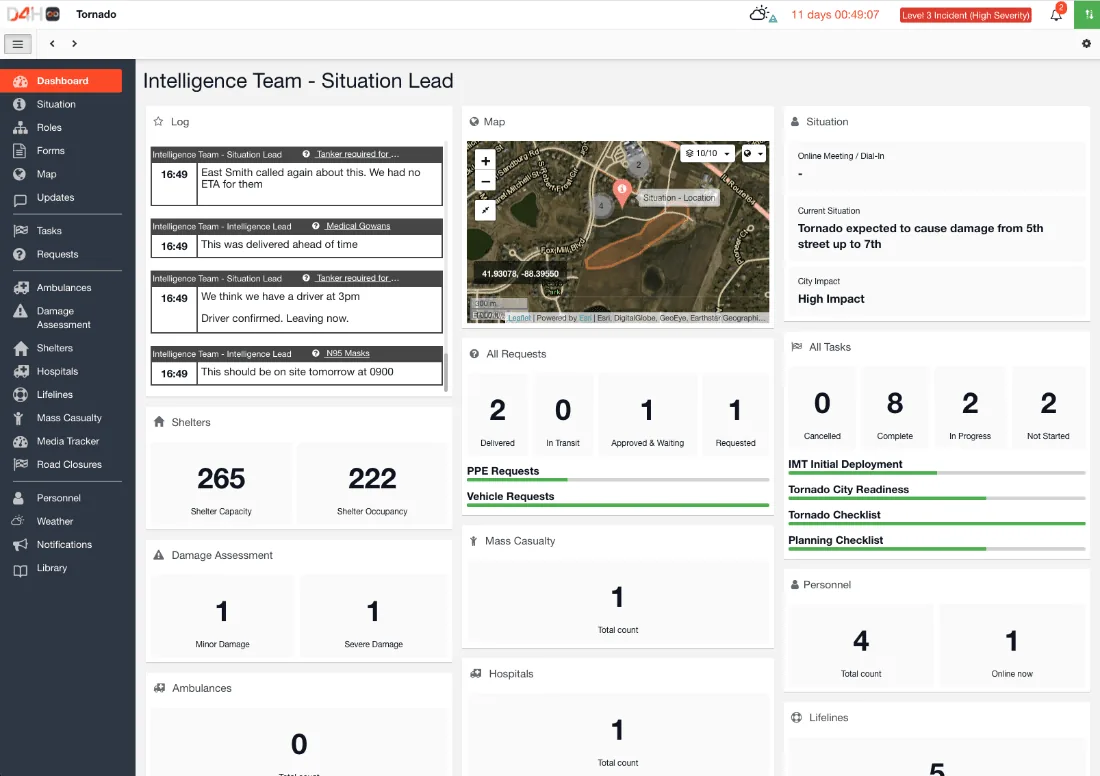
    Dashboard titled Intelligence Team - Situation Lead with a log, map, situation, requests, task and shelter counters and a left menu.

    Incident Management dashboard, tornado scenario

    Source

    Capabilities and scope

    D4H has been an EcoOnline business since the acquisition announced on 24 June 2025. It sells five modules: Incident Management on the Operations Center platform; Personnel & Training, Equipment Management and Incident Reporting on the Team Manager platform; and Alerting as a separate product. Every subscription also requires a cloud plan. Incident channels with plays, task and status boards, logs, maps and forms; multichannel alerting; responder qualifications, exercises and attendance; equipment inspections and repairs; incident reporting with health & safety reports and corrective-action tasks. Buying one module does not include the others or EcoOnline's wider EHS suite.

    D4H capabilities, evidence status and source links
    CapabilityEvidenceScope and source
    Incident channels and playsDocumented by vendor

    Plays switch on task boards, status boards, weather, forms and pre-loaded collections when a channel starts for a given incident type; a blank play is also available.

    Plays overview
    Mobile incident participationDocumented by vendor

    The app covers situation updates, role assignment, forms, logs with images and video, and task and status boards; changes appear on other platforms while the device is connected.

    Incident Management app overview
    Offline channel updatesDepends on scope

    Synchronized channels can be read and updated offline; first access must be online.

    Offline capability
    Alert delivery reportingDepends on scope

    Individual responses, an audit log and an exportable delivery report with message statuses and credits; reports need the Advanced or Professional tier, and the Delivery Report is web-only.

    Reviewing alert responsesUS pricing, modules and cloud plans
    Responder qualification expectationsDocumented by vendor

    Qualifications can be required per group, member or member status; qualifications set at organisation level apply to linked team accounts.

    Setting qualification expectations
    Equipment inspection and repairDocumented by vendor

    A failed step fails the inspection, repairs can be logged per step, and overdue items can turn Unserviceable; after one day only an Account Owner can change an inspection.

    Completing an equipment inspection
    Health & safety corrective actionsDepends on scope

    Injury and near-miss reports create corrective-action tasks tracked to completion; confirm which Team Manager module the quote includes.

    Health & safety reports overviewCompleting health & safety corrective actions
    APIs and webhooksDepends on scope

    Team Manager API v3 uses per-member tokens once the Owner enables access; Operations Center has a separate v1 API, and webhooks are listed with Professional Cloud.

    API quick startUS pricing, modules and cloud plans
    Training exercises, invitations and attendance analysisDepends on scope

    The separate Personnel & Training module schedules pre-planned exercises, requests member attendance and collects responses in real time. Exercise records can be compared with Incident Reporting entries by resources, tags and attendance; confirm both modules are in the quote.

    Training exercise scheduling, attendance and incident comparison — checked 28 September 2026
    Mobile equipment location and stock movementDepends on scope

    The separate Equipment Management mobile app can find or scan an item by barcode, QR code or RFID, move reusable items or selected quantities of disposable supplies to configured locations, and scan a destination. Locations must first be created on the web; the mobile app cannot move items between team accounts or issue an item to a member.

    Mobile equipment movement by barcode, QR or RFID — checked 28 September 2026

    Also watch for: The 25% cloud plan applies on top of every module subscription. Alert delivery reports are limited to the Advanced and Professional Alerting tiers. Operations Center is cloud-hosted only, with no local-server option. Several Alerting features are listed as coming in 2026.

    D4H pricing

    Published indicative annual module prices plus a mandatory cloud plan

    Entry price as recorded: USD 5,300/year for Incident Management Basic, plus required cloud plan.

    Pricing sources checked : Checked against the vendor's published pricing.

    The D4H pricing page has 15 published prices (unit, term, minimum and source).

    See the full D4H price table →

    Offline updates to synchronized incident channels only

    Incident Management channels already synchronized stay usable offline, and changes appear for everyone on reconnection. A channel must be started and first opened online; clearing the cache, logging out or re-syncing offline loses offline data, and template changes by others can corrupt it. Help recommends offline mode only for intermittent connections.

    What we could not verify

    6 depend on scope · 1 note

    Demo script

    Proposed demo: play-driven incident with a disconnected laptop

    1. Start a channel from a play that switches on a task board and a status board, and open it on two devices.
    2. Disconnect one device, update a task and a status-board row on both, then reconnect.
    3. Review the Log for both changes, then repeat after an administrator edits the template while one device is offline.

    Proposed demo: failed equipment inspection back to operational

    1. Scan an item and fail one inspection step with a note and an attachment.
    2. Add a repair from that step and set the item to Unserviceable.
    3. Complete the repair, pass a re-inspection and export the item's history, including who changed what.

    Proposed demo: alert to accounted-for responders

    1. Send an alert with two response options to a test group by SMS, push and email.
    2. Stop accepting responses and open the Result and Delivery Report tabs.
    3. Compare the responses with the on-call group, which the pricing page says requires Personnel & Training.

    Ask the vendor to show you

    1. Open a channel online, take one laptop offline, edit the same task-board row on both devices, reconnect and show which value wins and where the Log keeps the other.
    2. Fail one step of an equipment inspection, raise a repair and show the item's status; then show who can amend that inspection two days later.
    3. Send a test alert to a small group over SMS, voice and push on the Alerting tier we would buy, and show the delivery report and credits used.
    4. Set a qualification expectation for a group, let one member's certificate lapse and show how the gap appears before the next incident.
    5. Price our exact module set with the recommended cloud tier, and confirm whether the USD 4,500 and USD 12,000 cloud figures are minimum charges.

    Checks specific to this product

    Module and cloud-plan total:
    Price the exact modules and tiers with the cloud plan, and check user, concurrent-incident, personnel and location limits against the team.
    Use demo checklist

    Questions the sources answer

    Is D4H part of EcoOnline?

    Yes. EcoOnline announced the acquisition on 24 June 2025. D4H modules are still priced on their own page, which also advertises D4H + EcoOnline bundles; confirm what a bundle includes.

    Can Incident Management be hosted on our own server?

    No. D4H's offline-capability article states that Operations Center is a cloud-hosted service.

    Who can change a completed equipment inspection?

    Users with Owner, Editor or Member access and Equipment Basic can complete inspections. Once an inspection is more than one day old, only an Account Owner can change it, including adding attachments.

    Does D4H track corrective actions after an injury or near miss?

    Health & safety reports create corrective-action tasks listed under HS-Injury or HS-Near Miss headers in Logistics > Tasks. When all are completed, a green check appears on the report.

    Is the D4H API complete?

    Team Manager has API v3 with per-member tokens, and D4H asks customers to request Incident Management features they want added to it. Operations Center has its own v1 API documentation.

    Which Alerting features are still to come?

    The pricing page marks shared responses, the integrations API, file attachments, Microsoft Teams alerts, incident management triggers, confidential mode and automatic system tests as coming in 2026.

    Sources and change log

    15 sources, checked
    • : Replaced the mechanically assembled profile with a re-research of D4H's US price page and help centre: module tiers, the cloud-plan rule and tiers, plays, alert reporting limits, qualifications, corrective actions and the inspection amendment rule.
    • Desk research dated 25 September 2026 against D4H's US price page, help centre and acquisition announcement.

    Compare with

    Drawn from the profiles behind the Alternatives list above: most category tags shared with D4H first, then the closest overlap in documented capability names, then A to Z. Ratings, search demand and sponsorship are not used; rows are shown A to Z.

    • AED Log

      No shared category tag.

      Differs: offline unclassified (this profile: partial workflow).

      Same: scope, price and trial.

    • Omnilert

      Shared category tags: 1 (Emergency Management).

      Differs: offline unclassified (this profile: partial workflow).

      Same: scope, price and trial.

    • Rave Mobile Safety

      Shared category tags: 1 (Emergency Management).

      Differs: price no verified amount (this profile: amount published).

      Same: scope, offline and trial.

    All D4H alternatives

    Reviews on qhsetech.com

    Star ratings and review counts from the old catalog are not shown: no source for them was recorded.