
    QHSEtech

    FoodDocs

    FoodDocs turns a HACCP plan into scheduled monitoring checks that staff complete in an app, with corrective actions and a desktop-only supervisor verification step. Central kitchens on the Professional plan can link ingredient lots to prepared batches and dispatch records for a mock recall. Evaluate the plan tier together with the workflow: the app, the HACCP builder and traceability sit on different plans.

    Evidence: Researched profile

    Built from vendor sources checked ; AI-assisted drafting. Documentation review, not a hands-on test. How pages are made

    Who is FoodDocs for?

    Multi-site foodservice, food-to-go and care-home kitchens replacing paper HACCP logs, and central kitchens that need batch traceability for recalls. Verification and back-dated entries are desktop-only, back-dated entries can hide their actual entry time if an administrator enables that setting, and traceability needs the Professional plan. Offline use of the app is not documented. Generated HACCP content still needs competent review for the operation.

    Worth evaluating for multi-site kitchens that want HACCP monitoring on phones at a published per-site price, and for central kitchens that need batch recall on the Professional plan. Less suitable where supervisors must verify records on mobile, where devices work without a connection, or where the need is broader occupational or environmental EHS.

    Published price: €79/site/month billed annually (Lite, desktop monitoring only; excl. VAT; confirm invoice currency). Free trial documented. Sources checked .

    Product tour

    Vendor visuals—not a QHSEtech hands-on test.

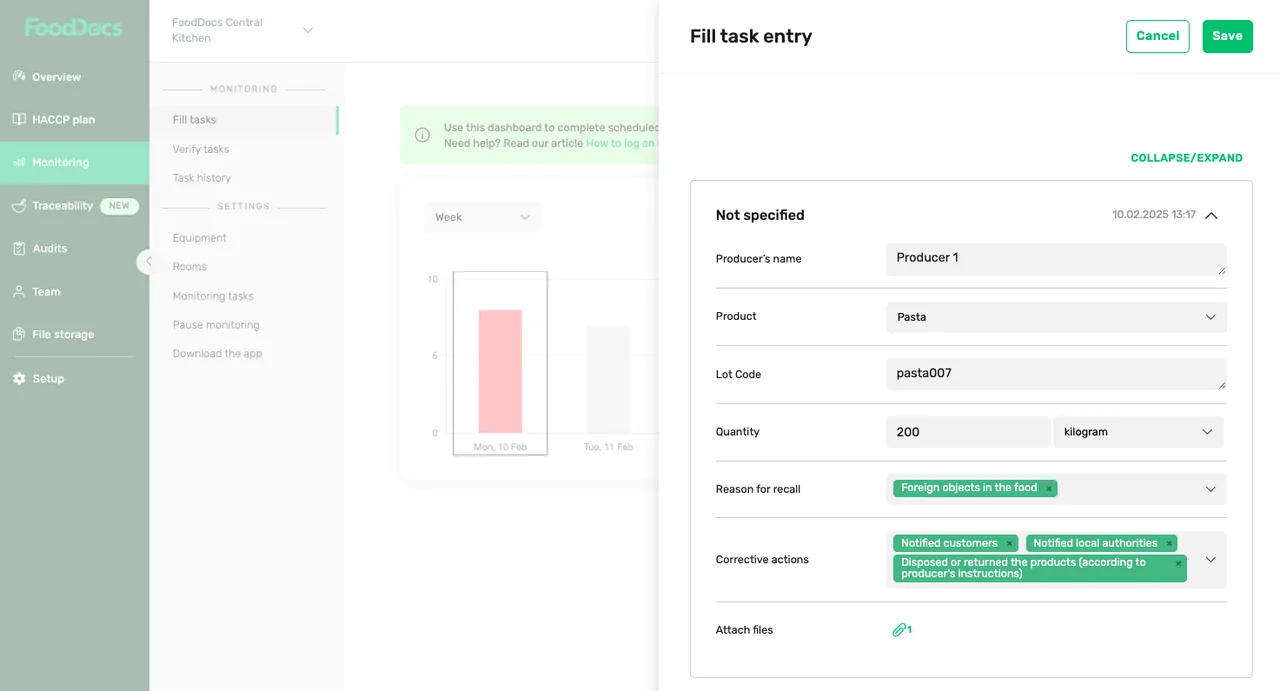
    Fill task entry form with producer, product, lot code, quantity, reason for recall, corrective actions and attached file fields

    FoodDocs recall entry form

    Source
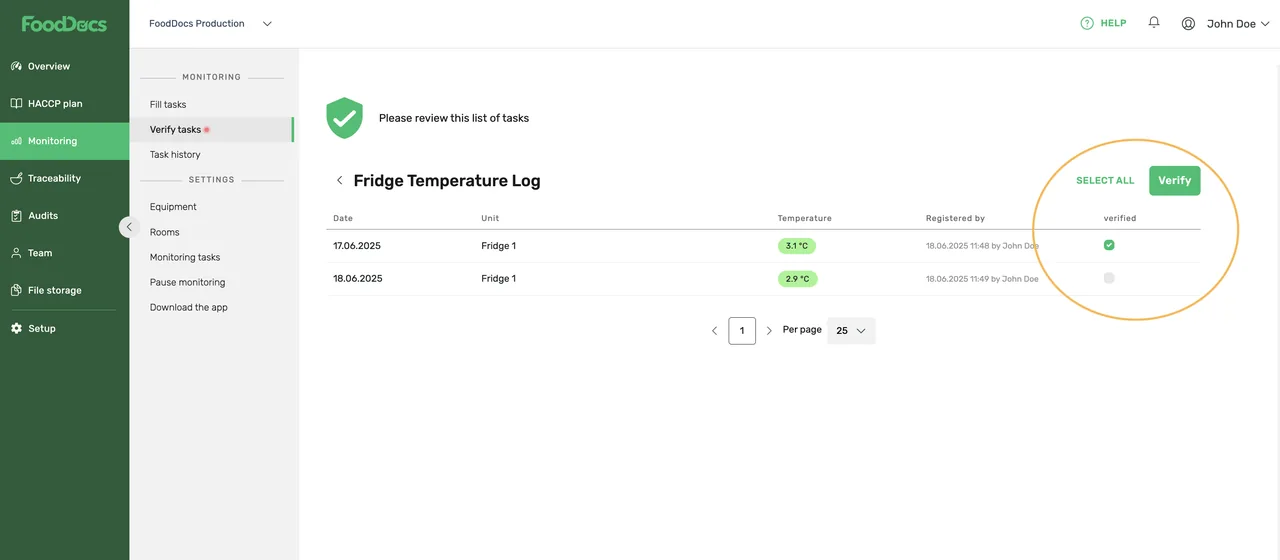
    Desktop Verify tasks list for a Fridge Temperature Log with two entries, Select all and Verify buttons and a verified column

    FoodDocs verify tasks screen

    Source

    Capabilities and scope

    FoodDocs is a HACCP-based food safety system for restaurant groups, food-to-go retail, healthcare foodservice (hospitals and care homes) and central kitchens. It combines a desktop dashboard, a monitoring app, a HACCP plan builder and, on the Professional plan, batch traceability. Healthcare here means food operations, not patient safety or occupational EHS. Monitoring (Lite and above), the HACCP plan builder and monitoring app (Standard and above), and traceability with batch-based monitoring (Professional and Enterprise). Sensor readings arrive through an API or emailed CSV; integration partners are listed for North America and Europe. Occupational safety, environmental management and supplier approval beyond receiving logs are outside the documented scope.

    FoodDocs capabilities, evidence status and source links
    CapabilityEvidenceScope and source
    Scheduled monitoring checks with instructionsDocumented by vendor

    Checklists, temperature logs and cleaning schedules with photo or video instructions and app notifications; the app starts on Standard, Lite is desktop only.

    HACCP monitoring appPricing and plans
    Supervisor verification of entriesDepends on scope

    An assigned verifier verifies entries singly or in bulk; verified entries are locked and show who verified them and when. Verification works only on desktop.

    Help: activate verificationHelp: verify monitoring tasks
    Back-dated monitoring entriesDepends on scope

    Desktop only. A past entry is stamped with the actual entry time, but a company setting can hide that stamp.

    Help: past entries
    HACCP plan builderDepends on scope

    Generates editable hazard analysis, CCPs, flow chart, SOPs and PRPs from Standard; download and printing need at least an annual payment. The plan still needs competent review.

    HACCP plan builderHelp: free trial
    Batch traceability and mock recallDepends on scope

    Links receiving, recipe-batch and dispatch logs, with .xlsx export for a recall search; Professional or Enterprise only.

    Help: product recallFood traceability
    Sensor measurementsDepends on scope

    Readings arrive through a documented REST endpoint or CSV email from partners such as ConnectedFresh, Thinnect and SmartSense; the help centre and pricing page disagree on which plan includes sensors.

    Help: sensorsIntegration partnersHelp: choosing a planPricing and plans
    Inspector accessDocumented by vendor

    Inspectors can be invited with read-only access to task history and downloads, and the HACCP plan can be shared with an expiry date.

    Help: inspector accessHelp: share the HACCP plan
    Offline monitoring in the appNot verified

    Not documented in the reviewed product pages or help centre.

    Team roles and task-level accessDocumented by vendor

    Team members can be assigned roles and either administrator or monitoring access; the vendor states that assigned roles determine which daily tasks each person sees. Test multi-site access, temporary workers and deactivated accounts before rollout.

    Team roles, access levels and assigned daily tasks — checked 28 September 2026
    Training certificates and expiry follow-upDocumented by vendor

    The Team module stores required training or certificate records, assigns a responsible role and frequency, calculates expiry from the issue date and sends expiry notifications. It records evidence; it does not itself establish competence or legal sufficiency.

    Training certificate requirements and expiry reminders — checked 28 September 2026Training certificate evidence and calculated expiry dates — checked 28 September 2026

    Also watch for: Verification and back-dated entries cannot be done in the app. Traceability and recall search need the Professional plan.

    FoodDocs pricing

    Per site per month, unlimited users; Enterprise quote only

    Entry price as recorded: €79/site/month billed annually (Lite, desktop monitoring only; excl. VAT; confirm invoice currency).

    Pricing sources checked : Checked against the vendor's published pricing.

    The FoodDocs pricing page has 6 published prices (unit, term, minimum and source) and annual against monthly billing.

    See the full FoodDocs price table →

    Offline not documented

    Not documented: the app, pricing and help pages reviewed on 25 September 2026 describe cloud storage, and no knowledge-base article covers disconnected use. Test a disconnected phone completing a temperature check with a photo, then reconnect and check the record.

    What we could not verify

    1 not verified · 5 depend on scope · 1 note

    Demo script

    Proposed demo: failed fridge check to verified record

    1. Configure a fridge temperature check with a photo instruction and switch on verification for a supervisor.
    2. On the app, enter an out-of-range reading and record the prompted corrective action.
    3. Log in on desktop as the supervisor, verify the entry and confirm it can no longer be edited.
    4. Try the same verification on a tablet and record what the supervisor can and cannot do.

    Proposed demo: back-dated entry an inspector can trust

    1. On desktop, add a missed check for the previous day.
    2. Open it in task history with the actual-entry-time stamp visible.
    3. Switch on 'Hide actual time of entry' and review how the same record now appears to a read-only inspector account.
    4. Agree who may change that setting.

    Proposed demo: ingredient recall in a central kitchen

    1. Record a delivery in the receiving log, two prepared batches and their dispatch logs.
    2. Search the ingredient batch in traceability and export the .xlsx.
    3. Reconcile received, used, in-stock and dispatched quantities as the help procedure describes.
    4. Record the recall as an unscheduled entry and time the exercise.

    Ask the vendor to show you

    1. Our supervisors work on tablets: show how they verify entries when verification is desktop-only, and what the verified badge records.
    2. If a manager back-dates a missed fridge check, how does an inspector see the real entry time, and who can switch on the setting that hides it?
    3. Run the documented ingredient recall on our data: receiving log, batch search, .xlsx export and dispatch list. Where must staff reconcile quantities by hand?
    4. Which plan includes the sensor API for our devices, how often do readings arrive, and what happens to a scheduled check when a sensor stops sending?
    5. Quote Standard versus Professional for our sites in writing, with the onboarding fee each plan carries, the invoice currency and VAT.

    Checks specific to this product

    Plan boundary:
    Map each workflow to a plan: desktop monitoring (Lite), app and HACCP builder (Standard), traceability and recall (Professional). Price the plan the workflow actually needs, per site.
    Use demo checklist

    Questions the sources answer

    Can supervisors verify checks on a phone?

    No. The help centre states that verification can be activated and performed only on the desktop version. Verified entries are locked and show the verifier and time.

    Can missed checks be entered later?

    Yes, on desktop only. The record carries the actual entry time unless an administrator enables 'Hide actual time of entry', so agree who controls that setting.

    How do sensors connect?

    Readings are posted to a FoodDocs API endpoint with a company token, or emailed as CSV. ConnectedFresh, Thinnect and SmartSense are listed partners; confirm which plan includes sensors.

    Is there a free trial?

    Yes. The help centre describes one 14-day trial of the paid plans per account, no card required, with a one-time extension on request. Unpaid accounts are frozen when the trial ends.

    Sources and change log

    17 sources, checked
    • : Added team-role access, training-certificate expiry controls and multi-site deviation reporting from current help pages, bringing the profile to the directory's deep-evidence threshold.
    • : Rewritten from the vendor's pricing page, product pages and help centre: plan-by-plan entitlements, euro amounts as displayed, desktop-only verification and back-dating, the hide-entry-time setting, the Professional-only recall procedure and the sensor API. Replaces the mechanically assembled profile.
    • Desk research from the vendor's own product pages, pricing page and help centre, checked on 25 September 2026.
    • Not hands-on testing or customer testimony; vendor testimonials and efficiency claims are excluded.

    Compare with

    Drawn from the profiles behind the Alternatives list above: most category tags shared with FoodDocs first, then the closest overlap in documented capability names, then A to Z. Ratings, search demand and sponsorship are not used; rows are shown A to Z.

    • SafetyChain

      Shared category tags: 1 (Food Safety).

      Differs: offline documented workflow (this profile: unclassified); price no verified amount (this profile: amount published); trial not established (this profile: free trial documented).

      Same: scope.

    Browse the category

    Reviews on qhsetech.com

    Star ratings and review counts from the old catalog are not shown: no source for them was recorded.