
    QHSEtech

    Procore Quality & Safety

    Procore Quality & Safety connects site inspections with assigned observations and incident records in a construction project context. Teams can record findings, follow up on deficient work and retain investigation information. Evaluate the actual field-to-review process with your project permissions and mobile devices, particularly where connectivity is unreliable.

    Evidence: Researched profile

    Built from vendor sources checked ; AI-assisted drafting. Documentation review, not a hands-on test. How pages are made

    Who is Procore Quality & Safety for?

    Construction teams that want inspection findings and incident follow-up connected to their Procore project records. Confirm the exact bundle and project setup. This review does not establish a complete permit-to-work, training-management or statutory reporting solution.

    Procore Quality & Safety can justify an annual proposal when inspection and incident records need to stay within existing construction project workflows. It is less compelling for a standalone safety team that does not need the wider project context or expects uncached project information to work offline.

    Watch for: Offline retrieval depends on previously cached project items. Tool access requires account scope, project enablement and permissions.

    Sources checked .

    Product tour

    Vendor visuals—not a QHSEtech hands-on test.

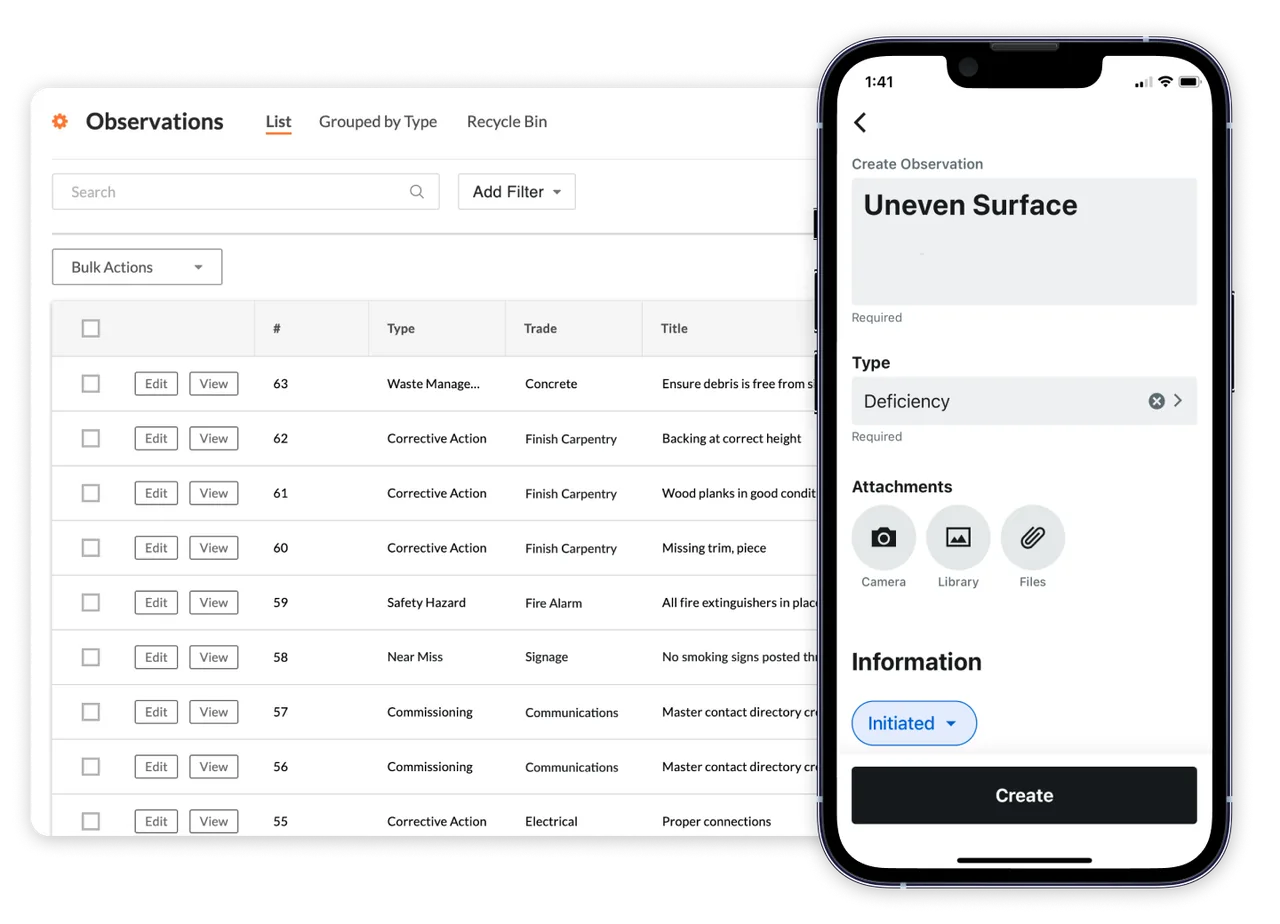
    Procore Observations list with type and trade columns beside a phone screen creating an Uneven Surface observation of type Deficiency

    Observations list and mobile create form

    Source

    Capabilities and scope

    The catalog route procore-safety refers to Procore's Quality & Safety offering within its construction platform, not a separate standalone product. Related tools appear under Project Management in the web navigation when included in the account and enabled for the project.

    Procore Quality & Safety capabilities, evidence status and source links
    CapabilityEvidenceScope and source
    Inspection captureDocumented by vendor

    Android guidance covers responses, comments and attachments; response configuration can require a photo or observation.

    Perform an inspection on Android
    Observation assignment and reviewDocumented by vendor

    Inspection-linked observations support assignees, due dates and review statuses. The documented Android process requires appropriate Inspections and Observations permissions.

    Inspection to observation on Android
    Incident investigation recordsDocumented by vendor

    Incident creation includes investigation and root-cause fields; records, witness statements and actions can be added afterward.

    Create an incident and investigation records
    Mobile offline useDepends on scope

    Requires preparation and cached items; new project information and transmission need connectivity. Verify individual actions and attachments.

    Mobile offline preparation
    Private incidentsDepends on scope

    Private-by-default settings and distribution lists are configurable. Validate the actual role matrix rather than assuming only the reporter can see a record.

    Incident privacy configuration
    CSV and PDF incident-list exportDocumented by vendor

    The export tutorial describes tab-specific list fields. It does not establish a complete investigation-and-attachment archive.

    Export incident lists as CSV or PDF
    Action Plan templates and approvalDepends on scope

    Action Plans can be built from company, project or pre-populated templates, assigned to responsible parties and approved before performance. Confirm that the tool is included and enabled in the proposed package.

    Create and approve an Action Plan
    Action Plan records, signatures and verificationDepends on scope

    Plan items can request supporting records, require assignee signatures and use defined verification methods such as hold point, measurement, surveillance, test or witness point. Access depends on Action Plans and related-tool permissions.

    Create and approve an Action PlanAction Plan verification methods
    Toolbox Talk attendance formDepends on scope

    Procore publishes a fillable Toolbox Talk Sign-In PDF that administrators can load as a company form template for completion through the web or mobile Forms tool. This is a form workflow, not evidence of a complete learning-management system.

    Toolbox Talk sign-in form
    Complete training and permit-to-work managementNot verified

    This review did not establish the legacy catalog's training, fall-protection and PTW tags as complete native workflows.

    First aid injury record typeDepends on scope

    Procore's support guide for adding an injury or illness record lists First Aid among the filing types, next to categories such as medically treated and lost time, and includes treatment-detail fields such as provider and facility. The guide does not explain how First Aid differs from the other types, and it does not describe first-aider rosters or first aid kit tracking.

    First aid injury record type, checked 1 October 2026First aid injury record type (2), checked 1 October 2026

    Also watch for: List exports should not be assumed to include every attachment or investigation record.

    Procore Quality & Safety pricing

    Annual subscription; custom quote

    No amount appeared on the pricing page on 26 September 2026: it starts a custom-quote questionnaire and says every annual contract has fixed pricing with unlimited users, data and 24/7 support; the Field Productivity product is priced by FTE instead. The pricing FAQ read on 3 October 2026 states an upfront annual fee by product based on Annual Construction Volume; ask how it applies to Quality & Safety. Request an itemized Quality & Safety scope, implementation services, growth terms and renewals.

    Pricing sources checked : Selected sources checked; no starting price recorded.

    Which product scope should the quote cover?

    Project-based Inspections, Observations and Incidents, with Action Plans described on the product page.

    Ask the vendor to identify the product, region, modules, billing unit, contract term and included services in writing.

    Prepared mobile offline; tool-specific limits

    Procore documents mobile offline capabilities on iOS and Android. Prepare needed project items while online: uncached information cannot be retrieved without connectivity. Android inspection guidance permits work on cached items and later synchronization. Confirm attachments and each required action on your actual device; an offline entry is not yet visible to the office. Removing the app loses cached items.

    What we could not verify

    1 not verified · 6 depend on scope · 1 note

    Demo script

    Inspection finding to reviewed observation

    1. Prepare the project inspection and roles; cache the required item before disconnected work.
    2. Record a deficient item with the required response and supporting evidence.
    3. Create a linked observation, assign responsibility and a due date; reconnect and confirm receipt if working offline.
    4. Have the assignee respond, then test reviewer rejection or closure and inspect the link back to the original finding.

    Private incident to an evidence handoff

    1. Configure incident visibility and use an authorised sample with no unnecessary personal data.
    2. Create the incident, capture investigation fields and add the required records or witness statement.
    3. Assign the next action and test access with an unrelated project user as well as the responsible reviewer.
    4. Export the appropriate incident tab; compare its fields with the requested investigation pack and identify additional records needed.

    Action Plan to verified completion

    1. Start from an approved template or create the plan, define sections and items, and assign the responsible parties.
    2. Select a verification method, require signatures where accountability calls for them and request the supporting inspections, forms, photos or other records.
    3. Publish the plan for approval and performance; have assignees complete each item with the requested evidence.
    4. Review the completed plan and related records, obtain the receiver signature and confirm the closure status and retained audit trail.

    Ask the vendor to show you

    1. On our proposed subscription, show enabled Inspections, Observations, Incidents and any Action Plans scope.
    2. Cache an inspection, disconnect, capture a finding and verify the received result after reconnecting.
    3. Have an assignee respond to an observation, then demonstrate reviewer rejection and closure.
    4. Create a private incident and compare access for the reporter, administrator and an unrelated project user.
    5. Export the incident list and show how investigation details and attachments would be delivered separately if required.
    6. Quote the selected products and ACV basis, including additional volume, implementation and renewal terms.
    Use demo checklist

    Questions the sources answer

    Is Procore Safety a separate product?

    This profile covers Procore Quality & Safety within its construction platform. Related tools can appear under Project Management; account inclusion and project enablement still matter.

    Can inspections be completed offline?

    The Android tutorial documents work on previously cached inspections and synchronization after reconnecting. Prepare needed records and test the actual device, attachments and workflow.

    Does an observation support review before closure?

    The documented inspection-to-observation process includes Ready for Review, Not Accepted and Closed statuses. Demonstrate the permitted assignee and reviewer actions with your roles.

    Is the CSV export a complete incident archive?

    Do not assume so. The reviewed tutorial lists fields for the selected incident tab. Require a demonstration of the detailed records and attachments needed for your handoff.

    Is there a verified free trial?

    Procore publishes a free personalized demo request. A self-service free trial for this offering was not verified; a demo is not trial access.

    Does Procore guarantee safety compliance?

    The reviewed workflows support documentation and follow-up. Their availability does not establish that your organisation meets every applicable safety or reporting obligation.

    Sources and change log

    15 sources, checked
    • : Expanded the Action Plans assessment with official template, approval, requested-record, signature and verification-method documentation, plus the bounded Toolbox Talk sign-in form workflow.
    • : Re-checked on 26 September 2026: the pricing page shows no amount and starts a custom-quote questionnaire (unlimited users, data and support; Field Productivity priced by FTE), so the price status is recorded as no amount shown rather than not established.
    • : Added current product identity, sourced workflow and offline boundaries, annual quote scope, export limitations and explicit trial uncertainty; removed reliance on legacy ratings and broad capability tags.

    Compare with

    Drawn from the profiles behind the Alternatives list above: most category tags shared with Procore Quality & Safety first, then the closest overlap in documented capability names, then A to Z. Ratings, search demand and sponsorship are not used; rows are shown A to Z.

    • Benchmark Gensuite

      Shared category tags: 2 (Incident Management, Audits & Inspections).

      Differs: scope EHS Management (this profile: Construction Safety).

      Same: offline, price and trial.

    • EcoOnline

      No shared category tag.

      Differs: scope EHS Management (this profile: Construction Safety).

      Same: offline, price and trial.

    • Ideagen EHS

      Shared category tags: 1 (Incident Management).

      Differs: scope EHS Management (this profile: Construction Safety).

      Same: offline, price and trial.

    All Procore Quality & Safety alternatives

    Reviews on qhsetech.com

    Reviews may be filed under other names

    Also recorded as Procore Safety. Older entries under a previous name may describe a different release or owner.

    Star ratings and review counts from the old catalog are not shown: no source for them was recorded.