    QHSEtech

    SaferMe

    SaferMe lets workers submit hazard, incident and inspection reports from phones or QR codes, routes each report through configurable states to an assignee, and tracks site attendance, inductions and training competency. Pricing is published per user and per form, with a free plan for two users and two forms.

    Evidence: Researched profile

    Built from vendor sources checked ; AI-assisted drafting. Documentation review, not a hands-on test. How pages are made

    Who is SaferMe for?

    Organisations with dispersed sites that need simple hazard and incident reporting plus QR-code sign-in and inductions for contractors. Offline reporting is only in the older SaferMe apps; the current SaferMe Live and web app need a connection, and the Android offline app lacks the Sites and Risk Register features. Every user needs a unique email address.

    Worth evaluating for small and mid-sized organisations that want contractors, visitors and staff to report hazards and sign into sites from a phone or QR code at a published price. The per-form charge rewards a small, stable set of forms. Teams working mostly without coverage should confirm the older offline app covers their forms, since the current app does not yet work offline.

    Published price: Free for 2 users and 2 forms; Professional $8/user + $4/form per month. Free trial documented. Sources checked .

    Product tour

    Vendor visuals—not a QHSEtech hands-on test.

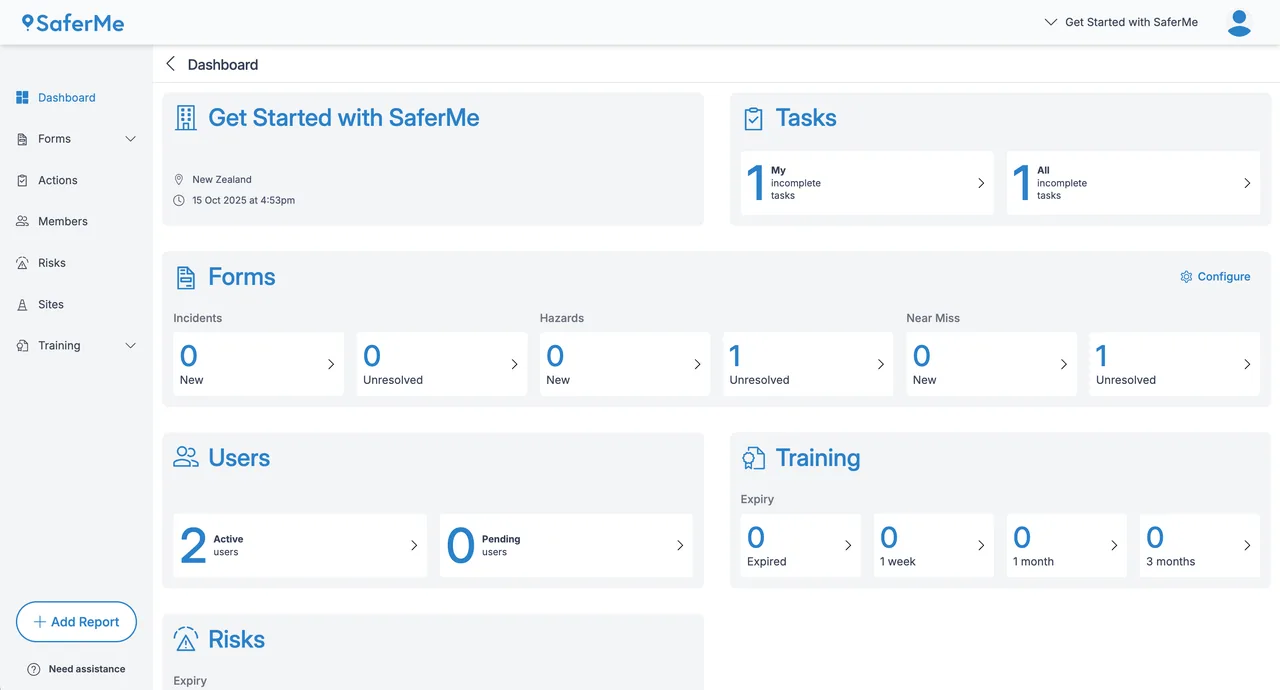
    SaferMe Dashboard page with tiles for tasks, incident, hazard and near-miss form counts, active users, training expiry and risks.

    SaferMe web app manager dashboard

    Source
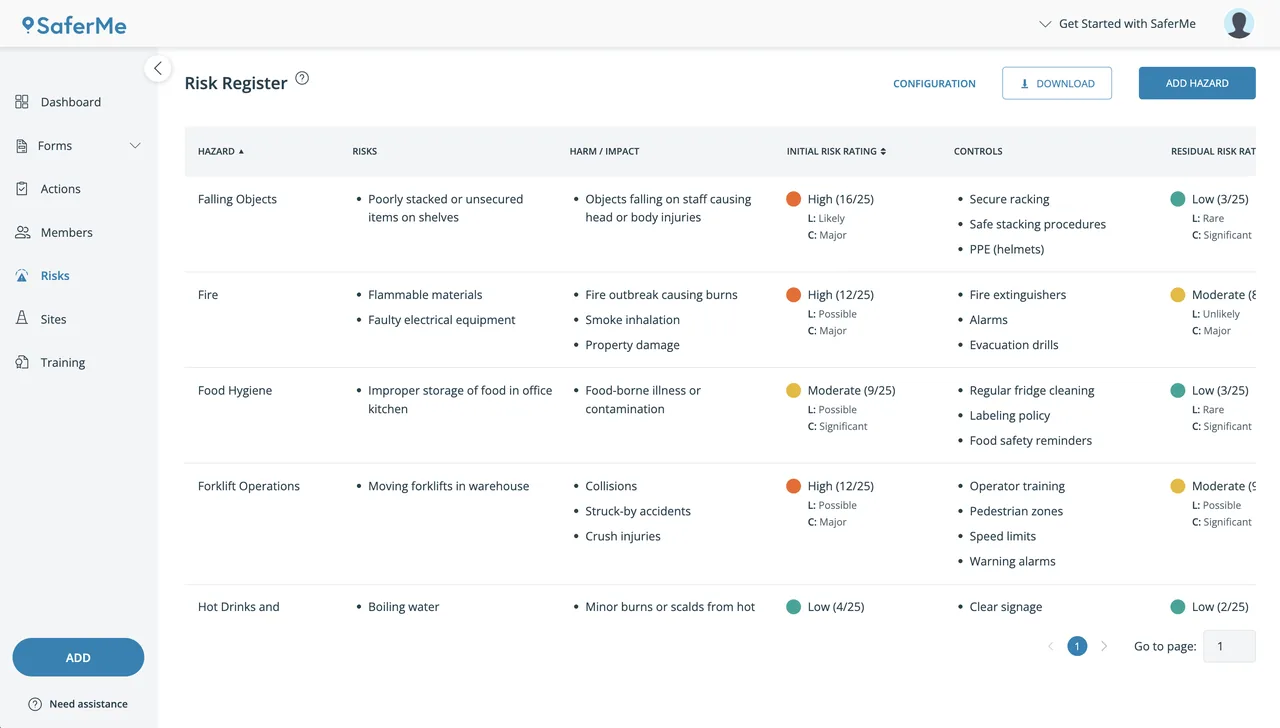
    SaferMe Risk Register table listing hazards, risks, harm, initial risk rating, controls and residual rating for example workplace hazards.

    SaferMe risk register list

    Source

    Capabilities and scope

    SaferMe Limited sells the SaferMe Safety Suite: configurable safety report forms, a risk register, QR-code site sign-in and inductions, and training records, used through a web app and mobile apps. Two app generations exist: SaferMe Live and the installable web app for online reporting, and the older SaferMe apps for offline reporting. Its earlier virus-management and contact-tracing products are separate scope. Safety Suite: drag-and-drop report forms with configurable states, private and public (QR) reporting, corrective actions and tasks, risk register with matrix, site sign-in and inductions, training modules with competency levels, and API V4 on Enterprise.

    SaferMe capabilities, evidence status and source links
    CapabilityEvidenceScope and source
    Configurable report forms and statesDocumented by vendor

    Drag-and-drop forms with any number of states, each with alerts, optional auto-transition, visibility limited to admins and assignees, auto-assignment and a due time.

    Report states and workflowSafety Suite features
    QR-code reporting without an accountDocumented by vendor

    Employees, contractors and visitors can open a form by scanning a QR code and submit it in a browser without a SaferMe account; QR codes on vehicles and plant support pre-start checks. Public reporting is a Professional and Enterprise feature.

    QR-code reports and inductionsPlans and pricing
    Site sign-in and inductionsDocumented by vendor

    Workers scan a site QR code and receive a sign-in link by phone number. Site managers can sign people in and out on their behalf and mark workers as inducted in bulk.

    Site sign-inSite sign-in records
    Risk register hazards in reportsDepends on scope

    A form field imports hazards from the Risks page and lets the report adjust likelihood, consequence and controls without changing the register; not offline on Android.

    Risk register hazards in reports
    Offline reporting by app versionDepends on scope

    Only the older apps report offline; the Android offline app has no Sites or Risk Register.

    Android apps: online and offline versionsiOS apps: online and offline versions
    Training records and competencyDocumented by vendor

    Managers and admins create training modules, assign training to workers and define up to eight competency levels. Training management is included in every plan, including Free.

    Training competency levelsPlans and pricing
    API V4Depends on scope

    Token-authenticated REST API with endpoints for reports, report states, forms, file attachments, risk assessments, sites, site visits, tasks and users. API access is listed only on the Enterprise plan.

    API V4 documentationPlans and pricing
    Report-linked corrective tasksDocumented by vendor

    Users can create multiple tasks against a report, assign each task to a worker and notify the assignee. The task appears in the assignee's Actions area and in the manager or admin dashboard, and task details are included in report PDF downloads. The article does not document due dates, escalation rules or approval gates, so confirm those in a demo.

    Report-linked corrective tasks — checked 28 September 2026
    Risk-register administration and review datesDocumented by vendor

    An organisation has one risk register with no documented hazard-count limit. Hazard records include risk and harm, controls, initial and residual ratings, and a next-review date; overdue reviews are flagged, and the register can be exported as a PDF. Confirm whether separate registers or business-unit partitioning are available.

    Risk-register hazard records and PDF export — checked 28 September 2026
    Manager action dashboardDocumented by vendor

    Admins and managers receive an action-oriented overview of incomplete tasks, new and unresolved reports for up to three selected forms, expiring training records and hazards due for review. This is documented as an operational dashboard, not a general analytics or BI module; manager visibility follows form permissions.

    Manager action dashboard — checked 28 September 2026

    Also watch for: Current SaferMe Live and web app have no offline reporting. Android offline app omits Sites and the Risk Register. Each user needs a unique email address.

    SaferMe pricing

    Free plan; Professional per user and per form; Enterprise quote

    Entry price as recorded: Free for 2 users and 2 forms; Professional $8/user + $4/form per month.

    Pricing sources checked : Checked against the vendor's published pricing.

    The SaferMe pricing page has 2 published prices (unit, term, minimum and source) and 1 EHS Management product priced in the same unit.

    See the full SaferMe price table →

    Offline reporting only in the older SaferMe apps

    The help centre splits two app generations. SaferMe Live (Android) and the installable iOS web app are for online reporting; offline reporting for them is still being built. The older SaferMe apps work without internet, but the Android offline app lacks Sites and the Risk Register.

    What we could not verify

    3 depend on scope

    Demo script

    Proposed demo: contractor near miss to resolved task

    1. A contractor without an account scans a site QR code, signs in and submits a near-miss form.
    2. The report enters a restricted state, is auto-assigned to the site supervisor with a due time, and triggers an alert.
    3. The supervisor adds a task, resolves the report, and the manager downloads it with its state history.

    Proposed demo: offline inspection on the older app

    1. Install the offline SaferMe app on Android and iOS and load the crew's inspection form.
    2. Complete an inspection with photos in airplane mode, then reconnect.
    3. Compare what synced with the same report from SaferMe Live, including any risk-register fields.

    Proposed demo: risk review to field report and audit evidence

    1. Create a hazard with controls, initial and residual ratings, and a near-term review date, then show how an overdue review is flagged on the dashboard.
    2. Embed that hazard in a field report and change its likelihood, consequence or controls for the job; verify that report-only changes do not alter the master register.
    3. Create and assign a corrective task from the report, complete it, then export the report and risk register to show what audit evidence is retained.

    Ask the vendor to show you

    1. Which app should our crews install for sites without coverage, and which features do they lose compared with SaferMe Live?
    2. Configure an incident form whose reports are visible only to admins and the assignee, auto-assign it to the reporter's supervisor with a 48-hour due time, and show the escalation.
    3. Sign a contractor in by QR code without an account, mark them inducted, and show the record the site manager sees.
    4. How do we add workers who have no email address, and how does each alias count towards per-user billing?
    5. What currency are the published prices in, and how are forms counted when a form is retired or replaced?

    Checks specific to this product

    App generation for your sites:
    Decide per site whether crews need the offline app, and list the features they give up on Android.
    Use demo checklist

    Questions the sources answer

    Can we add workers who have no email address?

    Every account needs a unique email. SaferMe's workaround is Gmail plus-addressing (name+1@gmail.com), which only works with Gmail or Google Workspace addresses, and each alias counts as a separate user.

    Who can see submitted incident reports?

    By default only form admins see all completed reports and workers see their own. A state can be set so only form admins and the assignee can view reports in it, which suits incident and near-miss forms.

    Are QR codes included?

    QR-code forms work without accounts, but the billing help says QR codes are enabled through the plan settings and supplied by SaferMe support. Ask whether QR codes or the 90 cm sign-in boards carry a charge.

    Sources and change log

    15 sources, checked
    • : Replaced the mechanically assembled profile: the pricing page now shows a free plan and Professional per-user and per-form amounts; added the online and offline app split, report states, QR sign-in and the unique-email rule.
    • Desk research dated 25 September 2026 against SaferMe's pricing and feature pages, nine help centre articles and the API V4 documentation.

    Compare with

    Drawn from the profiles behind the Alternatives list above: most category tags shared with SaferMe first, then the closest overlap in documented capability names, then A to Z. Ratings, search demand and sponsorship are not used; rows are shown A to Z.

    • myosh

      No shared category tag.

      Differs: trial on request (this profile: free trial documented).

      Same: scope, offline and price.

    • SAP Environment, Health, and Safety

      Shared category tags: 1 (EHS Management).

      Differs: trial not established (this profile: free trial documented).

      Same: scope, offline and price.

    • Synergi Life (DNV)

      Shared category tags: 1 (EHS Management).

      Same: scope, offline, price and trial.

    All SaferMe alternatives

    Reviews on qhsetech.com

    Star ratings and review counts from the old catalog are not shown: no source for them was recorded.