
    QHSEtech

    Resco Inspections & Audits

    Resco Inspections & Audits combines configurable questionnaires with mobile data collection and reporting. Its strongest shortlist case is an organization connecting field inspections to an existing business data environment. The buying decision includes the mobile app, backend, configuration work and administration licenses, not only the field-user price.

    Evidence: Researched profile

    Built from vendor sources checked ; AI-assisted drafting. Documentation review, not a hands-on test. How pages are made

    Who is Resco Inspections & Audits for?

    Inspection and field-service teams with Dynamics 365, Dataverse or Salesforce integration requirements and access to configuration expertise. Do not evaluate 'Resco Inspections' as one interchangeable package. Resco Forms is the renamed questionnaire toolset, while mobile app, Power Apps and backend choices change offline behaviour, media support, reports, administration and licensing. Offline availability is limited by the initial download and sync filters; conflicting mobile and server edits follow an administrator-selected resolution policy. Local encryption can be disabled by an administrator, and device security still needs MDM, authentication and lost-device controls. A generated PDF, signature image or exported CSV is not by itself a compliant approval, audit or electronic-signature process.

    Potentially worth the price when offline inspection records need to connect to an established enterprise data model. For a small standalone crew, compare the minimum license commitment and configuration cost with a simpler form tool. Require a working demonstration of the backend workflow before accepting the integration premium.

    Published price: EUR 50/user/month. Free trial documented. Sources checked .

    Product tour

    Vendor visuals—not a QHSEtech hands-on test.

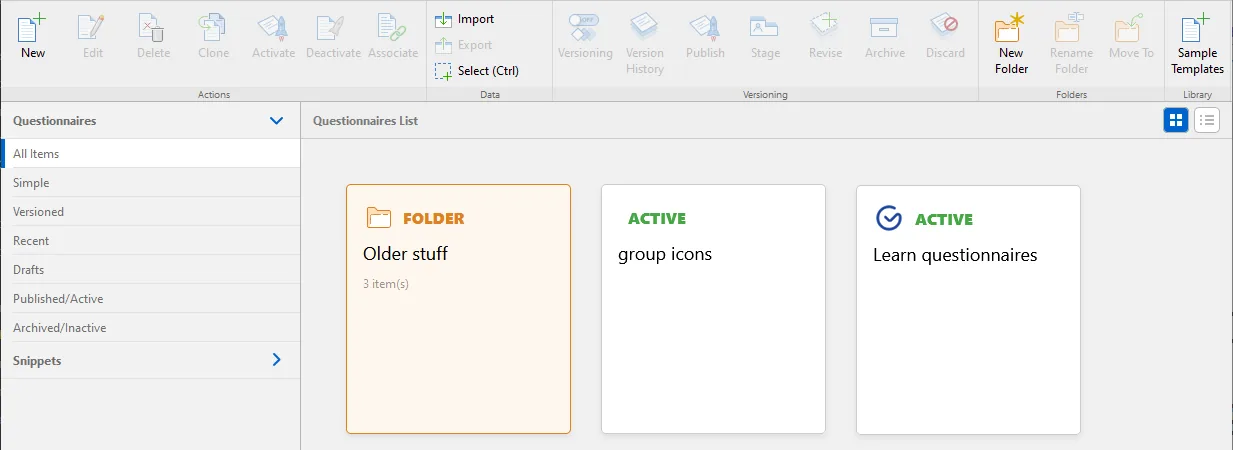
    Resco Questionnaire Designer toolbar with New, Import, Versioning, Publish and Folder commands above a list of questionnaire tiles

    Questionnaire Designer template list

    Source

    Capabilities and scope

    Inspections & Audits remains the solution label on the product page. Current documentation calls the underlying questionnaire toolset Resco Forms, formerly Resco Inspections. Confirm whether the proposal uses Resco mobile apps, Power Apps or Resco Cloud; deployment paths and licenses are not interchangeable. Configurable Resco Forms questionnaires, mobile inspections, device-generated reports and synchronized enterprise data. Deployment can use Resco mobile apps with Dynamics 365/Dataverse, Salesforce or Resco Cloud, or a separately configured Power Apps path; runtime, backend, licensing and feature parity must be confirmed together.

    Resco Inspections & Audits capabilities, evidence status and source links
    CapabilityEvidenceScope and source
    Configurable questionnairesDocumented by vendor

    Forms and questionnaire design support custom field collection; configure the rules for your own workflow.

    Resco Forms identity and integration boundaries
    Local offline dataDocumented by vendor

    The Resco app works with a synchronized local copy; record filters affect what is available.

    Mobile application and synchronization
    Offline report creationDocumented by vendor

    The app can create mobile reports from questionnaires while disconnected.

    Mobile application and synchronization
    Dynamics, Power Platform and Salesforce integrationDepends on scope

    Product lists these backends; confirm the runtime, data model and license path.

    Inspections solution and advertised Ultimate rateResco Forms identity and integration boundaries
    Power Apps offline setupDepends on scope

    Requires an offline profile with the necessary tables and an initial download before disconnection.

    Power Platform offline setup
    Salesforce without custom objectsDepends on scope

    Documentation lists restrictions including unsupported binary questions such as images and signatures for this deployment variant.

    Resco Forms identity and integration boundaries
    Questionnaire results APIDocumented by vendor

    Documentation identifies a read-only OData v4 service for questionnaire results; do not assume it provides all write operations.

    Resco Forms identity and integration boundaries
    Adaptive questionnaires and validationDocumented by vendor

    Questionnaires support smart visibility, enabled and required states, event-driven no-code rules, commands and JavaScript extensions. Preview can ignore some rules, so validate published templates in the actual mobile runtime before release.

    Questionnaire Designer, question types, media and template controlsQuestionnaire rules, validation and scripting boundaries
    Field media and structured evidenceDepends on scope

    The designer documents image capture, barcode questions, document roundtrip, tagged images and other question components. Storage, device and backend choices affect availability; Salesforce and report-rendering limitations need scenario testing.

    Questionnaire Designer, question types, media and template controls
    Synchronization filters and conflictsDepends on scope

    The sync engine downloads a configured subset of backend data, and concurrent offline or server edits are detected during synchronization. Administrators select an entity-level conflict policy, including manual handling, so the buyer must define authoritative-source and overwrite rules.

    Offline-first synchronization and backend scopeSynchronization conflict identification and resolution policies
    Results filtering and CSV exportDocumented by vendor

    The browser-based Results Viewer lists completed and in-progress questionnaires, supports filtering and exports selected results to CSV. Confirm permissions, attachment handling, column stability and the downstream reconciliation process.

    Results Viewer filtering and CSV export
    Configurable offline mobile reportsDepends on scope

    Generic, automatic and custom reports can be generated on-device while offline, with PDF and other documented output formats. Report options differ by backend; generic reports limit displayed images and the documented custom-report creation procedure does not work on Salesforce.

    Offline mobile report formats and backend limitations

    More capability notes

    1 additional areas. Status describes reviewed sources, not hands-on performance.

    Also watch for: Annual commitment and minimum licenses affect small-team affordability. Administration and implementation add to field-user cost. Runtime and backend choices change capability boundaries.

    Resco Inspections & Audits pricing

    Ultimate per user; annual billing

    Entry price as recorded: EUR 50/user/month.

    Pricing sources checked : Checked against the vendor's published pricing.

    The Resco Inspections & Audits pricing page has 2 published prices (unit, term, minimum and source), the entry cost worked out and 9 Audits & Inspections products priced in the same unit.

    See the full Resco Inspections & Audits price table →

    Offline work and integrations

    The Resco mobile app stores a synchronized copy of server data locally. Initial synchronization needs a connection; later synchronizations transfer changes, and administrators can filter records. Mobile questionnaire reports are documented offline. The Power Apps path requires a configured offline profile and an initial data download. These are separate paths, so test the actual app and backend named in the quote.

    What we could not verify

    7 depend on scope

    Demo script

    Offline equipment inspection with a local report

    1. Select the proposed backend and synchronize the asset records and questionnaire onto a test device.
    2. Disconnect, complete the questionnaire and generate the required mobile report.
    3. Reconnect and reconcile the record, answers and attachments with the backend.

    Backend and package acceptance check

    1. Ask the vendor to name the runtime, field-user package and administrator licenses.
    2. Demonstrate the actual photo and signature fields on that backend, including any custom objects needed.
    3. Export a result through the agreed interface and document who handles a synchronization failure.

    Offline conflict and authoritative-record acceptance test

    1. Configure the proposed sync filters and download a representative asset, inspection template, history and required attachments to two test devices.
    2. Disconnect one device and change the same record independently on the device and backend while completing related questionnaire answers.
    3. Reconnect and inspect the configured conflict policy, user prompts, Sync Dashboard evidence and final values on both sides.
    4. Repeat for each safety-critical editable table, including attachments and status changes, and document when manual review is mandatory.
    5. Verify that records excluded by sync filters cannot silently make the offline inspection incomplete or misleading.

    Ask the vendor to show you

    1. Which runtime, backend, Resco product, Ultimate field licences and administrator licences are included in the proposal?
    2. Does the annual 10-licence minimum apply, and which backend, Power Apps or Dynamics licences are additional?
    3. Which questionnaire generation, app version and report engine will be used, and what migration work applies to future upgrades?
    4. Show the initial download, sync filters and exact asset, document and history records available to an offline inspector.
    5. Which conflict policy applies to each editable table, and can a mobile or server change be overwritten without manual review?
    6. Demonstrate photo, signature, video, barcode, repeatable-group and report behaviour on the exact backend and device estate.
    Use demo checklist

    Questions the sources answer

    Is Resco Forms the same as Resco Inspections?

    The current documentation says Resco Forms was formerly known as Resco Inspections. Inspections & Audits is also used as a solution label. Confirm the exact app, toolset and backend in the proposal instead of treating every Resco offering as one package.

    Can Resco send inspection data to Dynamics 365 or Salesforce?

    Resco documents integration paths for those systems and Power Platform. Capabilities depend on the selected deployment. In particular, the documentation lists photo and signature restrictions for Salesforce inspections without custom objects, so demonstrate the intended architecture.

    What data is available during a Resco offline inspection?

    Only data selected by the app project's sync configuration and successfully downloaded is local. Test assets, history, documents, lookups and attachments needed for the job; offline mode does not imply that the entire backend is present.

    What happens if the same record changes offline and on the server?

    Resco detects synchronization conflicts and lets administrators configure the policy per entity, including manual resolution. Agree authoritative-source and safety-critical review rules before deployment.

    Can Resco inspection forms adapt to answers?

    Yes. Official documentation covers smart properties, no-code rules, commands and JavaScript. Because preview can omit some rule behaviour, acceptance-test the published form in the intended mobile app and version.

    Can Resco export inspection results?

    Results Viewer supports filtering and CSV export, while Resco Forms documents a read-only OData results service. These do not establish a general write API; confirm how downstream corrective actions and updates will be supported.

    Are offline reports identical across every Resco backend?

    No. Resco documents generic, automatic and custom report options, but some layouts and creation paths differ by backend. Generic reports also have image limits. Test the exact Dynamics, Salesforce or Resco Cloud configuration.

    Is data on a Resco mobile device encrypted?

    Resco documents encrypted local database and attachment storage enabled by default, but an administrator can disable database encryption. Security also depends on app passwords, device secure storage, MDM and lost-device procedures.

    Sources and change log

    13 sources, checked

    Compare with

    Drawn from the profiles behind the Alternatives list above: most category tags shared with Resco Inspections & Audits first, then the closest overlap in documented capability names, then A to Z. Ratings, search demand and sponsorship are not used; rows are shown A to Z.

    • Easy to Inspect

      Shared category tags: 1 (Offline Inspections).

      Differs: offline unclassified (this profile: documented workflow).

      Same: scope, price and trial.

    • GoAudits

      Shared category tags: 1 (Mobile Forms).

      Same: scope, offline, price and trial.

    • Lumiform

      Shared category tags: 2 (Offline Inspections, Mobile Forms).

      Differs: price no verified amount (this profile: amount published); trial not established (this profile: free trial documented).

      Same: scope and offline.

    All Resco Inspections & Audits alternatives

    Reviews on qhsetech.com

    Reviews may be filed under other names

    Also recorded as Resco Inspections. Older entries under a previous name may describe a different release or owner.

    Star ratings and review counts from the old catalog are not shown: no source for them was recorded.