
    QHSEtech

    Lumiform

    Lumiform suits recurring workplace checks where a frontline worker records findings and an office team follows up. Forms, drafts and actions are accessible through its mobile app. The evaluation question is whether the team can complete a real checklist, recover queued results and close a finding without recreating the record in another tool.

    Evidence: Researched profile

    Built from vendor sources checked ; AI-assisted drafting. Documentation review, not a hands-on test. How pages are made

    Who is Lumiform for?

    Multi-site operations, maintenance and safety teams replacing paper checklists with mobile inspections and corrective actions. Confirm workspace-wide plan changes, paid add-ons, approval rights and required languages. Offline completion does not make a result visible until synchronization succeeds. Demonstrate version history, locks and audit evidence before using exports as controlled records; the reviewed pages do not say how template edits affect completed forms or whether submitted reports can be edited.

    Worth shortlisting when repeat inspections and action follow-up consume measurable administration time. Request a full team quote and compare it with the hours spent preparing reports and chasing findings. A low per-seat impression is not enough if approvals and integrations add cost.

    Sources checked .

    Product tour

    Vendor visuals—not a QHSEtech hands-on test.

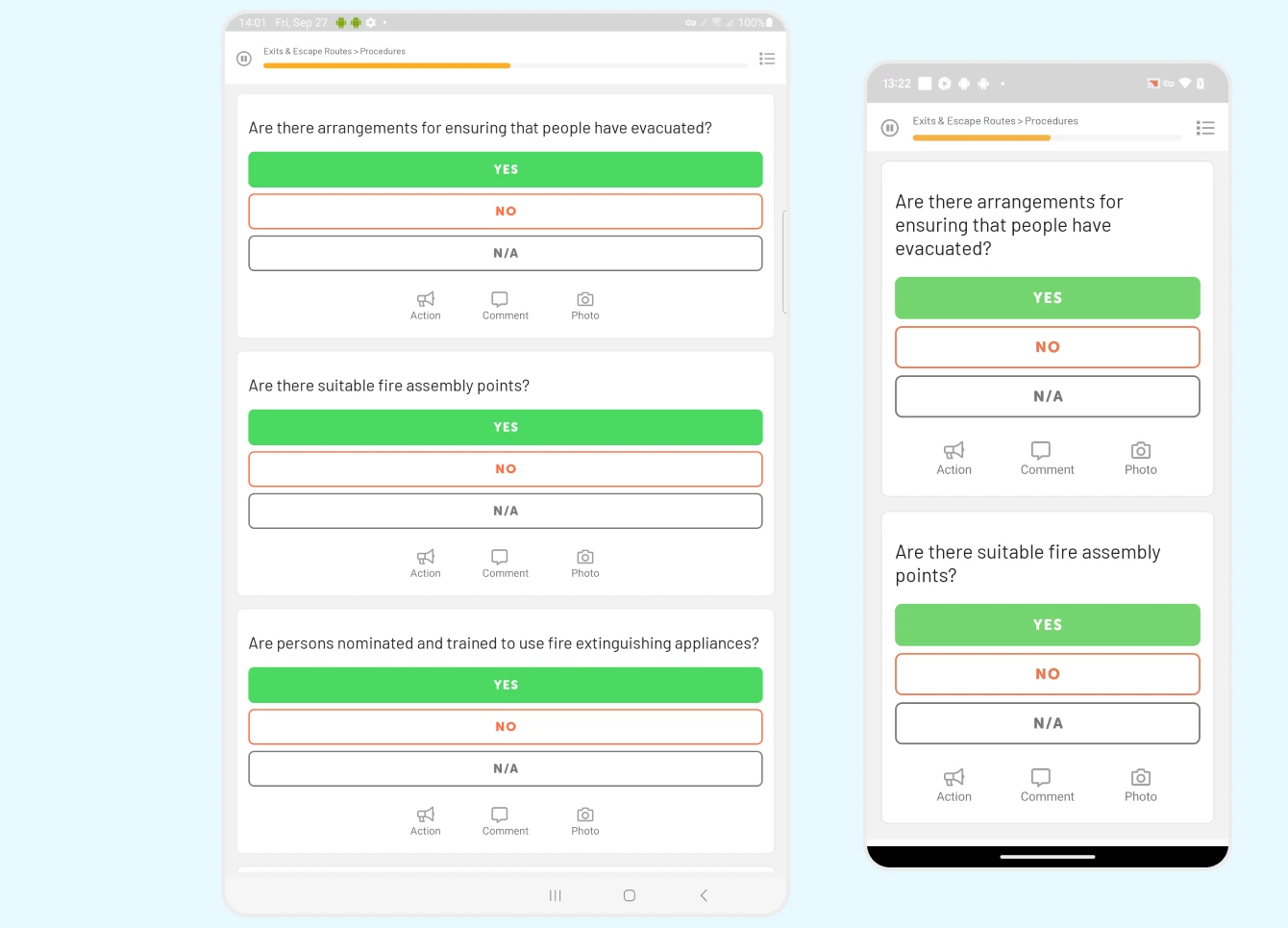
    Tablet and phone showing checklist questions with yes, no and not applicable buttons and action, comment and photo icons

    Mobile checklist with action and photo

    Source
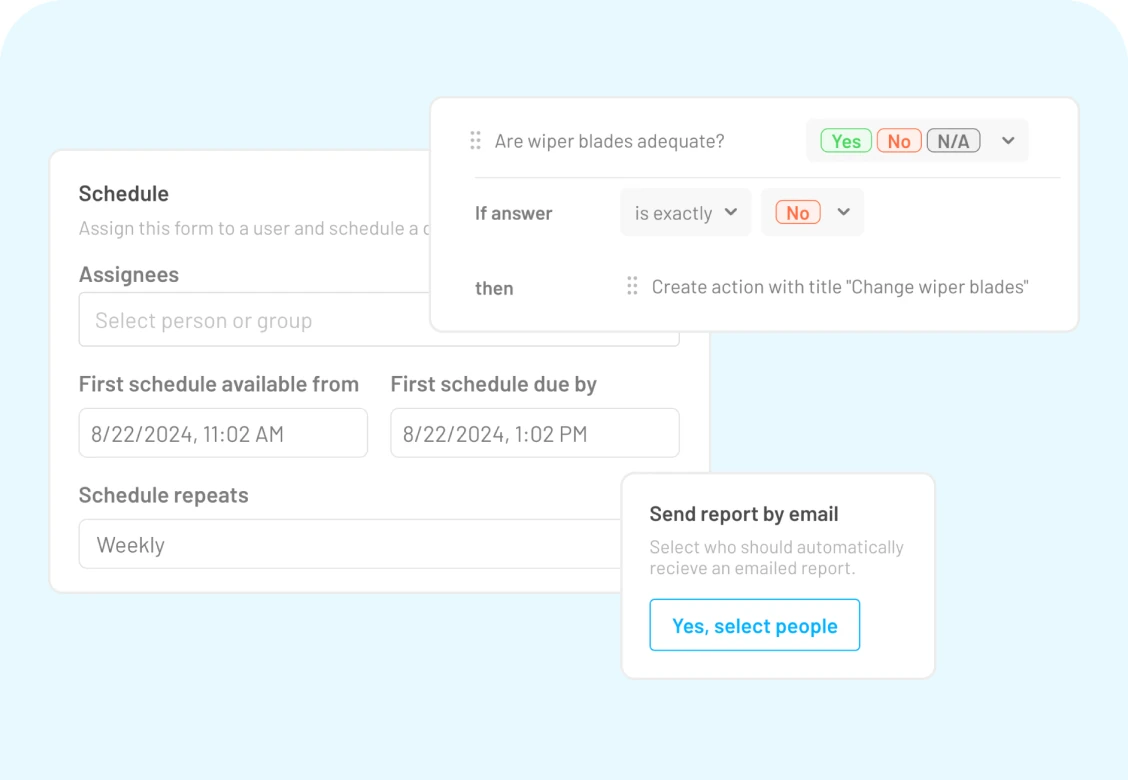
    Settings panels for a recurring schedule, a rule that creates an action when an answer is no, and a report email option

    Schedule and logic settings

    Source

    Capabilities and scope

    Lumiform combines mobile inspections with action tracking and reporting. Professional and Enterprise have different commercial scopes; an integration advertised by the vendor is not automatically included in every subscription.

    Lumiform capabilities, evidence status and source links
    CapabilityEvidenceScope and source
    Offline form completionDocumented by vendor

    Mobile forms can be completed without connectivity and synchronized later.

    Mobile workflow
    Pending-result outboxDocumented by vendor

    Completed results that cannot upload remain on the device; the outbox identifies unsent results.

    Unsent result outbox
    Action synchronizationDepends on scope

    A newly created action may not appear in the web app until it synchronizes; support documents a swipe-down sync.

    Action synchronization
    Photos and signaturesDocumented by vendor

    The app lists drawing on photos and signature capture; test attachment recovery in the intended workflow.

    Supported mobile functions and languages
    Multilingual mobile interfaceDepends on scope

    The vendor download page says its apps are available in 12+ languages, and its FAQ says 12. Confirm exact languages and separately validate translated checklist content.

    Supported mobile functions and languages
    Approvals and API accessDepends on scope

    Enterprise includes these functions; Professional requires appropriate add-ons.

    Current plans and commercial boundaries
    Voice-to-text without connectivityNot verified

    Voice-to-text is listed, but disconnected availability by device and language was not established.

    Configurable forms, conditional logic and schedulesDocumented by vendor

    Administrators can build forms, organize pages and repeatable sections, require fields, assign users or groups and configure schedules. If-then logic can reveal questions or sections and create actions. The reviewed pages do not say how template edits affect completed inspections, so demonstrate versioning and historical retrieval.

    Form creation, assignments and recurring schedulesConditional form logic and response-triggered actionsRepeatable form sections
    Assigned actions and resolution trailDepends on scope

    Actions can be created from a response or independently with owner, priority, deadline and evidence. The product documents reminders, status tracking, chat, third-party assignment and change logs. Approvals remain package-dependent and do not establish mandatory independent effectiveness review.

    Action ownership, status, attachments and audit logsCurrent plans and commercial boundaries
    Inspection and action analyticsDocumented by vendor

    Analytics summarizes submitted forms, negative responses, scores, overdue forms and actions with filters and drill-downs. Test permissions, refresh and export requirements; the overview does not establish immutable regulated records.

    Inspection and action analyticsProduct scope and cloud-only deployment
    Horizontal lifeline and fall protection inspection templateDepends on scope

    Lumiform's public template library includes a horizontal lifeline inspection checklist that covers the line, anchor points and connected connectors or harnesses, usable from the mobile app with reporting and assigned responsibilities. Only this one fall-protection template page could be retrieved; other fall protection templates the vendor appears to list were not confirmed, and no equipment register, expiry reminders or rescue planning is documented on the page.

    Horizontal lifeline and fall protection inspection, checked 1 October 2026

    Also watch for: Current plan prices require a quote. Pending forms and actions can remain invisible to web users until synchronized. Crew language and offline voice-input behavior need device-level validation.

    Lumiform pricing

    Professional and Enterprise; contact vendor

    Current pricing page requests a quote for both plans and provides no numeric subscription amount. Confirm currency (EUR, GBP or USD), billing term, seat minimum, user count, taxes and add-ons. Approvals, integrations, API, webhooks and SSO are Enterprise features or Professional add-ons. A free trial may be offered under the terms; eligibility and duration require confirmation.

    Pricing sources checked : Selected sources checked; no starting price recorded. Numeric figures on older use-case or third-party pages were not treated as a current offer. Obtain the accepted offer and included features before comparing total cost.

    Which product scope should the quote cover?

    Cloud-hosted mobile forms, recurring inspections, conditional workflows, assigned actions, reports and analytics. Approvals, API, webhooks, SSO and advanced integrations depend on the selected package or add-ons. Lumiform states that it does not plan to offer an on-premises version.

    Ask the vendor to identify the product, region, modules, billing unit, contract term and included services in writing.

    Offline work and integrations

    The vendor documents offline form completion and later synchronization. Its help center says unsent completed results remain on the device in the outbox until a stable connection permits upload. Actions may require opening their list and swiping down to synchronize. Test photos, drafts and assigned forms before a disconnected shift; do not equate completion on the phone with office visibility.

    What we could not verify

    1 not verified · 5 depend on scope

    Demo script

    Disconnected maintenance inspection

    1. Prepare a permitted test checklist and synchronize the phone while connected.
    2. Disable connectivity, complete it with a defect photo and inspect the pending result in the outbox.
    3. Reconnect, verify the web result and reconcile the photo and completion record.

    A finding with follow-up responsibility

    1. Create a test finding with an owner and supporting photo.
    2. Demonstrate action synchronization and any required approval in the quoted plan.
    3. Close the finding and export the inspection and action evidence for review.

    Proposed demo: scheduled multi-site inspection to exception trend

    1. Assign a recurring inspection to a test site and group, with a rule requiring a photo and action when a critical answer fails.
    2. Complete it on mobile, verify the generated action's owner, priority, deadline, attachment and log, then close it under the quoted approval rules.
    3. Use Analytics to isolate site exceptions and confirm that users without required permissions cannot see them.

    Ask the vendor to show you

    1. Show a completed form in the outbox while the phone is disconnected, then verify its uploaded photos and timestamps.
    2. Show whether an offline action becomes visible to its owner automatically or requires a manual sync.
    3. Quote the entire workspace with approvals, API, SSO and integrations separately identified.
    4. Demonstrate the checklist, interface and voice input in our actual crew languages.

    Checks specific to this product

    Outbox recovery:
    Completed results that cannot upload stay on the device and the outbox shows them. Complete several inspections with attachments offline, reconnect on a weak network and confirm each appears in the web app. Keep a screenshot of the outbox and the received reports.
    Template versioning and completed records:
    The reviewed pages do not say how template edits affect completed forms or whether submitted reports can be edited. Change a template after some inspections are done, then retrieve an earlier inspection and inspect the version history. Ask which roles can edit submitted reports and whether it can be locked.
    Use demo checklist

    Questions the sources answer

    Does Lumiform work without an internet connection?

    Yes, the mobile app documents offline forms and later synchronization. Unsent completed forms remain in the outbox until upload succeeds. Test your actual photos, drafts and reconnect process before field rollout.

    Can Lumiform support multilingual crews and voice input?

    The vendor download page lists 12+ languages (its FAQ says 12), and the pricing matrix lists voice-to-text. These are separate capabilities. Confirm your languages and test dictation with connectivity disabled rather than assuming every device supports offline speech recognition.

    Can Lumiform connect inspections to other systems?

    The vendor publishes an integration directory and lists API and webhooks in its commercial offering. Entitlement depends on the package or add-ons. Demonstrate the specific record, attachment and failure handling you need before purchasing.

    Sources and change log

    15 sources, checked

    Compare with

    Drawn from the profiles behind the Alternatives list above: most category tags shared with Lumiform first, then the closest overlap in documented capability names, then A to Z. Ratings, search demand and sponsorship are not used; rows are shown A to Z.

    • Easy to Inspect

      Shared category tags: 2 (Offline Inspections, Corrective Actions).

      Differs: offline unclassified (this profile: documented workflow); price amount published (this profile: no verified amount); trial free trial documented (this profile: not established).

      Same: scope.

    • GoAudits

      Shared category tags: 1 (Mobile Forms).

      Differs: price amount published (this profile: no verified amount); trial free trial documented (this profile: not established).

      Same: scope and offline.

      Side by side: Lumiform and GoAudits
    • Resco Inspections & Audits

      Shared category tags: 2 (Offline Inspections, Mobile Forms).

      Differs: price amount published (this profile: no verified amount); trial free trial documented (this profile: not established).

      Same: scope and offline.

    All Lumiform alternatives

    Reviews on qhsetech.com

    Star ratings and review counts from the old catalog are not shown: no source for them was recorded.