Salus

    The vendor's pages describe a platform for trade contractors that brings worker orientations, certificates, training, job hazard analyses and other forms, permits, equipment checks, inspections, incidents and corrective actions into one record, with QR-code access from the field and offline capture. They describe an AI assistant, Rosie, that drafts documents such as toolbox talks, turns spoken field notes into structured records, translates forms and documents and answers from the customer's own records, while the pages say people review and approve its work. A Trust Portal is described for giving general contractors and owners live proof, and a Procore connection is documented with stated limits. Pricing is quote-only.

    Evidence: Researched profile

    Built from vendor sources checked ; AI-assisted drafting. Documentation review, not a hands-on test. How pages are made

    Who is Salus for?

    Specialty and trade contractors in the United States or Canada that want field forms, permits, certificates and incident records in one mobile system and are willing to scope the AI features and integrations in a quote. Rosie's output is described by the vendor itself as needing review by qualified people, and independent accuracy testing is not described. The Procore pages say incidents, inspections and observations are not currently confirmed as synced, and the incident pages state that the customer's team stays responsible for OSHA recordkeeping decisions and submissions. Certificate checks are described as a consistency check on uploaded evidence rather than confirmation with each issuing body. Security certifications are not described on the reviewed pages, the terms say the services may be hosted in Canada or other jurisdictions, and the contracting entity named in the terms differs from the company named on the About page.

    Trial or demo on request. Sources checked .

    Product tour

    Vendor visuals—not a QHSEtech hands-on test.

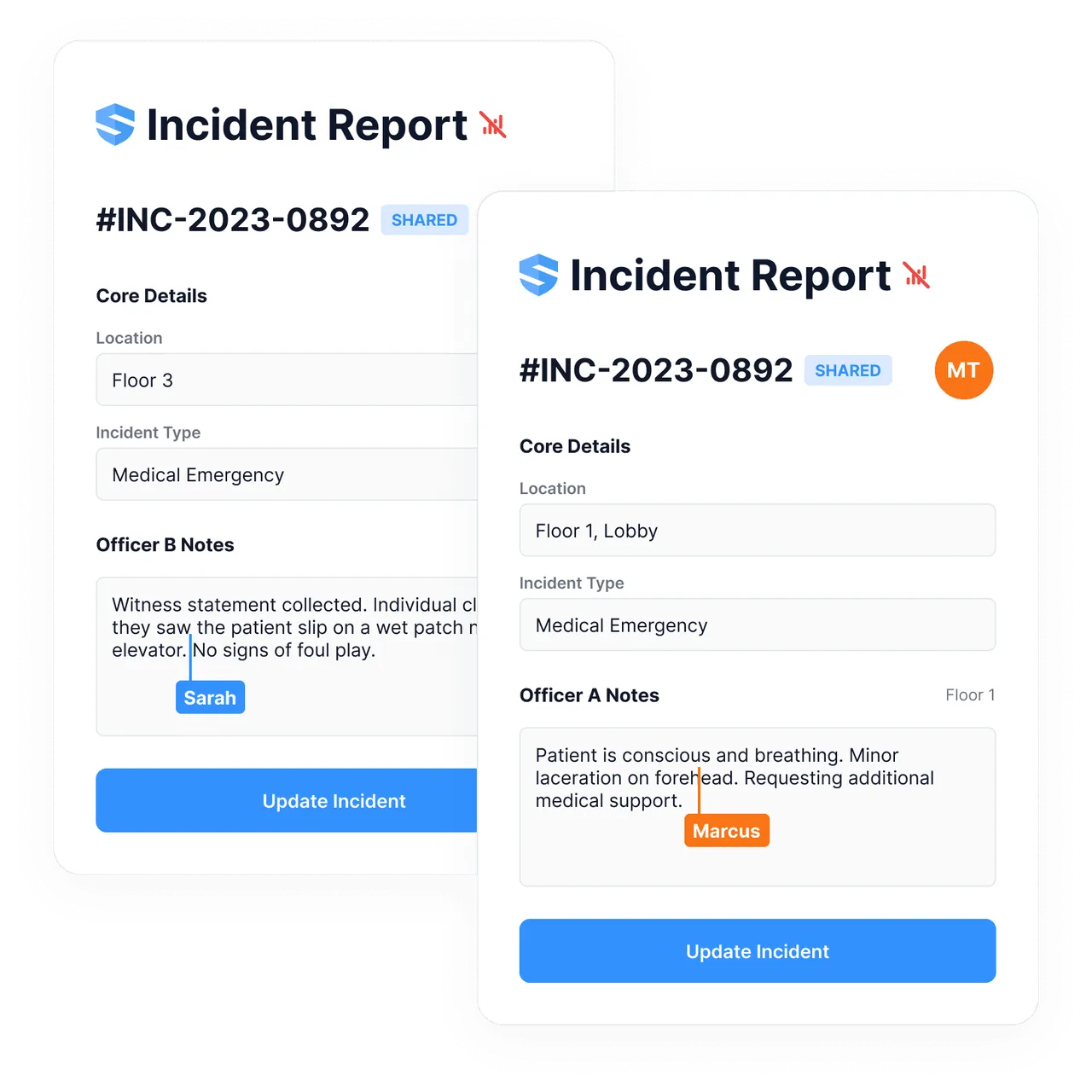
    Two incident report cards showing location, incident type, officer notes and an Update Incident button, with Sarah and Marcus cursors

    Incident report edited by two users

    Source
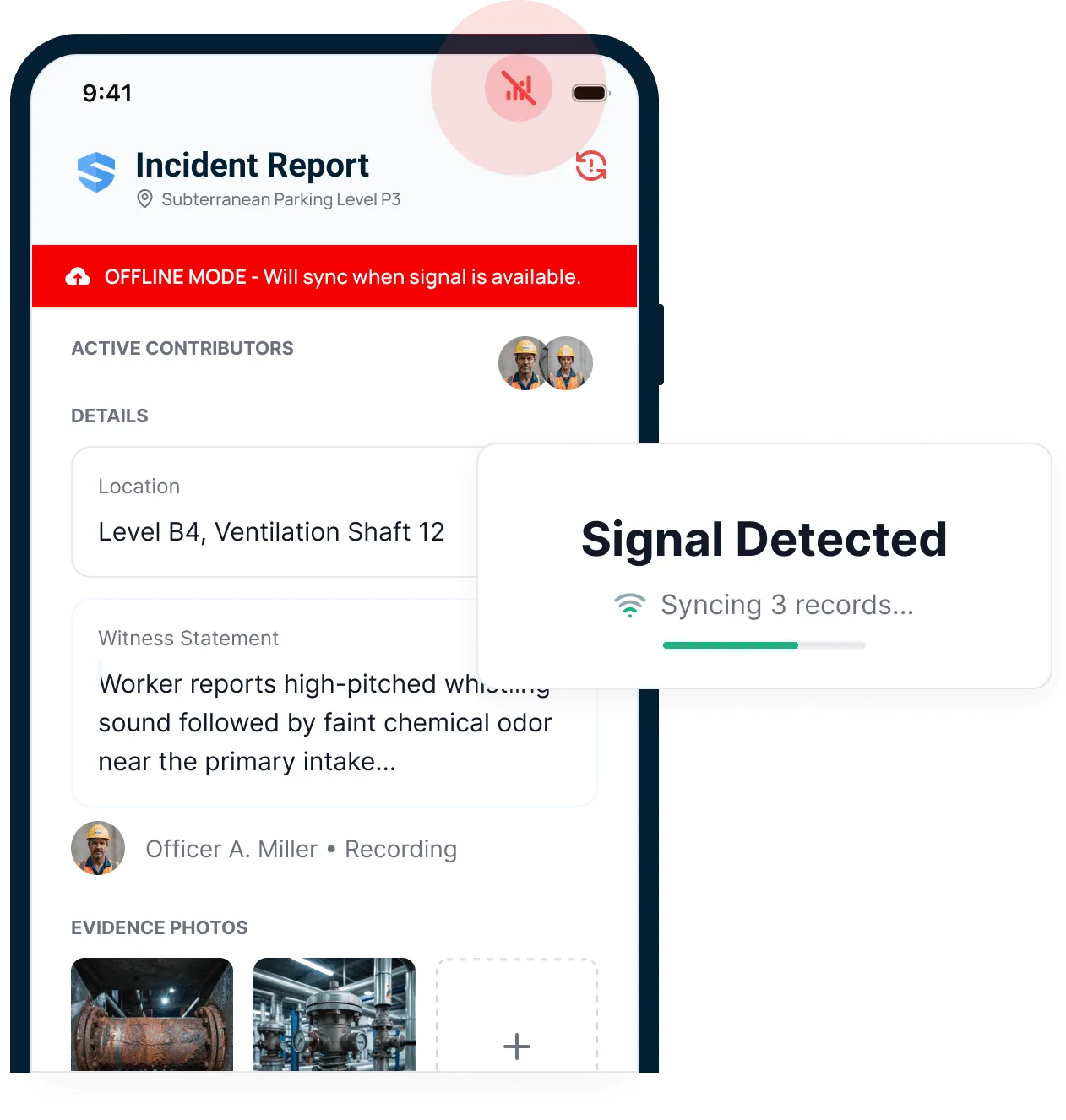
    Phone screen of an incident report with an offline banner, witness statement, evidence photos and a Signal Detected syncing card

    Offline incident report with sync notice

    Source

    Capabilities and scope

    This profile covers only the construction safety platform at salussafety.io, including the AI assistant named Rosie. It does not cover any other company or product called Salus, such as unrelated manufacturers, healthcare firms or software businesses that share the name. The vendor's About page names SALUS Safety Technology Inc., gives a Seattle, Washington address and states 400K users across 150K sites; this is the vendor's own figure. The terms of service name SALUS Technologies Inc. as the company providing the services, give a Vancouver, British Columbia address for legal notices and a Seattle address for general contact, use British Columbia law, and carry a copyright footer in the name SALUS Safety Technology Inc. The pages do not explain how the two names relate, so confirm which entity signs your contract. The site has separate United States and Canada versions, and this review reads the United States pages. No parent company, owner or funding is stated on the reviewed pages.

    Salus capabilities, evidence status and source links
    CapabilityEvidenceScope and source
    Offline field capture and syncDocumented by vendor

    The platform and offline pages describe forms, inspections, permits, incidents and SDS records working offline, with photos, signatures and voice notes, then syncing. The offline page lists limits: a record that has not synced should not be relied on as a delivered alert, urgent incidents follow the customer's own emergency procedures, and only the data needed for active sites is downloaded.

    SALUS offline mode, checked 2 October 2026SALUS platform overview, checked 2 October 2026
    Forms, JHAs, permits, inspections and corrective actionsDocumented by vendor

    The platform page lists adaptive forms for JHAs and pre-task plans, permits for high-risk work, equipment inspections, inspections with findings and action routing, and corrective actions with named owners. Form fields, permit types and approval rules are not itemised on the pages cited here; ask for a walkthrough of your own forms.

    SALUS platform overview, checked 2 October 2026
    Incident capture and OSHA recordkeeping contextDocumented by vendor

    The incidents page describes keeping evidence such as photos, voice notes and witness statements with the record, root-cause findings creating corrective actions, and OSHA-recordable context organised together. It says the customer's safety team remains responsible for recordkeeping decisions and submissions, so confirm what the OSHA 300, 300A and 301 outputs are.

    SALUS incidents module, checked 2 October 2026SALUS platform overview, checked 2 October 2026
    Worker certificates and readinessDocumented by vendor

    The certificates page describes uploaded credentials with expiry alerts at 30, 14, 7 and 1 day, and permits, equipment and high-risk forms able to check readiness. It describes Rosie's check as a comparison of uploaded evidence with the worker record, not primary-source confirmation from every issuing authority.

    SALUS certificates module, checked 2 October 2026SALUS platform overview, checked 2 October 2026
    Orientations, training, subcontractor readiness and Trust PortalDocumented by vendor

    The platform page lists QR onboarding and site access, short training, subcontractor readiness across sites, and a Trust Portal giving general contractors and owners live proof. Access scoping and what an external viewer sees are not described on the cited pages.

    SALUS platform overview, checked 2 October 2026

    More capability notes

    7 additional areas. Status describes reviewed sources, not hands-on performance.

    Also watch for: No price, plan tiers or trial are shown; a form and a specialist walkthrough are the route to a quote. Security certifications and subprocessors are not described on the reviewed pages, and the terms allow hosting in Canada or other jurisdictions. The Procore connection is not currently confirmed for incidents, inspections or observations.

    Salus pricing

    Custom quote after a short form and a specialist walkthrough; no published tiers

    The pricing page checked on 2 October 2026 shows no amount and no published plan tiers. It says quotes are tailored to the crew and jobsite footprint, the safety workflows needed, setup and migration, integrations and data connections, and rollout and support. The route to a price is a short form, after which the page says a specialist will get in touch within one business day to schedule a 30-minute walkthrough and discuss pricing. No trial, entry plan, contract term or per-user or per-site basis is described on that page. Confirm the term, the pricing basis, the modules and the AI assistant included, onboarding and migration charges, and renewal terms in writing.

    Separate pricing recheck date not recorded. Confirm current pricing with the vendor.

    Which product scope should the quote cover?

    Operational safety for construction trade contractors: orientations, certificates, training, forms and JHAs, permits, equipment, inspections, incidents, corrective actions, Trust Portal reporting and the Rosie AI assistant, on the United States site.

    Ask the vendor to identify the product, region, modules, billing unit, contract term and included services in writing.

    Offline work and integrations

    The platform and offline pages describe forms, inspections, permits, incidents and SDS records working without signal, with photos, signatures and voice notes captured in place and synced when the connection returns, with iOS and Android apps. The offline page says a record that has not synced should not be relied on as a delivered alert, points to the customer's own emergency procedures for urgent incidents, and says only the data needed for the active sites is downloaded. Test your own forms, permits and certificate lookups in a dead zone before relying on it.

    What we could not verify

    2 not verified · 1 depends on scope
    • Not verified in the sources: Rosie accuracy and independent evaluation; Security attestations and data hosting.
    • Depends on plan or configuration: API access, automations and scheduled reporting.

    Demo script

    Proposed demo: onboarding to permit to incident, offline

    1. Onboard a test worker by QR code, upload a certificate and view the expiry alert and readiness status.
    2. Request a high-risk permit from a phone in airplane mode, then sync and review the approval and any conflict check.
    3. Record an incident with photos and a voice note, ask Rosie to structure it, and show the human approval step.
    4. Create a corrective action from the incident, then show what the Procore connection moves for the linked project and how incident data reaches Procore.
    5. Generate the owner or insurer view and the OSHA-related records, noting what remains manual.

    Ask the vendor to show you

    1. Which of the modules and Rosie capabilities are in the quote, and is anything priced separately or limited by plan?
    2. Show a form, a permit and a certificate check completed offline on a phone, then synced, and what office staff see before sync.
    Use demo checklist

    Sources

    10 sources, checked

    Reviews on qhsetech.com

    Reviews may be filed under other names

    Also recorded as SALUS Safety, SALUS Safety Technology. Older entries under a previous name may describe a different release or owner.

    Star ratings and review counts from the old catalog are not shown: no source for them was recorded.