
    QHSEtech

    Appenate

    Appenate lets teams build worker-facing mobile applications around their own data and inspection processes. Native apps support field capture, while connectors move completed records into office systems. It suits buyers willing to own form design and workflow configuration.

    Evidence: Researched profile

    Built from vendor sources checked ; AI-assisted drafting. Documentation review, not a hands-on test. How pages are made

    Who is Appenate for?

    Maintenance, construction and industrial teams needing custom mobile forms with data flowing to existing business systems. Offline capability stores field data locally and synchronizes it later; it does not establish that cloud connectors, alerts, AI processing or office approvals operate while disconnected. Appenate is a configurable platform, so buyers own form logic, testing and ongoing administration. Distill, WebForms, white-labeling and hosting options require separate commercial scope.

    Worth shortlisting when custom forms and existing-system connections are central requirements. Compare the five-seat commitment and configuration effort with the cost of a simpler checklist tool before purchasing.

    Published price: USD 20 per user/month, billed annually; 5-user minimum. Free trial documented. Sources checked .

    Product tour

    Vendor visuals—not a QHSEtech hands-on test.

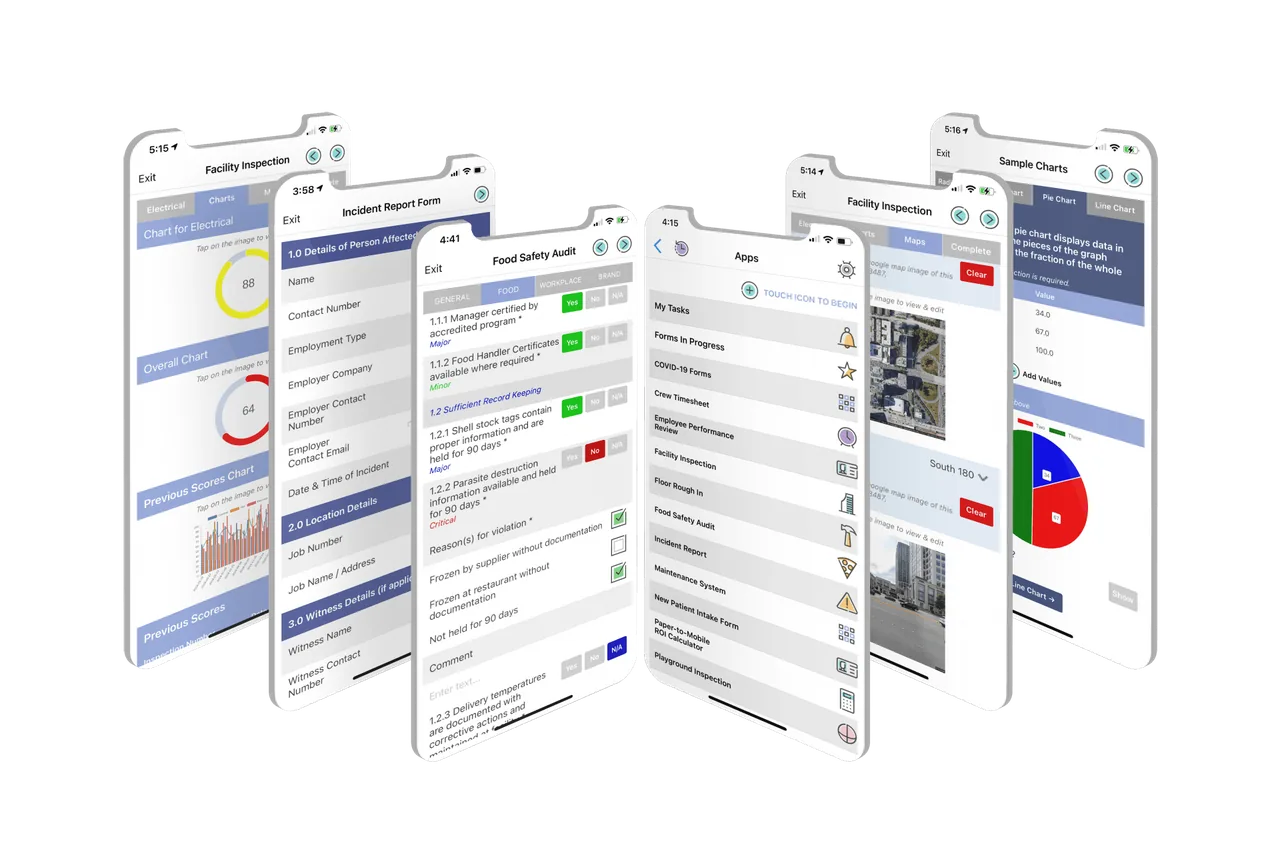
    Six phone screens showing a facility inspection, incident report form, food safety audit, app list and sample charts

    Mobile app screens: forms, app list and charts

    Source

    Capabilities and scope

    Appenate is a configurable mobile app and forms platform. The former Forms On Fire domain now redirects to Appenate and some directories list Appenate as formerly Forms On Fire; this profile covers the Appenate offering and does not assume that reseller or white-label subscriptions have identical terms. No-code field applications for inspections, maintenance, task dispatch and evidence capture, with native offline forms and plan- or quote-dependent connectors, WebForms, analytics, white-labeling and hosting options. Customers configure and govern their own operational logic.

    Appenate capabilities, evidence status and source links
    CapabilityEvidenceScope and source
    Custom field applicationsDocumented by vendor

    A drag-and-drop builder, repeated data and formulas support tailored inspection forms.

    Device fields and app features
    Offline native captureDocumented by vendor

    Native field apps collect locally and synchronize after connection returns; validate the intended setup.

    Pricing and paid-plan boundariesMobile capture and report output
    Photo, audio and video evidenceDocumented by vendor

    Forms can capture media, GPS locations, barcodes, QR codes and NFC input.

    Device fields and app features
    Report deliveryDocumented by vendor

    The vendor describes Word and Excel-based templates and PDF/email delivery.

    Mobile capture and report output
    Office-system integrationDocumented by vendor

    Documented connectors include SharePoint, SQL Server, Power BI and ArcGIS; validate credentials and plan entitlement.

    Connectors and REST integration
    Job dispatchDepends on scope

    Tasking and dispatch are listed for Premium and above.

    Pricing and paid-plan boundaries
    No-account web submissionsDepends on scope

    WebForms is a separately quoted add-on for browser submissions without login; do not assume native offline behavior.

    Pricing and paid-plan boundaries
    AI-assisted form inputDepends on scope

    Voice and photo fill are documented; review extracted fields and confirm plan allowance and connectivity.

    AI feature scope
    Conditional forms and data validationDocumented by vendor

    Forms can use validation and conditional logic to adapt visible fields and guide field users based on entered data. The customer remains responsible for designing, testing and maintaining rules that correctly represent the operational process.

    Offline storage, synchronization and validation
    Recurring task and dispatch workflowsDepends on scope

    Appenate documents recurring tasks, push notifications, task maps, minimum completion requirements and linking tasks to apps or forms. Tasking and dispatch are plan-dependent, and remote notification or reassignment requires connectivity even when an assigned form remains usable offline.

    AI feature scopePricing and paid-plan boundaries
    Dashboards and data visualizationDepends on scope

    Appenate describes mapping and enquiry screens plus Distill for combining form, spreadsheet and connected-source data. Distill is separately quoted, so do not assume its dashboards or data preparation are included in a regular mobile-forms subscription.

    AI feature scopePricing and paid-plan boundaries
    Role-based access and data protectionDepends on scope

    Appenate's DPA describes unique authentication, MFA for authorized personnel, differentiated roles, least-privilege access, encryption in transit and at rest, and SOC 2 Type II assessment. Request the current assurance report and demonstrate customer-configurable app, folder, data and administrator permissions.

    Data-processing and security controls

    More capability notes

    1 additional areas. Status describes reviewed sources, not hands-on performance.

    Also watch for: Requires form design and ongoing configuration ownership. Five-user paid minimum can outweigh low per-user pricing for very small crews. External web submissions and advanced platform options need separate scope.

    Appenate pricing

    Per-user Standard, Premium and Pro subscriptions

    Entry price as recorded: USD 20 per user/month, billed annually; 5-user minimum.

    Pricing sources checked : Checked against the vendor's published pricing.

    The Appenate pricing page has 6 published prices (unit, term, minimum and source), the entry cost worked out, annual against monthly billing and 9 Audits & Inspections products priced in the same unit.

    See the full Appenate price table →

    Native mobile offline capture and later sync

    The vendor documents local mobile data capture followed by synchronization when connectivity returns. Prepare the actual app before a remote visit and verify uploaded records afterward. Include those in the demonstration.

    What we could not verify

    7 depend on scope · 1 note

    Demo script

    Demo request: disconnected equipment inspection

    1. Configure required evidence, an asset identifier and a failed-check branch.
    2. Load the app, disconnect, complete the inspection and attach media.
    3. Reconnect, verify the server record and inspect interrupted-upload recovery.

    Demo request: inspection-to-office handover

    1. Map a sample inspection to the intended SharePoint or database destination.
    2. Submit a failed check and inspect the generated report and notification.
    3. Simulate destination rejection and demonstrate administrator recovery.

    Demo request: dispatched inspection to reviewed office record

    1. Create a recurring task linked to an inspection form with conditional failure fields, required evidence and minimum completion rules.
    2. Dispatch it with a push notification, disconnect the device and complete the form with media and signature.
    3. Reconnect and verify task status, server receipt, generated report and delivery to the intended connector.
    4. Reject or correct an incomplete submission through the proposed office workflow and inspect the retained original evidence and timestamps.

    Ask the vendor to show you

    1. Demonstrate a disconnected inspection with photos and its successful server receipt.
    2. What happens after an interrupted upload or conflicting edit?
    3. Which connectors and external-user submissions are included in the proposed quote?
    4. Who will maintain forms, permissions and report templates after launch?
    5. Which task, notification, connector and report actions wait until a disconnected device synchronizes?
    6. How are conflicting edits, interrupted media uploads, duplicates and rejected connector deliveries surfaced and recovered?
    Use demo checklist

    Questions the sources answer

    Can Appenate run inspections without cell service?

    Appenate documents offline collection in its native apps with synchronization after reconnection. Demonstrate the complete form, media upload and receipt confirmation on the devices your team uses.

    Can contractors submit Appenate forms without an account?

    The optional WebForms offering allows browser submissions without login. Request its price and access controls separately, and verify the intended contractor workflow.

    Does Appenate connect inspection records to existing systems?

    The vendor lists built-in connectors and a REST API. Ask for a working example against your own target system, including failed-delivery handling and the purchased connector entitlement.

    Can we try Appenate before buying?

    The signup page advertises a 15-day trial without a credit card. Use it to test a representative field workflow and quantify administration effort, rather than treating a template demonstration as proof of fit.

    Do Appenate integrations run while a device is offline?

    The native app can retain form data locally and synchronize it when connectivity returns. That does not mean cloud connectors, notifications, AI processing or destination-system updates occur during the outage; demonstrate their post-sync behavior.

    Can Appenate AI approve a safety-critical form?

    Appenate's own AI policy says users must not rely solely on AI outputs for critical safety sign-offs, legal decisions or engineering approvals. Keep a qualified human review in the workflow.

    Sources and change log

    11 sources, checked
    • : Expanded the buyer evidence with conditional logic, task dispatch, analytics, data-protection, white-label and AI-governance boundaries from official Appenate sources.
    • : Added sourced pricing, minimum-seat context, offline verification boundaries and buyer demonstration scenarios.

    Compare with

    Drawn from the profiles behind the Alternatives list above: most category tags shared with Appenate first, then the closest overlap in documented capability names, then A to Z. Ratings, search demand and sponsorship are not used; rows are shown A to Z.

    • FastField by Quickbase

      Shared category tags: 3 (Mobile Forms, Offline Inspections, others).

      Same: scope, offline, price and trial.

    • Fulcrum

      Shared category tags: 1 (Mobile Forms).

      Same: scope, offline, price and trial.

    • Kizeo Forms

      Shared category tags: 3 (Mobile Forms, Offline Inspections, others).

      Same: scope, offline, price and trial.

    All Appenate alternatives

    Reviews on qhsetech.com

    Reviews may be filed under other names

    Also recorded as Appenate Mobile Forms, Forms On Fire. Older entries under a previous name may describe a different release or owner.

    Star ratings and review counts from the old catalog are not shown: no source for them was recorded.