Fulcrum

    Location-rich field inspections with prepared offline collection

    Vendor sources checked · Documentation review

    Configurable field records and geospatial collection; integration and administration features depend on the package.

    This profile uses official documentation and editorial evaluation scenarios. It does not present firsthand product testing or a verified aggregate review score.

    Audit & Inspection
    From US$43/user/month; annual subscription, minimum five users

    Direct vendor link · Confirm demo access with the vendor

    Editorial review by Dimitris Mitsios

    Founder of The QHSE Standard; product marketing at Tekmon. LinkedIn

    Tekmon is a featured commercial partner. Disclosure and review scope

    At a Glance

    Best for

    Field teams whose inspections need location, maps and structured records

    Standout

    Published offline collection instructions

    Watch out for

    Five-user annual commitment may exceed a small team's needs

    Pricing

    Confirm plan and scope

    Overview

    Fulcrum connects configurable field forms with location data. Evaluate a representative asset inspection from mobile capture through cloud synchronization and office export. Scope geospatial content and any integration separately from the form itself.

    Workflows to evaluate

    Use these editorial scenarios in a permitted demonstration. They are evaluation exercises; no test results are implied.

    Proposed demo: remote asset inspection

    1. Prepare the app, records and a Streets or Satellite work area on the intended device.
    2. Disconnect and capture one asset finding with location and media, including a point beyond the downloaded area.
    3. Reconnect and reconcile the device record, attachments and office view.

    Proposed demo: checklist correction and evidence review

    1. Configure a representative repeated asset section and required evidence fields.
    2. Ask the vendor to demonstrate an incomplete finding, correction and reviewer access.
    3. Export the resulting record and compare its identifiers and attachments with the source.

    Proposed demo: a record sent to another system

    1. Use the proposed Elite or Enterprise integration entitlement and map the destination fields.
    2. Create and then correct a test record; ask how the receiving system handles updates.
    3. Demonstrate an interrupted transfer, ownership of recovery and a usable exit export.

    Capabilities and plan scope

    Documentation describes availability; your demonstration establishes whether the proposed scope meets your requirement.

    Fulcrum capabilities, evidence status and source links
    CapabilityEvidenceScope and source
    Disconnected field recordsDocumented by vendor

    Record collection can continue without internet; cloud synchronization requires a connection.

    Offline collection and synchronization
    Prepared offline basemapsDepends on scope

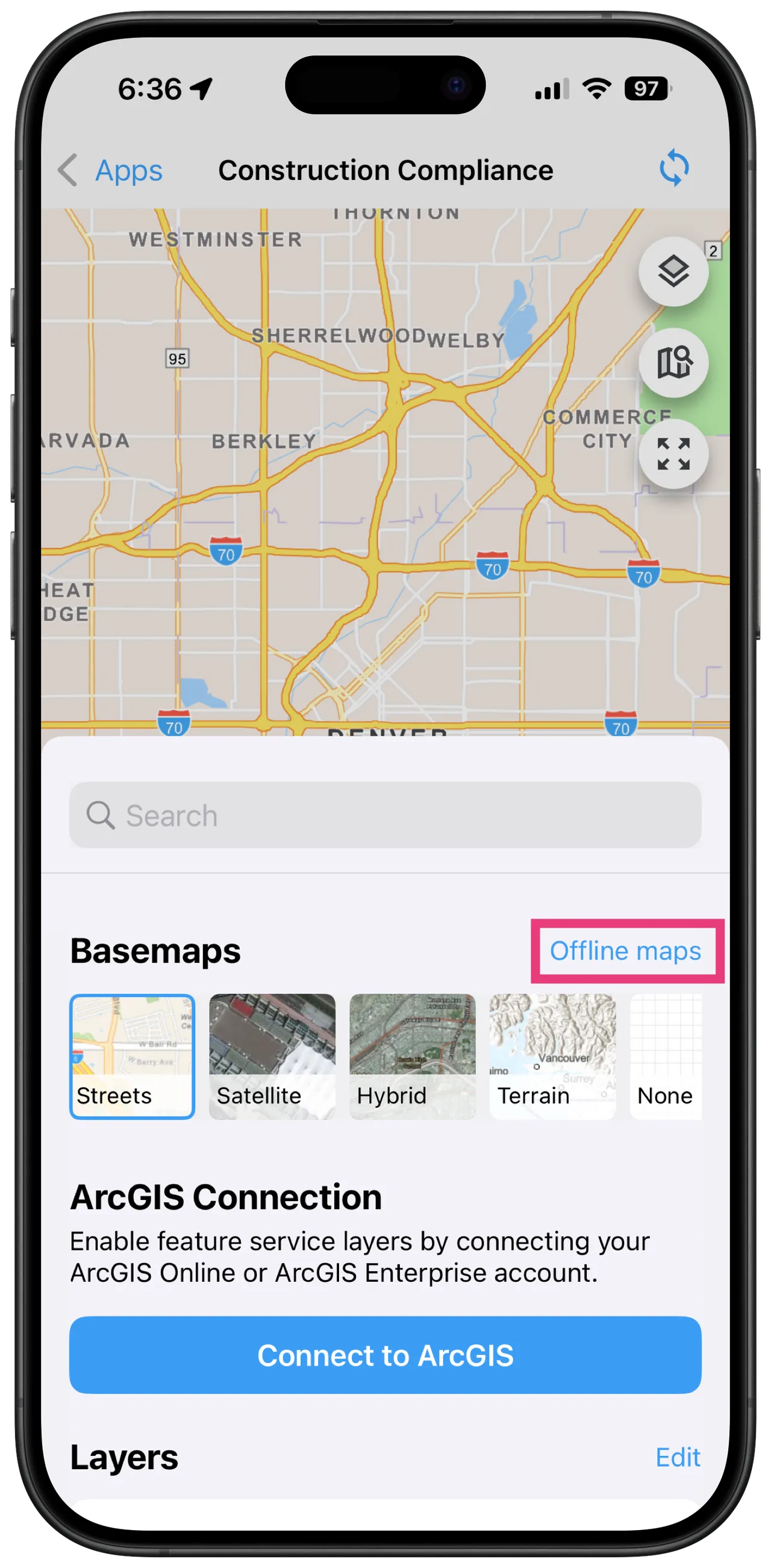
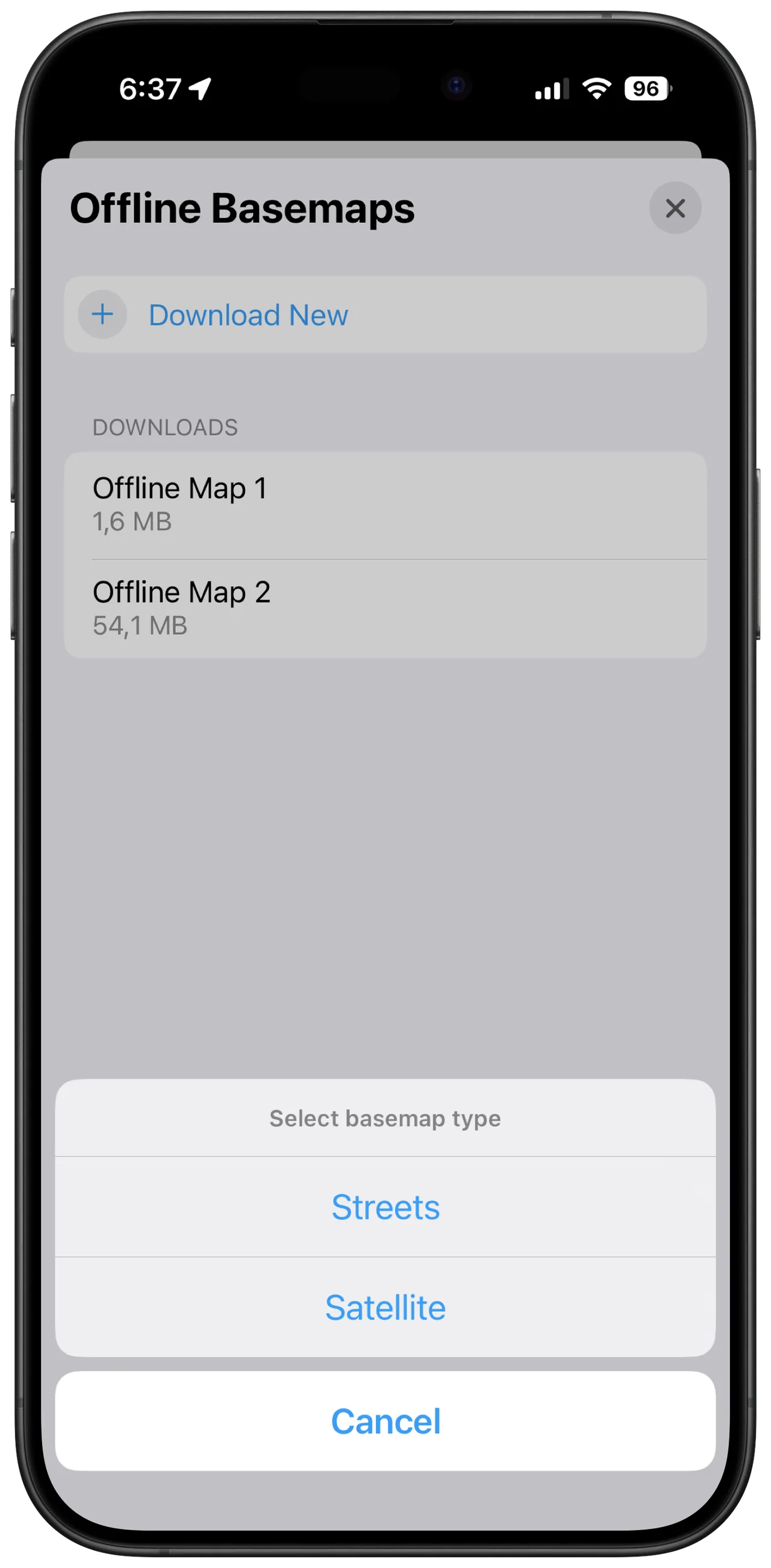
    Download Streets or Satellite coverage on each device with Esri Maps enabled. Terrain and Hybrid are outside this documented download feature.

    Preparing offline Esri basemaps
    Configurable inspection formsDocumented by vendor

    The package listing includes conditional fields, repeatable entries and linked records; demonstrate your validation rules.

    Pricing and package boundaries
    Evidence captureDocumented by vendor

    Published field types include photos, audio, video, barcodes, QR codes and signatures. Check the evidence retained in your exported record.

    Pricing and package boundaries
    APIs and webhooksDepends on scope

    Operational and query APIs plus webhooks are listed in Elite and Enterprise; budget implementation separately.

    Pricing and package boundaries
    Office export and reportsDocumented by vendor

    Professional lists import, export and reports. Verify the required destination format and attachment handoff in a demonstration.

    Pricing and package boundaries

    Before you book a demo

    Based on the vendor sources linked below, consulted on . This is a documentation review, not a hands-on test. Fit assessments and demo questions are our editorial interpretation.

    Fulcrum is the field operations platform developed by Spatial Networks. Professional, Elite and Enterprise are distinct subscription packages.

    Pricing and product-scope recheck

    : Selected sources checked.

    Rechecked published US-dollar prices, annual five-user minimum, API package boundaries and the advertised 14-day trial. This verifies the public offer, not tenant access, custom fees or a negotiated agreement.

    This targeted recheck does not refresh every claim in the profile. Earlier source dates and any unresolved requirements remain applicable.

    When to consider it

    Field teams whose inspections need location, maps and structured records. An annual five-user commitment applies, and API access requires the appropriate package. Prove the prepared map and record workflow on the intended device.

    Mobile offline capture; synchronization requires connectivity

    Mobile records can be collected offline; cloud synchronization needs connectivity. Prepare apps and required records before departure. The documented Esri basemap download feature requires Esri Maps to be enabled and supports Streets or Satellite, not Terrain or Hybrid. Download the work area on each device while connected. Demonstrate coverage boundaries, attachments and office receipt rather than treating offline capture as proof of a completed cloud handoff.

    Ask the vendor to show you

    1. Prepare a map and inspection app, disconnect and record a finding with media; show the synchronized cloud record.
    2. Change one record on two devices and demonstrate reconciliation without losing evidence.
    3. Export a completed record and explain the API/package needed to send it to our asset system.
    4. Quote annual users, storage, integration services, taxes and renewal conditions separately.
    Use the full demo checklist

    Directory listing

    Check current details with the vendor

    Fits All sizes

    Company size coverage

    0+ Industries

    Fulcrum use-cases mapped

    Key Features

    Configurable field forms
    Offline data collection
    Location-rich inspection records
    Media and signature capture
    Package-dependent API and webhooks

    Reasons to shortlist and points to check

    Published offline collection instructions
    Explicit annual minimum-user commercial terms
    Geospatial and integration package distinctions
    Five-user annual commitment may exceed a small team's needs
    Elite scope is needed for published API access
    Cloud receipt depends on reconnection

    Fulcrum pricing

    Pricing basis

    US$43/user/month; annual subscription, minimum five users

    Model: Annual subscription; Professional, Elite and Enterprise

    Free trial

    Professional is US$43 and Elite US$55 per user/month. All plans require an annual subscription and at least five users; Enterprise requires a proposal. Confirm taxes, additional storage and services. The official trial landing page advertises 14 days; confirm package access before evaluation.

    Is Fulcrum worth the price?

    In our editorial judgment, Fulcrum may be worth its price when location-rich inspections justify the annual five-user commitment and required package. It is less suitable when a basic checklist meets the need or the team cannot justify the minimum subscription.

    Editorial assessment based on documented scope, not a measured return on investment. Compare a written proposal with your requirements and pilot results.

    Confirm pricing with the vendor

    Pricing varies by modules, users, and contract length. Always confirm with the vendor.

    See Fulcrum in action

    Request a product demo

    Get Demo

    Evaluate Fulcrum alongside other options

    Start with the same workflow and compare quoted scope, unresolved questions and observed demo results.

    Considering alternatives?

    Free 60-second quiz

    Not sure if Fulcrum is the right fit?

    Take our 60-second quiz and get a free, expert-curated shortlist of the 3 best QHSE platforms for your industry, size, and processes.

    • 3 personalized matches
    • Expert-curated
    • 100% free
    • No signup wall
    Find My Best Match

    Reviews on qhsetech.com (0)

    Be the first to review Fulcrum

    Describe what you used, what worked, and what you would check before buying again.

    Frequently Asked Questions

    What is the minimum subscription?
    The public offer requires at least five users and an annual subscription. Professional is US$43 and Elite US$55 per user/month; request a proposal for Enterprise and any services.
    Can Fulcrum collect records without internet?
    Yes, the help center documents disconnected collection. Cloud synchronization needs connectivity, so a saved mobile record is not proof that the office has received it.
    Which basemaps can be downloaded?
    The documented Esri Maps feature supports Streets and Satellite with the relevant area downloaded in advance. Terrain and Hybrid are not supported by that download feature; custom MBTiles are a separate route to discuss.
    Can the downloaded map be shared between devices?
    The help article describes downloads as local to the device and not shareable between users or devices. Include map preparation for each device in the pilot.
    Does Professional include APIs and webhooks?
    The published package boundary places these in Elite and Enterprise. Confirm the required interface, authentication, support and implementation charges.
    How long is the advertised free trial?
    The official landing page advertises a 14-day free trial. Confirm available package features and expiry arrangements; this review did not create or test a tenant.
    Does an offline record trigger a connected integration immediately?
    Disconnected capture cannot establish receipt in another system. Ask the vendor to show synchronization and downstream processing after reconnection, including recovery from a failed transfer.
    What should we export during the evaluation?
    Use your own representative record, linked evidence and required identifiers. Compare the exported result with the original and ask which history, media and formats your proposed package includes.
    Is Fulcrum worth the price?
    In our editorial judgment, Fulcrum may be worth its price when location-rich inspections justify the annual five-user commitment and required package. It is less suitable when a basic checklist meets the need or the team cannot justify the minimum subscription.

    Answers use the vendor-source review and its stated scope.

    Interested in Fulcrum?

    Get a personalized demo and see how it fits your organization.

    Book a Demo

    Reasons to evaluate

    • Published offline collection instructions
    • Explicit annual minimum-user commercial terms
    • Geospatial and integration package distinctions
    Visit Website View Alternatives

    Pricing

    Model: Annual subscription; Professional, Elite and Enterprise

    Starting at: US$43/user/month; annual subscription, minimum five users

    Professional is US$43 and Elite US$55 per user/month. All plans require an annual subscription and at least five users; Enterprise requires a proposal. Confirm taxes, additional storage and services. The official trial landing page advertises 14 days; confirm package access before evaluation.

    Supported Processes

    Audit ManagementInspectionsMobile Forms

    Industries

    Company Size

    employees

    Standards and frameworks in the catalog

    Catalog references are not evidence of certification. Confirm the relevant product, certificate holder and scope.