QHSEtech

    Clappia

    Clappia lets teams configure their own inspection and reporting apps. Its relevance to QHSE is flexible field capture, including photos, followed by the workflow your team designs. Budget for someone to own the forms and their changes.

    Evidence: Researched profile

    Built from vendor sources checked ; AI-assisted drafting. Documentation review, not a hands-on test. How pages are made

    Who is Clappia for?

    Teams with specific inspection forms and an internal owner who can configure and maintain them. Clappia is a configurable platform, so the buyer owns process design, testing, permissions, changes and ongoing administration. Prepared mobile forms and records can work offline, but public links and status changes cannot; do not treat an offline submission as an approved inspection or authority to work. Bulk uploads and edits do not trigger normal workflows. Approval nodes can complete after any configured approver changes status or after expiry, so safe branching must be demonstrated. AI-created apps and AI Block outputs require human review, validation and sensitive-data governance. GPS can be user-adjustable and does not prove presence. Confirm plan entitlements, API and AI call pools, add-ons, third-party keys, currency and taxes.

    Worth shortlisting when your forms change frequently and configuration ownership is realistic. Compare ongoing administration with the cost of a more predefined inspection tool.

    Published price: INR 600/user/month, monthly billing. Free trial documented. Sources checked .

    Product tour

    Vendor visuals—not a QHSEtech hands-on test.

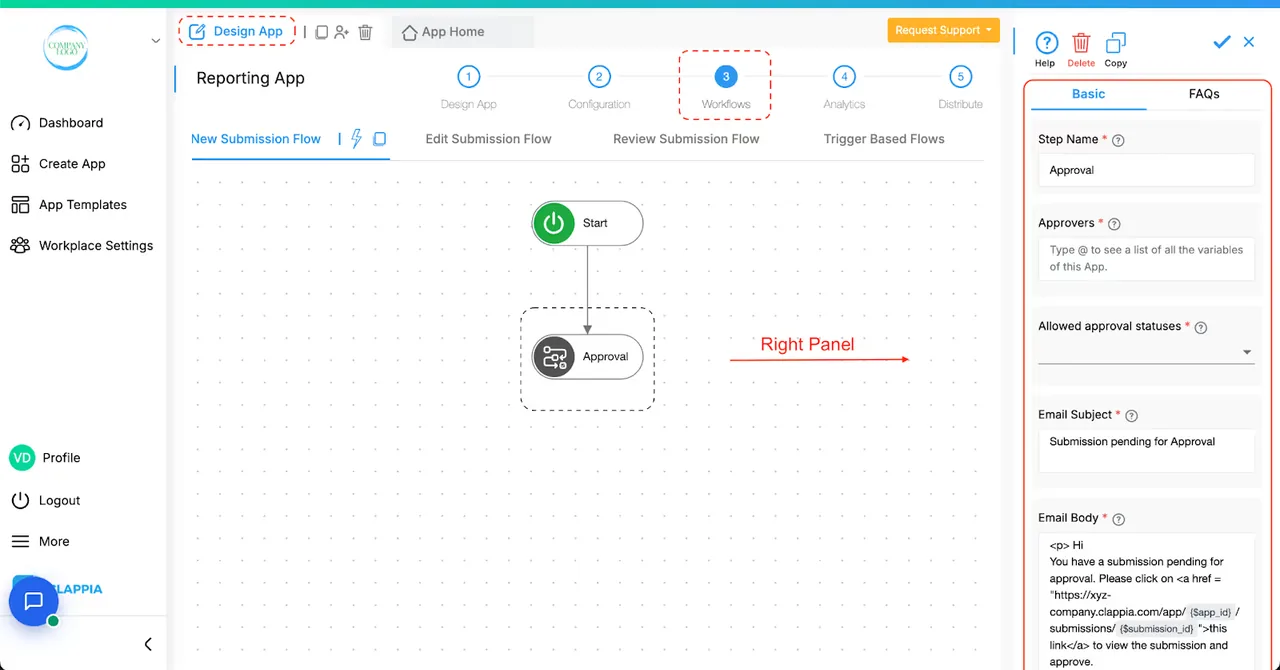
    Clappia workflow editor with a Start step linked to an Approval node and its right-hand settings panel for approvers, statuses and email.

    Workflow editor with an Approval node

    Source
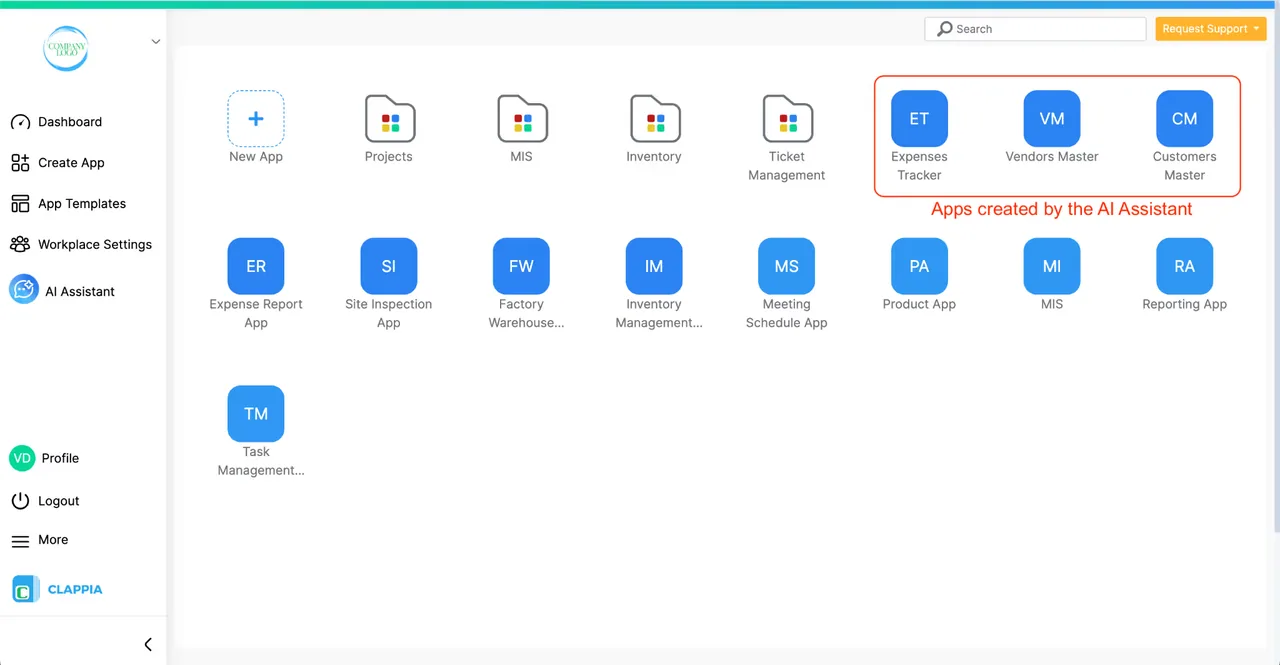
    Clappia workplace dashboard listing example apps such as Site Inspection App, with three apps highlighted as created by the AI Assistant.

    Workplace dashboard with AI Assistant menu and apps

    Source

    Capabilities and scope

    Clappia is a general-purpose no-code application platform. Safety inspections and reporting are configured applications, not evidence of a complete preconfigured EHS suite. Clappia's general-purpose no-code workplace for configurable mobile and web apps, forms, workflows, public links, APIs, GPS and optional AI features. QHSE inspections, incidents and approvals are buyer-configured applications rather than a documented preconfigured EHS suite. Plan, add-on, AI-provider, public-link and third-party service scopes must be mapped separately.

    Clappia capabilities, evidence status and source links
    CapabilityEvidenceScope and source
    Offline new and existing recordsDepends on scope

    Requires preloading the app and any existing records. Offline status changes are excluded.

    Offline preparation and limitations
    Photo and file captureDocumented by vendor

    Mobile attachments can be captured offline and uploaded with the submission after connectivity returns; web offline submission is excluded.

    Photo and file evidence
    No-account reportingDepends on scope

    Shared web links accept submissions without accounts. Users cannot revisit or edit previous submissions and need connectivity.

    Online link sharing
    Public APIsDepends on scope

    Documents authenticated submission creation, retrieval and updates. Confirm quota, key management and endpoint entitlement.

    Public API documentation
    Licence administrationDocumented by vendor

    Paid licences are managed through workplace billing with roles for managers, builders and users.

    Subscription and licence administration
    Approval workflowsDepends on scope

    Listed in Professional; verify that the intended approval design is included.

    Plans and regional pricing
    Event-driven workflow automationDepends on scope

    Clappia documents user-triggered flows for new, edited and reviewed submissions plus trigger-based flows and nodes for email, Slack, REST APIs, push notifications, approvals, SMS, schedules and other actions. Bulk Upload and Bulk Edit do not trigger workflows. Confirm plan entitlement, quotas, ordering, retries, idempotency, failed-node visibility and every critical bulk or system-generated path before relying on automation.

    Workflow triggers, nodes and bulk-operation exception : checked 29 September 2026Add-on and usage pricing for REST API and AI calls : checked 29 September 2026
    Status-based approval nodeDepends on scope

    The Approval node emails configured admin or reviewer approvers and completes when any configured approver changes the submission to an allowed status; after the configured expiry it also completes and later nodes continue. System-created or edited submissions require an explicit Execute with System Workflow setting. Demonstrate multi-approver rules, rejection and change-request statuses, expiry branches, segregation of duties, reassignment, comments, signatures and audit history; node completion is not equivalent to safe or compliant approval.

    Approval node, approver completion, expiry and system-workflow behavior : checked 29 September 2026
    AI-assisted app and workflow buildingDepends on scope

    The AI Assistant can draft apps from prompts or uploaded text-based documents, edit fields, formulas and workflows, and explain features. Access is currently on request and only app builders can create or edit. Clappia explicitly tells users to review and test AI-created apps and notes limitations with complex logic and inter-app fields. Apply change control, sandbox testing, approvals, rollback and sensitive-document policy before production use.

    AI Assistant app creation, editing, document upload and review cautions : checked 29 September 2026
    AI processing block with structured outputsDepends on scope

    The AI Block can generate or extract one or multiple outputs for use in forms and logic, using Clappia AI or supported third-party providers; administrators may supply certain provider API keys. Published call pools, add-ons and provider billing differ. Confirm model and provider, region, retention, training use, prompt and output logging, secrets handling, cost, failure behavior and human validation. AI output must not authorize work, close findings or establish factual evidence without review.

    AI Block outputs, providers, limits and own-key option : checked 29 September 2026Add-on and usage pricing for REST API and AI calls : checked 29 September 2026
    GPS capture and configurable location editingDepends on scope

    The GPS block captures coordinates and can fetch an address, display a map and optionally allow users to reposition the pin. Public link use needs the customer's Google Maps API key for address fetching or pin movement, with potential third-party charges. Confirm device permissions, accuracy metadata, offline behavior, user-edit indicators, geocoding terms, API-key restrictions and audit history; coordinates or a map pin do not prove a person performed work at that location.

    GPS coordinates, manual adjustment, address and public-link API boundary : checked 29 September 2026

    Also watch for: Configuration ownership remains with the buyer. Offline status changes are not supported. Public links cannot be used offline.

    Clappia pricing

    Free plan and per-user subscriptions

    Entry price as recorded: INR 600/user/month, monthly billing.

    Pricing sources checked : Checked against the vendor's published pricing.

    The Clappia pricing page has 4 published prices (unit, term, minimum and source), annual against monthly billing and 9 Audits & Inspections products priced in the same unit.

    See the full Clappia price table →

    Prepared mobile capture offline; public links and status approvals online only

    The mobile app can queue prepared new submissions and edits to preloaded records, including supported attachments, for later synchronization. Existing records must be loaded before disconnection; status changes are not supported offline and browser link sharing remains online-only. Demonstrate app and record preparation, authentication expiry, stale versions, attachment persistence, device restart, simultaneous edits, failed or partial uploads, retry, duplicate prevention and final server state. Keep approval, escalation and operational authority in an online or independently controlled process.

    What we could not verify

    9 depend on scope

    Demo script

    Demo exercise: disconnected inspection and recovery

    1. Open the configured checklist and relevant existing records online.
    2. Disconnect and capture a finding with a photo, then restart the app.
    3. Reconnect and inspect pending submissions and pending files separately.
    4. Confirm the final record before allowing the supervisor to change its status.

    Demo exercise: external reporter and internal review

    1. Open a shared reporting link in a browser without signing in.
    2. Submit a test hazard with only the identity fields you actually require.
    3. Check what the reporter can see afterward and how a correction is handled.
    4. Compare that experience with an authenticated mobile worker.

    Demo exercise: AI-drafted inspection through controlled approval

    1. Use a sanitized fictional checklist to have the AI Assistant draft an inspection app, then review every field, formula, permission and workflow change before publishing to a test workplace.
    2. Submit one record manually with GPS and evidence, create another through a system workflow, and bulk-upload a third to expose which approval and notification paths do or do not run.
    3. Route the manual and system-created records to approval, let one approval expire, reject another and attempt approval by an unauthorized user; verify branching, reminders, comments and retained history.
    4. Promote only the reviewed configuration, record the approved version and rollback procedure, and export the submissions, AI-assisted changes, workflow executions, failures, status decisions and API usage.

    Ask the vendor to show you

    1. Which forms and existing records must workers preload?
    2. How do pending files recover after an interrupted upload?
    3. Can our external reporters use an online link without an account?
    4. What workflow and API usage charges apply to our workload?
    5. Show which submission paths bypass workflows, including bulk upload, bulk edit, system workflows and offline synchronization.
    6. For each approval, demonstrate the required approvers, expiry branch, rejection, change request, unauthorized attempt and retained decision evidence.
    Use demo checklist

    Questions the sources answer

    Can Clappia inspections work without cell service?

    Prepared mobile apps can collect data offline. Existing records need separate preloading. Include a restart and reconnection in your evaluation.

    Can contractors submit Clappia forms without an account?

    Yes, through link sharing while online. That route does not provide access to previous submissions or offline operation. Design a separate correction process.

    Does Clappia upload inspection photos after reconnecting?

    Its mobile file documentation describes local storage and later upload of attachments. Check file permissions, sizes and upload completion with your own devices.

    Is Clappia a ready-made QHSE management system?

    It is a configurable application platform. Map your required incident, approval and follow-up processes before deciding whether a configured app is sufficient.

    Do Clappia workflows run after bulk uploads or bulk edits?

    The official workflow documentation says they do not. Critical imports need a separately tested process; opening and saving records one by one is the documented current workaround for triggering edit workflows.

    Does an expired Clappia Approval node mean a request was approved?

    No. The node can complete after its configured expiration and downstream steps then continue. Configure an explicit condition after the node, test the timeout path and keep approval authority separate from workflow completion.

    Can AI Block output approve work or close a safety finding?

    It can generate structured outputs for use in logic, but the result is model-generated and may consume different provider or Clappia call pools. Require human verification and never use an unreviewed output as operational authority or factual evidence.

    Does Clappia GPS prove a worker was at the inspection location?

    No. Accuracy depends on the device and permissions, and the configuration can allow manual pin movement. Public-link address or pin features may require the buyer's Google Maps key. Preserve edit indicators and corroborate location when it matters.

    Sources and change log

    13 sources, checked
    • Official Clappia product, pricing and help documentation, not hands-on testing, independent customer testimony, a security assessment or validation of a configured QHSE application.
    • General platform features establish building blocks, not a ready-made safety process.
    • AI features, workflow nodes, APIs, GPS and third-party services require plan, quota, privacy and configuration confirmation.
    • AI-created logic and outputs are treated as drafts requiring human review; location and completed workflow states do not prove physical presence, control effectiveness or authority to work.

    Compare with

    Drawn from the profiles behind the Alternatives list above: most category tags shared with Clappia first, then the closest overlap in documented capability names, then A to Z. Ratings, search demand and sponsorship are not used; rows are shown A to Z.

    • Appenate

      Shared category tags: 2 (Mobile Forms, Offline Inspections).

      Differs: offline documented workflow (this profile: partial workflow).

      Same: scope, price and trial.

    • Array (BuildArray)

      No shared category tag.

      Same: scope, offline, price and trial.

    • Dashpivot by Sitemate

      No shared category tag.

      Differs: scope QHSE Platforms (this profile: Audits & Inspections).

      Same: offline, price and trial.

    All Clappia alternatives

    Reviews on qhsetech.com

    Star ratings and review counts from the old catalog are not shown: no source for them was recorded.