QHSEtech

    Fluix

    Fluix combines field data capture with a defined route for review and delivery. It suits teams replacing forms that otherwise travel through email and shared folders. Evaluate the complete submission-to-approval process, including how a returned form is corrected and where the final record is stored.

    Evidence: Researched profile

    Built from vendor sources checked ; AI-assisted drafting. Documentation review, not a hands-on test. How pages are made

    Who is Fluix for?

    Field teams that need offline forms followed by office review and document delivery. Offline capture depends on prior synchronization and supported mobile behavior; unsynchronized records remain device-dependent and can be lost. Guest access, multi-step approvals, datasets, analytics, SSO and integrations may be plan-specific. Electronic signatures and audit history support evidence but do not establish a qualified-signature regime or compliance by themselves. Test failed HTTP or connector submissions, retries and duplicate prevention, and request the current SOC 2 report and scope rather than relying on a marketing statement.

    Worth evaluating when the value comes from routing and closing a field record, as well as collecting it. Include the minimum-seat commitment and office-review requirements when comparing an inexpensive form-only tool.

    Free trial documented. Sources checked .

    Product tour

    Vendor visuals—not a QHSEtech hands-on test.

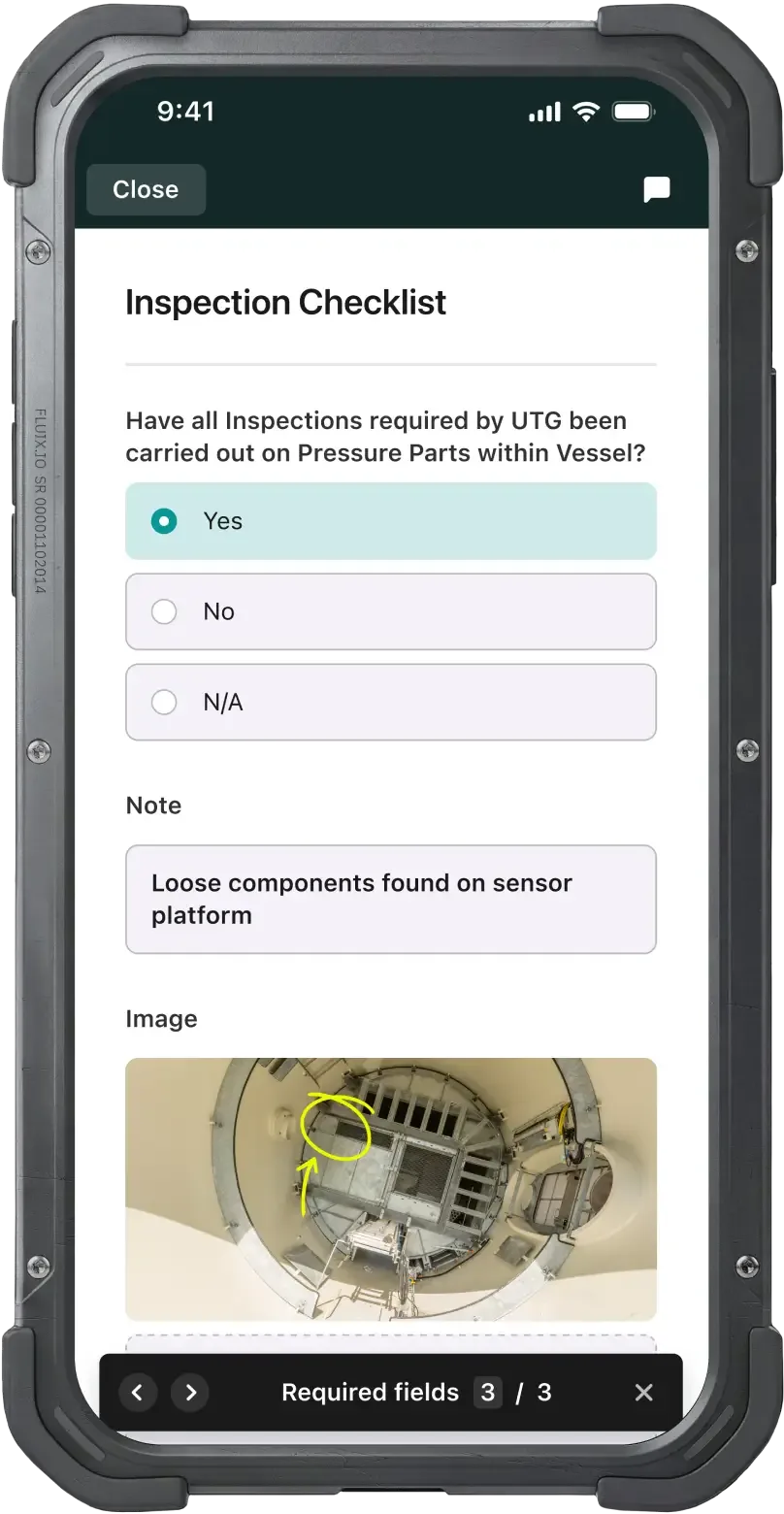
    Phone screen of an Inspection Checklist with Yes/No/N-A options, a note, a photo with a hand-drawn circle and a required-fields counter

    Mobile inspection checklist with note and annotated photo

    Source

    Capabilities and scope

    Fluix provides mobile forms and document workflows. Its current pricing page uses Crews, Operations and Enterprise, while older help and solution pages still mention Core; confirm current entitlement mapping. Fluix combines mobile forms and document workflows with conditional routing, approvals, role-based access, datasets, reporting and integration actions. Current pricing uses Crews, Operations and Enterprise, while parts of the help center still reflect older Documents, Tasks or Core terminology. Confirm the current application, plan, user minimums, guest rights, storage, analytics and integration entitlements for every required workflow.

    Fluix capabilities, evidence status and source links
    CapabilityEvidenceScope and source
    Form and document captureDocumented by vendor

    The vendor describes mobile forms, electronic signatures, code scanning and location/time fields.

    Form and workflow capabilities
    Offline submission queueDepends on scope

    Prepared mobile forms wait locally for reconnection; first login and live server information remain online tasks.

    Offline behavior and limitations
    Multi-step approvalsDepends on scope

    The current package comparison places multi-step approvals in Operations.

    Current plans and minimums
    External guest accessDepends on scope

    Operations advertises guest access; verify guest actions and licence conditions.

    Current plans and minimums
    Integration workflowsDepends on scope

    Help examples use external automation platforms and older Core naming. Confirm the current package and third-party account requirements.

    Integration configuration examples
    Safety checklist use casesDocumented by vendor

    The safety product page describes recurring site checks and hazard-assessment form workflows, not certification of the customer's process.

    Safety inspection use cases
    Conditional routing and escalationDepends on scope

    Fluix documents branching based on submitted field values, routing to email, storage, CRM or another approval round, plus notifications and overdue redirection in current workflow tooling. Confirm plan entitlement, supported field logic, exception paths and change control for the proposed application.

    Conditional routing examples and setupForm and workflow capabilitiesWorkflow configuration FAQ on task reminders and overdue redirection
    Document status and workflow audit historyDocumented by vendor

    Document Status shows the current stage, responsible user or group and timestamps for workflow movements, and can export status data through CSV, XLS or API. Test whether content edits, signatures, comments, failed submissions and reversals have the history required by the buyer.

    Document status, workflow history and API export
    Datasets and reporting exportsDepends on scope

    Fluix datasets can collect submitted form fields for aggregation and export, with a Data Analyst role controlling access. Collection begins after the dataset submit action is added and is not retroactive; confirm plan entitlement, schema changes, history, limits and downstream refresh behavior.

    Dataset extraction, export and analyst permissionsForm and workflow capabilities
    Role-based administration and device controlsDepends on scope

    Fluix documents granular permissions, admin roles, guest access, SSO, device management and configurable deleted-form recovery. Confirm plan availability, segregation of duties, account-owner transfer, mobile wipe or token revocation, recovery scope and retention settings.

    Form and workflow capabilitiesAdministrative roles and permissions
    Workflow routing and controlled document distributionDocumented by vendor

    Custom workflows route field submissions, manager approvals and signatures and distribute updated document versions to assigned participants. Buyers should test published-version control, in-progress records during a workflow edit and proof that workers receive the intended reference version.

    Workflow routing, approvals and version distribution
    SOC 2 evidence for the SaaS platformDepends on scope

    Fluix announced a SOC 2 attestation covering its SaaS platform, including backend services, mobile apps, web interfaces, APIs and supporting utilities. The pricing page labels SOC 2 as Type II. Procurement should request the current report, its period, exceptions, control responsibilities and subservice scope; an announcement alone is not the assurance report.

    SOC 2 attestation announcement and stated scope

    Also watch for: Minimum user counts affect small-team cost. Some official help still uses older plan names. Lost unsynchronized devices create data-recovery risk.

    Fluix pricing

    Per-user plans with minimums

    First listed price: 29 per user, per month (Crews), currency not established.

    Pricing sources checked : Checked against the vendor's published pricing.

    The Fluix pricing page has 2 published prices (unit, term, minimum and source) and 10 Audits & Inspections products priced in the same unit.

    See the full Fluix price table →

    Offline work and integrations

    The mobile app caches assigned content and queues completed forms locally until connectivity returns. Initial login, live updates, notifications and dashboards need connectivity. Browser offline use is not supported in the reviewed guidance. Unsynchronized data can be lost with the device.

    What we could not verify

    8 depend on scope

    Demo script

    Demo exercise: disconnected inspection to review

    1. Prepare the real checklist and reference document on the target phone.
    2. Disconnect and complete a failed check with a photo and signature.
    3. Inspect the outgoing queue before reconnecting.
    4. Have the reviewer return the record, correct it and verify the final archived copy.

    Demo exercise: controlled integration handoff

    1. Define the final record and destination fields with the administrator.
    2. Submit one approved inspection into the proposed destination.
    3. Simulate a failed connection and a resubmission.
    4. Verify duplicate prevention, access permissions and the paid licences required on both sides.

    Demo exercise: failed inspection to conditional escalation and dataset

    1. Prepare the inspection and reference file on the target mobile device, disconnect, record a failed checkpoint with evidence and submit it to the local outgoing queue.
    2. Reconnect and verify that conditional logic routes the failure to a reviewer while a passing record follows the approved archive path.
    3. Return the failed record for correction, allow its deadline to expire once and inspect escalation, responsible user, timestamps and retained versions.
    4. Approve the corrected record, confirm the dataset contains the intended fields only, and export document status and dataset evidence for reconciliation.

    Ask the vendor to show you

    1. Which current plan and application include each form, approval, guest, dataset, SSO, storage and integration requirement?
    2. What are the minimum seats, billing term, selected currency, storage limits and implementation costs?
    3. Demonstrate first login, prior synchronization, disconnected completion, device restart, outgoing status and successful recovery after reconnection.
    4. How will a worker and administrator detect, retry and reconcile a stuck or duplicated submission?
    5. Show conditional routing for a failed inspection, including return for correction, escalation, overdue redirection and final approval.
    6. Which history is retained for edits, routing, users, timestamps, signatures, comments and document versions, and what exports preserve it?
    Use demo checklist

    Questions the sources answer

    Does Fluix support offline inspections?

    Yes, documented mobile capture includes forms and an outgoing submission queue. Prepare the device online first. A disconnected submission reaches shared workflows only after synchronization.

    Can contractors review Fluix records?

    The current Operations plan advertises guest access. Confirm whether your contractor can only view, sign, edit or participate in approvals. Test the proposed permissions with a real external account.

    Is a Fluix trial available?

    The help guide documents a free 14-day account without a credit card. Its plan terminology is older than the current pricing page. Confirm which current package and integrations are enabled for the evaluation.

    Does offline mode mean every Fluix function works without a connection?

    No. Assigned content must be synchronized first, and login, live updates, notifications, dashboards and shared workflow delivery need connectivity. Test the exact device, task, offline duration and recovery path.

    Are datasets and exported reports retroactive?

    The help center states that a dataset starts collecting only after it is added as a workflow submit action. Confirm migration or backfill needs and do not assume historical forms populate automatically.

    Does Fluix guarantee that an HTTP or connector submission is delivered exactly once?

    That guarantee was not established. Demonstrate timeouts, retries, authentication expiry, duplicate prevention, reconciliation and operational alerting for the proposed destination.

    Does Fluix's SOC 2 announcement replace a security review?

    No. Request the current report and scope, review exceptions and customer responsibilities, and evaluate identity, devices, retention, recovery, integrations and incident terms for the contracted service.

    Sources

    14 sources, checked

    Compare with

    Drawn from the profiles behind the Alternatives list above: most category tags shared with Fluix first, then the closest overlap in documented capability names, then A to Z. Ratings, search demand and sponsorship are not used; rows are shown A to Z.

    • Appenate

      No shared category tag.

      Differs: offline documented workflow (this profile: partial workflow).

      Same: scope, price and trial.

    • Array (BuildArray)

      No shared category tag.

      Same: scope, offline, price and trial.

    • Clappia

      No shared category tag.

      Same: scope, offline, price and trial.

    All Fluix alternatives

    Reviews on qhsetech.com

    Star ratings and review counts from the old catalog are not shown: no source for them was recorded.