QHSEtech

    Optial

    Optial EHS SmartStart connects site assurance activities through a configurable platform. Buyers can select modules and define local responsibilities while maintaining a broader management view. Its deployment options merit attention when hosting control matters as much as field data capture.

    Evidence: Researched profile

    Built from vendor sources checked ; AI-assisted drafting. Documentation review, not a hands-on test. How pages are made

    Who is Optial for?

    Organizations connecting multi-site EHS governance with configurable workflows and specific hosting requirements. Confirm modules, configuration services and field-device support. A disconnected server deployment does not prove that every mobile task works without a network.

    Worth evaluating when shared EHS governance and deployment flexibility justify configuration effort. Compare the complete delivery scope with a simpler inspection application before committing.

    Watch for: No public numeric subscription verified. Offline field scope needs task-level confirmation. Implementation and infrastructure responsibilities vary by deployment.

    Trial or demo on request. Sources checked .

    Product tour

    Vendor visuals—not a QHSEtech hands-on test.

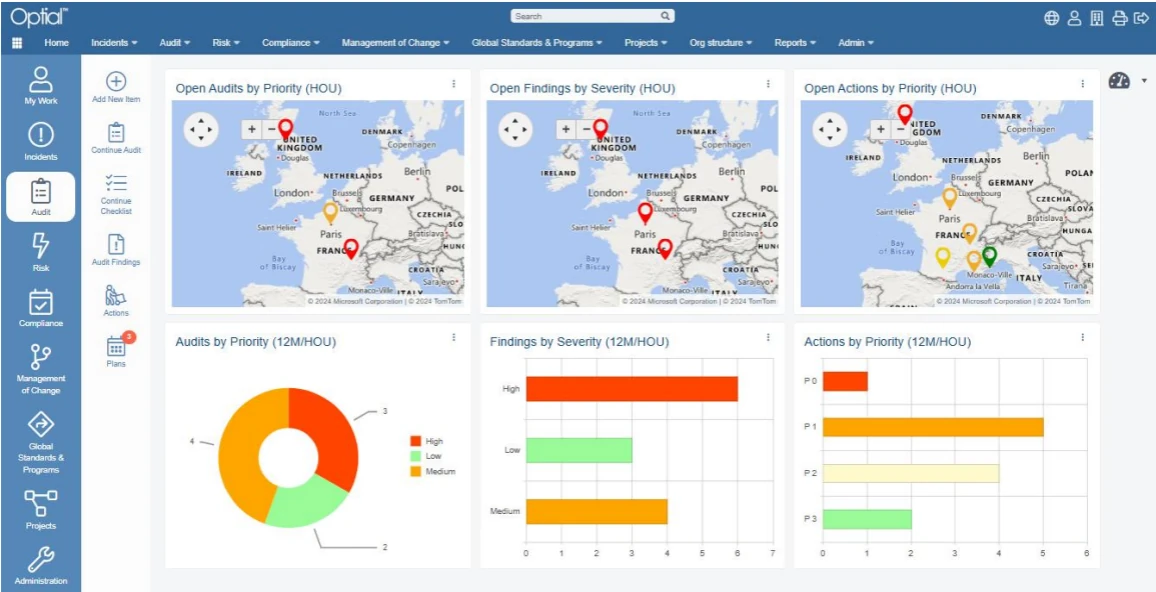
    Optial dashboard with three maps and three charts of open audits, findings and actions by priority and severity

    EHS SmartStart dashboard with maps and charts

    Source
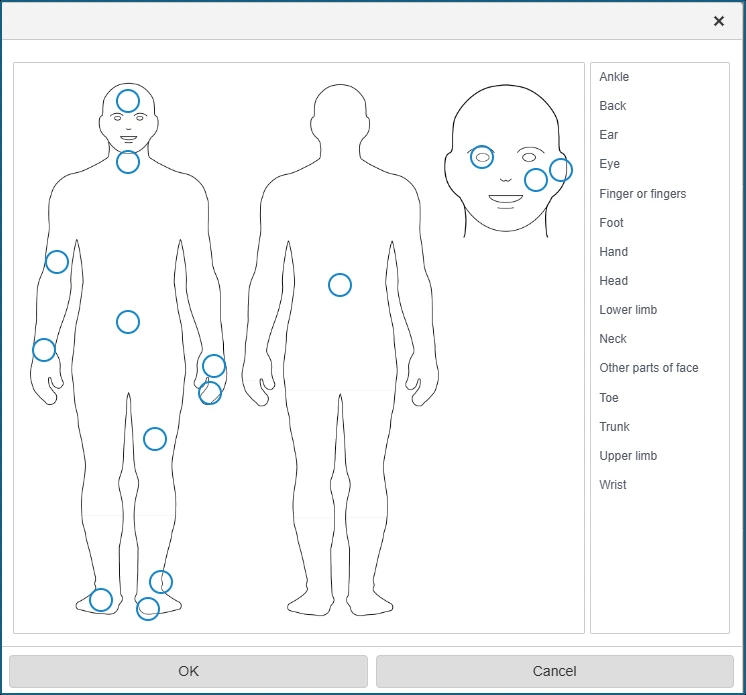
    Front, back and head body diagrams beside a list of body parts for marking where an injury occurred

    Injury body part picker

    Source

    Capabilities and scope

    Optial markets two distinct modular suites: EHS SmartStart and GRC SmartStart. This profile covers EHS SmartStart only; GRC modules, bespoke cross-suite configurations and custom projects should not be assumed to be included.

    Optial capabilities, evidence status and source links
    CapabilityEvidenceScope and source
    Incident capture and investigationDocumented by vendor

    Log and categorise incidents, attach evidence, assign investigation ownership and link corrective plans to activities and risks. Confirm the incident taxonomy and mandatory fields during configuration.

    Incident management module
    Incident metrics and analyticsDocumented by vendor

    Lost-time analysis, audit trails, notifications, dashboards, heat maps and configurable reports are described for the Incident Management module. Validate required statutory calculations and export formats.

    Incident management module
    Audit planning and findingsDocumented by vendor

    Plan periodic audits with Gantt views, delegate checklists, capture findings and track assigned remediation to resolution across sites.

    Audit management module
    Risk assessment and planningDocumented by vendor

    Maintain site-specific hazard and risk registers, schedule assessments, document controls and assess workplace hazards and environmental aspects. Confirm the scoring matrix and approval method against internal policy.

    Risk management module
    Corrective and preventive actionsDocumented by vendor

    Assign CAPAs with owners, deadlines, notifications, escalations and progress tracking across incident, audit, risk and compliance workflows; exact cross-module behaviour depends on the selected bundle.

    EHS SmartStart overview and module boundariesRisk management moduleAudit management module
    Compliance obligations, inspections and permitsDocumented by vendor

    Allocate regulations to sites, maintain control repositories, schedule recurring inspections, manage permits and place obligations on compliance calendars. Confirm which regulatory feeds and jurisdictions are contracted.

    Compliance management module
    Checklist generation and compliance analyticsDocumented by vendor

    Generate site-specific audit checklists from applicability analysis and review compliance via dashboards, reports and geographic visualisation. Validate the source content and mapping rules in a pilot jurisdiction.

    Compliance management module
    Management of changeDocumented by vendor

    Submit chemical, structural or process changes; assess safety and environmental impacts; and route reviews, investigations and sign-offs before implementation.

    Management of change module
    Multi-language and locale supportDepends on scope

    The platform describes user-selectable interface localisation, multilingual content, Unicode, locale-aware formats and local template variants. Confirm the exact shipped languages, customer translation responsibilities and regulatory-content languages.

    Global and multi-language support
    Hosting, SSO and data residencyDepends on scope

    Optial describes SaaS on Azure, client data-centre and client private-cloud deployments, plus SAML SSO and contractually fixed primary/DR locations. Operations, patching, backup and DR responsibility changes by model and must be written into the contract.

    Hosting, identity and deployment choices
    Configuration, import and offline accessDepends on scope

    Front-end configuration, third-party data import and offline laptop/tablet access are described at overview level. Demonstrate the exact offline-enabled tasks, sync/conflict handling, integration interfaces and upgrade treatment of configurations.

    EHS SmartStart overview and module boundariesEHS software, offline access and commercial modelEHS management system and configuration

    Optial pricing

    Custom quote

    Pricing is not publicly available as a numeric subscription, contact vendor. Optial describes scalable annual pricing for EHS SmartStart. Request modules, users, configuration, regulatory content, hosting, migration, training and support as separate line items, with currency, minimum term and renewal conditions.

    Pricing sources checked : Selected sources checked; no starting price recorded. Annual pricing is described without a public numeric rate.

    Which product scope should the quote cover?

    EHS SmartStart is modular: Incident, Risk, Audit, Compliance and Management of Change are separately described modules, while Projects, Actions and Global Standards/Programs are described at suite level. Legal content, hosting model, integrations, localisation and custom configuration require explicit commercial and implementation scoping.

    Ask the vendor to identify the product, region, modules, billing unit, contract term and included services in writing.

    Offline work and integrations

    Its hosting documentation separately describes air-gapped on-premises operation. Verify device capture, local storage and reconciliation for your configuration.

    What we could not verify

    4 depend on scope · 2 notes

    Demo script

    Demo exercise: incident to verified CAPA

    1. Submit a near miss or environmental event with classification, site, evidence and immediate controls.
    2. Assign an investigator, document causes and create preventive actions with owners and deadlines.
    3. Escalate an overdue action, verify closure evidence and inspect the audit trail and lost-time/dashboard outputs.

    Demo exercise: risk assessment to mitigation

    1. Create a site-specific hazard or environmental-aspect assessment using the buyer's scoring matrix.
    2. Attach controls and create CAPAs for residual risks, then schedule reassessment.
    3. Review the Gantt/planning view, approval history and management reporting across two sites.

    Demo exercise: legal obligation to inspection

    1. Apply a regulation to a sample site and show how the source requirement becomes a local obligation.
    2. Generate or configure an inspection checklist, link a permit and assign recurring calendar tasks.
    3. Record a non-conformance, follow remediation to closure and demonstrate the legal-content update path and geographic reporting.

    Ask the vendor to show you

    1. Which modules and configuration changes are included?
    2. Which inspection tasks work disconnected on our intended devices?
    3. Who owns backups, upgrades and recovery for this hosting model?
    4. Which languages and regulatory content are included in the proposal?
    Use demo checklist

    Questions the sources answer

    What is Optial EHS SmartStart?

    It is Optial's modular EHS offering alongside its wider GRC portfolio. Define the selected applications and implementation scope before comparing proposals.

    Does Optial support multilingual teams?

    The vendor describes interface localization and global templates with local variants. Ask workers to complete a representative task in each required language before procurement.

    Sources and change log

    13 sources, checked

    Compare with

    Drawn from the profiles behind the Alternatives list above: most category tags shared with Optial first, then the closest overlap in documented capability names, then A to Z. Ratings, search demand and sponsorship are not used; rows are shown A to Z.

    • Benchmark Gensuite

      Shared category tags: 1 (Incident Management).

      Differs: scope EHS Management (this profile: Safety Management); offline partial workflow (this profile: unclassified); trial not established (this profile: on request).

      Same: price.

    • Evotix

      Shared category tags: 3 (Audit Management, Incident Management, others).

      Differs: scope EHS Management (this profile: Safety Management); offline documented workflow (this profile: unclassified); trial not established (this profile: on request).

      Same: price.

    • Ideagen EHS

      Shared category tags: 1 (Incident Management).

      Differs: scope EHS Management (this profile: Safety Management); offline partial workflow (this profile: unclassified); trial not established (this profile: on request).

      Same: price.

    All Optial alternatives

    Reviews on qhsetech.com

    Reviews may be filed under other names

    Also recorded as Optial EHS SmartStart. Older entries under a previous name may describe a different release or owner.

    Star ratings and review counts from the old catalog are not shown: no source for them was recorded.