
Demo exercise: inspection and follow-up
- Create a short checklist requiring evidence after a negative answer.
- Invite a worker, assign the project and complete a sample record.
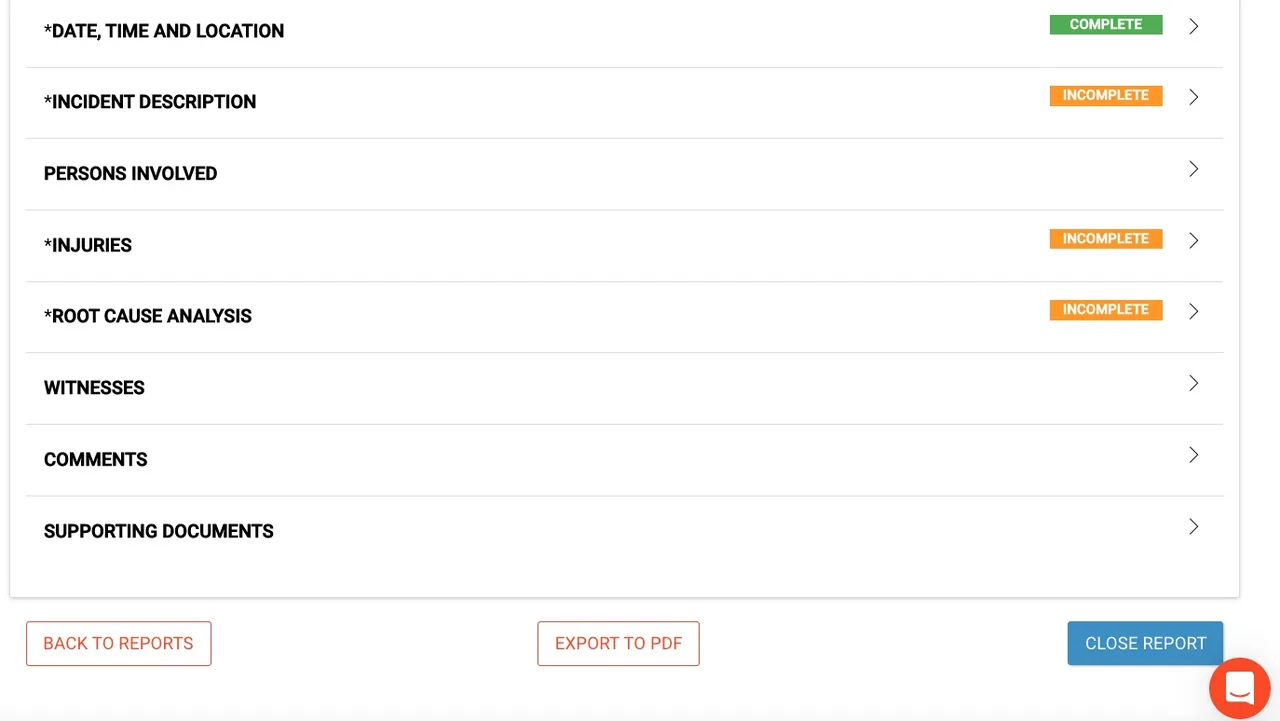
- Review the resulting report and demonstrate the correction process.
Safesite combines mobile inspections and safety actions with project reporting for administrators. Its documented template controls let teams require follow-up evidence for selected responses. Evaluate the reporting horizon and worker onboarding before choosing between free access and a paid plan.
Safesite price on record: Free plan and paid subscription · Published amounts carry caveats, noted below · Pricing checked · See pricing
Built from vendor sources checked ; AI-assisted drafting. Documentation review, not a hands-on test. How pages are made
Field teams standardizing recurring inspections, hazards and safety meetings across projects. The free plan limits reporting history. Workers need organization invitations and assigned access; do not assume anonymous reporting or automatic translation of your custom content.
Worth considering when a small team needs repeatable safety actions with a low-cost evaluation route. Value depends on retained reporting access and administrative time, so test the full reporting cycle before upgrading.
Watch for: Free reporting is restricted to the last 30 days. Completed inspections cannot be edited according to the help guide. Paid-price currency and billing basis require confirmation.
Free trial documented. Sources checked .
Vendor visuals—not a QHSEtech hands-on test.
Safesite is the safety app and management dashboard associated with the Foresight insurance offering. Software subscription access and insurance services have different commercial scopes. Mobile safety actions and administration dashboard; insurance-related services and paid reporting entitlements are separate buying considerations.
| Capability | Evidence | Scope and source |
|---|---|---|
| Custom inspection questions | Documented by vendor | Templates support defined answer types and conditional requirements for photos, comments, observations or hazards. Template controls |
| Offline work | Documented by vendor | Core mobile functions save work without connectivity and sync on reconnection; task performance has not been tested by QHSEtech. Offline capture and reconnection |
| Multilingual app | Documented by vendor | English, Spanish, French and Portuguese are described. Custom form content can be supplied in additional languages without implying automatic translation. Language scope |
| Worker access | Depends on scope | Administrators invite users and assign projects. The reviewed onboarding does not establish anonymous public submissions. Worker onboarding and permissions |
| Report export | Documented by vendor | Administrators can access and export safety-action reports by project or group, subject to plan access. Administrative report exports |
| Action analytics | Documented by vendor | Analysis pages cover inspections, hazards, incidents, observations and meetings. Safety-action analysis |
| Hazard corrective action and resolution | Documented by vendor | Assigned team members receive notifications and must add a comment or photo before resolving a hazard. The reviewed instructions allow the responsible team to resolve it and do not establish a separate verifier or rejection stage. Hazard assignment, evidence and resolution |
| Toolbox talks with attendance evidence | Documented by vendor | Mobile users can complete meeting topics, record talking points, attach observations or hazards, add attendees, and finish with attendee signatures or a photo. Completed meetings are not editable; these signatures are not established as regulated digital signatures. Safety meetings, attendance evidence and PDF reporting |
| Equipment-linked inspections | Documented by vendor | Registered equipment can carry inspection records and maintenance timing, with equipment-specific inspection templates. This is an inspection record workflow, not proof of full CMMS work-order or parts management. Equipment-linked maintenance inspections |
| Incident administration and closure | Documented by vendor | Administrators can create, update, edit and close injury, near-miss, property-damage, theft and equipment-failure reports, with mandatory sections identified before closure. An OSHA 300-log option does not establish automated regulatory submission. Incident administration and closure |
| Certification records and expiry reminders | Documented by vendor | Administrators can maintain personnel and company certificates, attach files and track expirations; expiring certificates appear in summary emails. This does not establish course delivery or a full LMS. Personnel and company certification records |
| Fall protection inspection templates and equipment-linked inspections | Documented by vendor | Safesite's template library lists, with Safesite as contributor, a harness-and-lanyard equipment inspection (harness, lanyard, snap hook or carabiner fields) and a construction fall protection inspection covering written programs, ladders, scaffolds and guardrails. Its help centre separately describes registering equipment and logging inspections against it. The harness template does not list self-retracting lifelines or anchor points, and the help article does not say that harnesses are a supported equipment type, so how a given harness would be registered and re-inspected on a schedule needs confirming. Fall protection inspection templates and equipment-linked, checked 1 October 2026Fall protection inspection templates and equipment-linked (2), checked 1 October 2026Equipment-linked maintenance inspections |
Free plan and paid subscription
Free access is advertised with unlimited members and guests but a 30-day reporting window. Premium displays $16 per member/month alongside annual/monthly controls and a 20% annual discount. The retrieved page does not explicitly state the currency code or unambiguously map the displayed amount to the active billing setting, so no verified currency-based starting price is assigned. Confirm checkout terms, taxes and billable members. A 30-day Premium trial is advertised.
Pricing sources checked : Selected sources checked; plan prices above. Dollar currency and the displayed billing selection need confirmation; insurance services are a separate offer.
The vendor says core app functions retain work offline and synchronize when connectivity returns. Test downloaded templates, attachments and the reconciliation outcome on your phones before remote deployment; this is documentation-based assessment.
The vendor documents offline use for core mobile functionality and synchronization after reconnection. Check your own templates and attachments on representative devices before field rollout.
The reviewed mobile onboarding requires an invitation and project access. Public anonymous reporting was not established, so test the proposed contractor route rather than assuming guests bypass onboarding.
The help guide says completed inspections cannot be edited and recommends saving unfinished work as a draft. Ask for the approved correction and audit-history process before adopting the app.
Drawn from the profiles behind the Alternatives list above: most category tags shared with Safesite first, then the closest overlap in documented capability names, then A to Z. Ratings, search demand and sponsorship are not used; rows are shown A to Z.
Shared category tags: 2 (Safety Management, Incident Management).
Differs: scope QHSE Management (this profile: Safety Management).
Same: offline, price and trial.
Shared category tags: 2 (Safety Management, Incident Management).
Differs: scope QHSE Management (this profile: Safety Management); trial not established (this profile: free trial documented).
Same: offline and price.
Shared category tags: 1 (Incident Management).
Differs: scope EHS Management (this profile: Safety Management); trial on request (this profile: free trial documented).
Same: offline and price.
This site does not currently collect reader reviews. Star ratings and review counts from the old catalog are not shown: no source for them was recorded.
Also recorded as Safesite Safety Management. Older entries under a previous name may describe a different release or owner.