
    QHSEtech

    SafetyReports

    SafetyReports supports site inspections and incident investigations, with additional modules for broader field workflows. Its help centre provides specific offline procedures instead of a single suite-wide assumption. Buyers should distinguish a standalone inspection subscription from the current Pro and Premium suite offers.

    Evidence: Researched profile

    Built from vendor sources checked ; AI-assisted drafting. Documentation review, not a hands-on test. How pages are made

    Who is SafetyReports for?

    Construction teams and safety consultants needing structured inspection reports and follow-up across sites. Current suite plans differ from some app-store wording. Confirm purchased modules and synchronization procedures separately; free Inspection access does not include offline mode.

    Worth evaluating when the inspection output and corrective follow-up match a consultant's or site team's routine. Compare suite scope and synchronization effort with the actual users and jobs, rather than applying the standalone app price to the entire deployment.

    Watch for: Suite subscription prices require a quote. Some official pages retain earlier plan terminology. Offline steps vary by module and include explicit synchronization.

    Free trial documented. Sources checked .

    Product tour

    Vendor visuals—not a QHSEtech hands-on test.

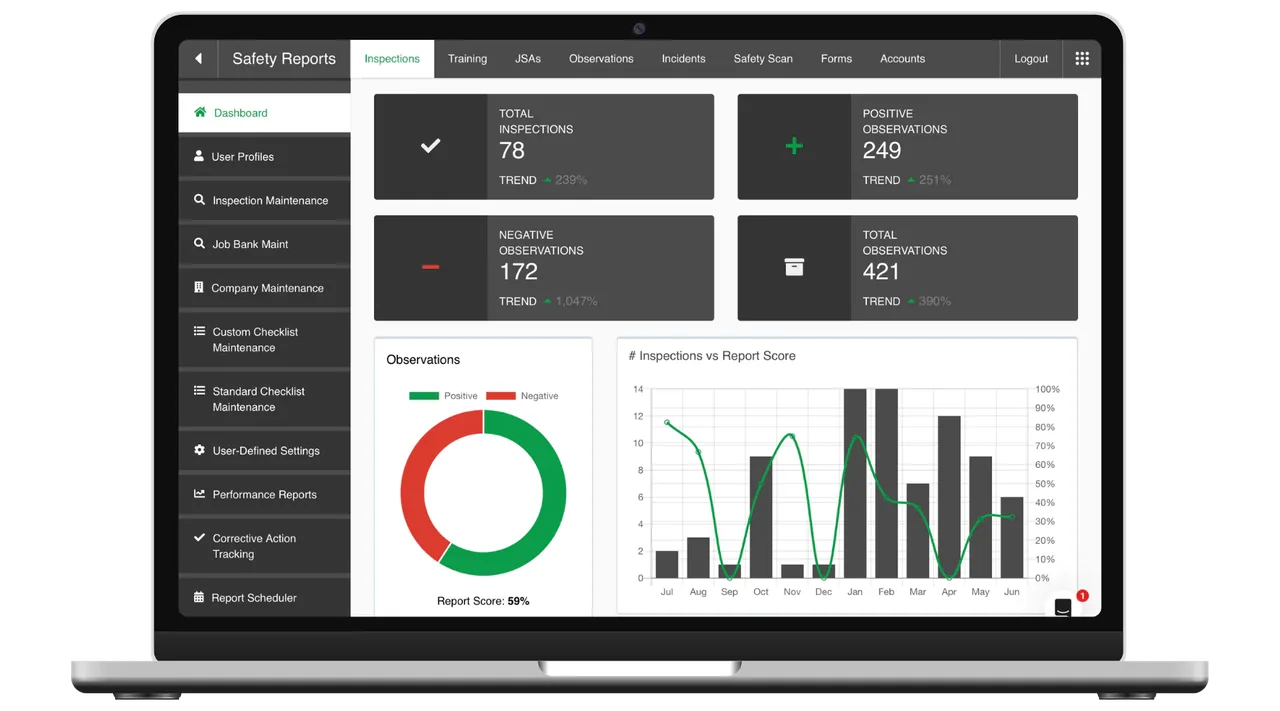
    Laptop showing the Safety Reports Inspections dashboard with inspection and observation counters, a donut chart and a bar chart

    Inspections module admin dashboard

    Source

    Capabilities and scope

    SafetyReports is the safety and risk-management offering in the AlignOps portfolio. Older pages and app text may mention Align Technologies or earlier suite tiers; confirm the current proposal rather than treating all historic names as current plans. Inspection and incident workflows, with JSA, Scan, Forms and other entitlements determined by the purchased suite or standalone subscription.

    SafetyReports capabilities, evidence status and source links
    CapabilityEvidenceScope and source
    Inspection outputDocumented by vendor

    Published examples show multiple report presentations, preloaded OSHA and industry checklists, inspection evidence, signatures and corrective-action tracking. This is an inspection workflow; the reviewed sources do not establish audit-programme governance or auditor impartiality.

    Inspection product and example reports
    Incident investigationDocumented by vendor

    Record near misses or injuries with photos and causal information, use the five-whys process and assign corrective follow-up. A responsible party can submit an action as complete and thereby mark it closed; independent approval or rejection is not established by the instructions.

    Incident investigationIncident corrective-action response and closure states
    Offline inspectionsDepends on scope

    Paid/full mobile scope includes offline capture. Follow the inspection-specific reconnect, sync and submission sequence.

    Inspection offline and submission procedurePublisher Android description and standalone subscription
    Offline JSAsDepends on scope

    Download relevant databases and selected JSAs first; the JSA guide specifies a separate sync operation.

    JSA offline preparation
    Module entitlementsDepends on scope

    Current tier definitions distinguish the suite's core workflows from broader field modules. Verify the signed order.

    Current suite pricing and add-ons
    Data export and integrationDepends on scope

    Web Inspection documentation describes report and checklist exports. API access is separately listed as an add-on.

    Inspection web reporting and checklist exportCurrent suite pricing and add-ons
    Inspection corrective-action trackingDocumented by vendor

    Negative findings receive tracking IDs, responsible-party notifications and Open, In Progress or Closed status. Deleting a tracked item stops notifications but preserves it in the original inspection.

    Electronic corrective-action tracking for inspection findings
    Training records and recurring requirementsDepends on scope

    The Pro Training module documents toolbox talks, history, recurring requirements and scheduled reports. Exams and confirmations are separate and exam functionality may add billing.

    Current suite pricing and add-onsTraining administration, records and recurring requirements
    Configurable field formsDepends on scope

    Premium Forms supports sections, response types, conditional questions, photos, action flags, touchscreen signatures and PDF or Excel output. Do not generalize these functions to other modules.

    Current suite pricing and add-onsForms conditional logic, evidence, signatures and output
    Safety observationsDepends on scope

    The Observations add-on supports positive or negative records with locations, evidence, severity, categories, factors, actions, geotagging and anonymous submission. Anonymous records do not count toward named-user targets.

    Current suite pricing and add-onsPositive and negative safety-observation capture
    QR and route-based asset inspectionsDepends on scope

    Premium Scan supports asset lookup by tag or QR, ad-hoc and route checklists, notes, photos, tasks and inspection history. The scope applies specifically to Scan.

    Current suite pricing and add-onsQR and route-based asset inspections

    SafetyReports pricing

    Custom quote; limited free Inspection account

    Current Pro and Premium suite rates are not publicly available, contact vendor. API access and Observations are listed as add-ons. Separately, the publisher's Android Inspection listing advertises Full Mode at USD 44.99/month after a 14-day trial; it also retains older suite names, so confirm availability and entitlements at checkout. That standalone amount is not a price for the suite. Request billing unit, minimum commitment, currency, onboarding and integrations.

    Pricing sources checked : Selected sources checked; plan prices above. A limited free inspection account and a separate Android Full Mode trial are documented; the store's older suite terminology requires confirmation.

    Offline work and integrations

    The Inspection help guide describes manually switching offline, reconnecting, selecting a record to sync and then submitting it. JSA has its own preparation and sync procedure. The Android listing limits free Inspection mode to online use; do not extrapolate offline support to every module.

    What we could not verify

    8 depend on scope

    Demo script

    Demo exercise: offline inspection submission

    1. Prepare a sample job and verify offline eligibility for the purchased plan.
    2. Record a finding while disconnected and reconnect using the documented procedure.
    3. Confirm both synchronization and final submission, then inspect the report.

    Demo exercise: investigation and role access

    1. Create a sample near-miss report with an annotated photo.
    2. Assign investigation follow-up and review the resulting action record.
    3. Test access for a supervisor and external oversight role using non-sensitive sample data.

    Demo exercise: inspection finding to accountable closure

    1. Submit a negative inspection item and confirm it receives a unique tracking record.
    2. Assign a responsible party and inspect notifications using non-sensitive test data.
    3. Move it through Open, In Progress and Closed, then verify the original inspection retains the finding and updates.

    Ask the vendor to show you

    1. Is this a standalone Inspection subscription or the current suite?
    2. Which modules, API permissions and administrator roles are included?
    3. What remains on-device after sync, and how are failed submissions recovered?
    4. Which privacy, retention and access controls apply to injury information?
    Use demo checklist

    Questions the sources answer

    Does syncing an inspection also submit it?

    The Inspection help guide distinguishes successful synchronization from final submission. Include both steps in the field procedure and verify receipt before considering the report delivered.

    Sources

    15 sources, checked

    Compare with

    Drawn from the profiles behind the Alternatives list above: most category tags shared with SafetyReports first, then the closest overlap in documented capability names, then A to Z. Ratings, search demand and sponsorship are not used; rows are shown A to Z.

    • Easy to Inspect

      No shared category tag.

      Differs: scope Audits & Inspections (this profile: Safety Management); offline unclassified (this profile: partial workflow).

      Same: price and trial.

    • GoAudits

      No shared category tag.

      Differs: scope Audits & Inspections (this profile: Safety Management); offline documented workflow (this profile: partial workflow).

      Same: price and trial.

    • Mitti (by SafetyCulture)

      Shared category tags: 1 (Incident Management).

      Same: scope, offline, price and trial.

    All SafetyReports alternatives

    Reviews on qhsetech.com

    Reviews may be filed under other names

    Also recorded as Safety Reports, Safety-Reports. Older entries under a previous name may describe a different release or owner.

    Star ratings and review counts from the old catalog are not shown: no source for them was recorded.