
    QHSEtech

    Envoy

    Envoy is a workplace platform whose visitor management product covers guest pre-registration, host notifications, badge printing and watchlist screening, alongside desk, room and mailroom products. Its site also describes emergency management and multi-tenant visitor management for landlords.

    Evidence: Researched profile

    Built from vendor sources checked ; AI-assisted drafting. Documentation review, not a hands-on test. How pages are made

    Who is Envoy for?

    Offices that want visitor check-in alongside desk and room booking in one workplace platform. Visitor management is one product in a broader workplace suite; confirm which modules the quoted subscription includes and how the evacuation roll call behaves without network access.

    Watch for: Broader workplace suite may exceed a visitor-only requirement. Pricing is tiered per location; confirm current amounts on the vendor site.

    Published price: $362 per location per month (Premium, billed annually). Sources checked .

    Product tour

    Vendor visuals—not a QHSEtech hands-on test.

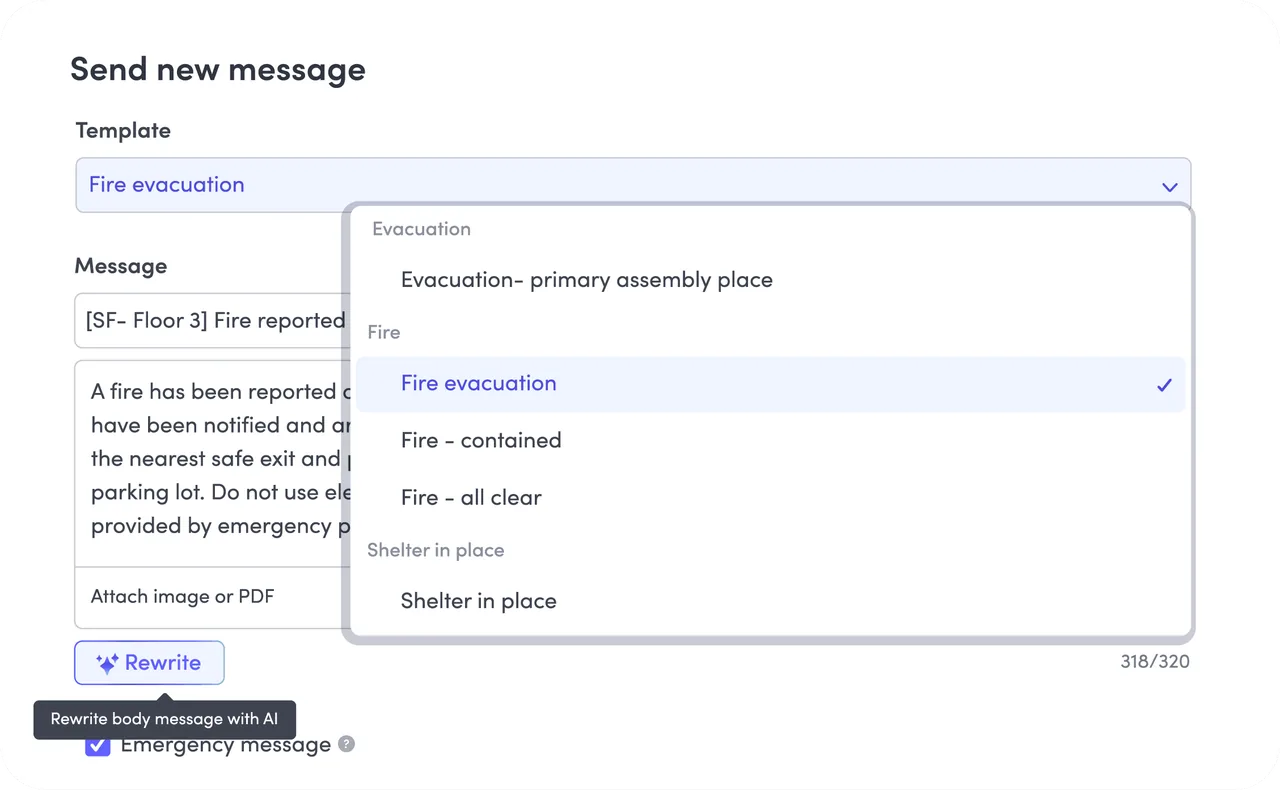
    Envoy Send new message form with a template list: evacuation, fire evacuation, fire contained, all clear, shelter in place

    Emergency message composer, template list

    Source

    Capabilities and scope

    Envoy is a workplace and visitor management product outside the core QHSE catalogue; this profile covers its visitor management capability only.

    Envoy capabilities, evidence status and source links
    CapabilityEvidenceScope and source
    Visitor managementDocumented by vendor

    The visitor management product page describes guest pre-registration, host notifications, badge printing and watchlist screening.

    Envoy visitor management product page, checked 2 October 2026
    Offline kiosk sign-in with queued entriesDepends on scope

    The help article states visitors can still sign in on a disconnected iPad and entries are queued and uploaded later with the original sign-in time. It also states host notifications are not sent offline and that offline mode does not work when features such as block list, ID scanning, required registration, videos in legal documents or conditional rules are enabled.

    Envoy Help Center, offline mode, checked 2 October 2026
    Emergency notifications and roll callDepends on scope

    The product page describes alerts by SMS, email, push, Slack, Teams and signage, two-way check-in where people mark themselves safe, templates and timestamped records. The pricing page card and table list them under Premium, while the evacuation help article says they are available on Enterprise. Confirm the plan in writing.

    Envoy emergency notifications product page, checked 2 October 2026Envoy Help Center, using visitors for evacuation, checked 2 October 2026Envoy pricing page, checked 2 October 2026
    Evacuation list from the visitor logDocumented by vendor

    The help article describes filtering the visitor log to 'Currently signed in' on the dashboard or mobile app as the list to account for. It notes strict sign-out procedures help accuracy; people who leave without signing out may still appear.

    Envoy Help Center, using visitors for evacuation, checked 2 October 2026
    Integrations and directory syncDocumented by vendor

    The integrations page states 100+ integrations including access control (for example Brivo, Kisi, Verkada), directory and SSO (Entra ID, Okta, SAML), Slack, Teams and webhook or Zapier options. Check the named integration against your version and plan.

    Envoy integrations page, checked 2 October 2026
    Security, SSO and data retentionDocumented by vendor

    The security page states SOC 2 Type II, GDPR and CCPA statements, TLS 1.2 or above in transit, AES256 at rest, SAML SSO and default purge of visitor sign-in data with retention options on Premium and Enterprise. Data residency was not specified on the page; ask where your data is stored.

    Envoy security and compliance page, checked 2 October 2026
    Envoy Response incident managementDepends on scope

    A separate page describes threat monitoring, notifications to employees and visitors, roll call and an exportable record. The pricing page lists Response separately.

    Envoy Response critical event management page, checked 2 October 2026Envoy pricing page, checked 2 October 2026

    Envoy pricing

    Free Basic plan; Premium per location, billed annually; Enterprise by quote

    Envoy's pricing page (checked 2 October 2026) lists Visitors Basic as free with limited features, 100 entries a month and up to 50 employees in the directory, Premium at $362 per location per month billed annually with unlimited entries, and Enterprise at custom pricing. Confirm the current amounts, currency, taxes and included modules before comparing.

    Separate pricing recheck date not recorded. Confirm current pricing with the vendor.

    Offline work and integrations

    Test the evacuation list with the kiosk disconnected.

    What we could not verify

    3 depend on scope · 1 note

    Demo script

    Visitor check-in, offline kiosk and evacuation drill

    1. Configure the kiosk with the security features you need, such as ID scanning or block list, and pre-register two visitors.
    2. Disconnect the iPad, sign in a visitor and record what works, what is queued and whether the host is notified.
    3. Reconnect, confirm the queued entry appears with the original time, then run an evacuation drill using the 'Currently signed in' list and a test emergency notification.
    4. Export the visitor log and notification record and compare them with the actual headcount.

    Proposed demo: pre-registration, screening and access provisioning

    1. Invite a test visitor with a legal document attached.
    2. Add a test name to the blocklist and show the flag and denied-entry log.
    3. Show a temporary access grant ending with the visit.
    4. Show the host notification and badge print.
    5. Export the visitor and denied-entry log.

    Ask the vendor to show you

    1. Disconnect the kiosk configured with your security features and show whether visitors can still sign in and what is queued.
    2. Run an evacuation drill using the 'Currently signed in' list and compare it with the actual headcount.
    3. Send a test emergency notification, have some people respond safe, and export the sent and acknowledged record.
    4. Show which plan includes emergency notifications and mass messaging, in writing.
    5. Demonstrate a pre-registered visitor signing an NDA and a block-listed visitor being flagged.

    Checks specific to this product

    Offline behaviour against your configuration:
    The help article states offline mode does not work when block list, ID scanning, required registration, videos in legal documents or conditional rules are enabled. List the features you need, disconnect a kiosk configured with them and record whether sign-in still works. Retain the screenshot and the queued-entry count.
    Use demo checklist

    Questions the sources answer

    How does Envoy support an evacuation?

    The help article describes using the 'Currently signed in' visitor log view, with mass messaging and mark-as-safe for Enterprise accounts. The emergency notifications product page describes multi-channel alerts and roll call.

    Sources

    9 sources, checked

    Compare with

    Drawn from the profiles behind the Alternatives list above: most category tags shared with Envoy first, then the closest overlap in documented capability names, then A to Z. Ratings, search demand and sponsorship are not used; rows are shown A to Z.

    • Archie

      Shared category tags: 1 (Visitor Management).

      Same: scope, offline, price and trial.

    • Greetly

      Shared category tags: 1 (Visitor Management).

      Same: scope, offline, price and trial.

    • Lobbytrack

      Shared category tags: 1 (Visitor Management).

      Same: scope, offline, price and trial.

    All Envoy alternatives

    Reviews on qhsetech.com